Moving an organization to passkeys without breaking access
A phased roadmap, the SMS/voice retirement deadlines, metrics that prove progress, and a repeatable readiness report
MFA to Passkeys in Microsoft Entra ID series · Part 7 of 7
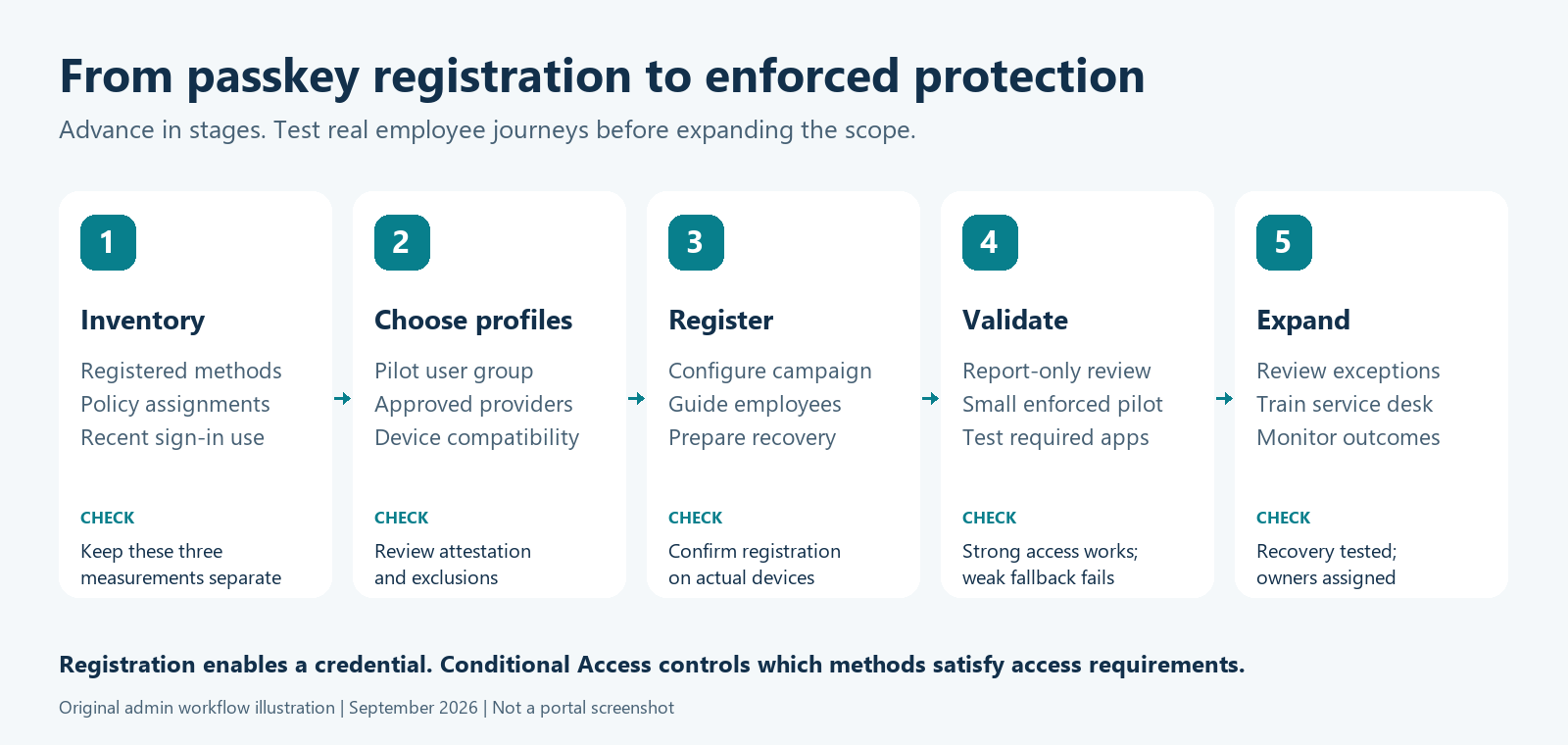
Parts 1 to 6 each covered one piece of the work: the threat model, the credential choice, enforcement, enrollment, session protection, and privileged access. This final part puts them in order.
Moving to passkeys takes more than changing an authentication method setting. The programme touches every user, the service desk, endpoint management, and incident response. A planned rollout cuts AiTM phishing risk sharply without a wave of lockouts. A rushed rollout, run against Microsoft's deadlines, floods the help desk with recovery calls, and attackers exploit that confusion.
The clock: where we are at Q4 2026
From Microsoft Learn: passkeys by default and SMS/voice retirement:
- 1 Sep 2026 (done): passkeys became the default. SMS/voice-enabled users were auto-enabled for passkeys, and the registration campaign moved to Microsoft managed.
- 18 Sep 2026 (done): customer-managed telecom providers became available to review in the Microsoft Security Store.
- 30 Oct 2026 (this month): customer-managed telecom providers can be selected and configured.
- 1 Feb 2027 (upcoming): Microsoft-provided SMS/voice retires for everyone except Global Administrators and external users. SMS/voice-only users get a blocking passkey registration prompt, with no opt-out.
- 1 Jul 2027 (upcoming): the same applies to Global Administrators and external users.
The auto-enablement has already happened, and you have roughly four months until the first hard deadline.
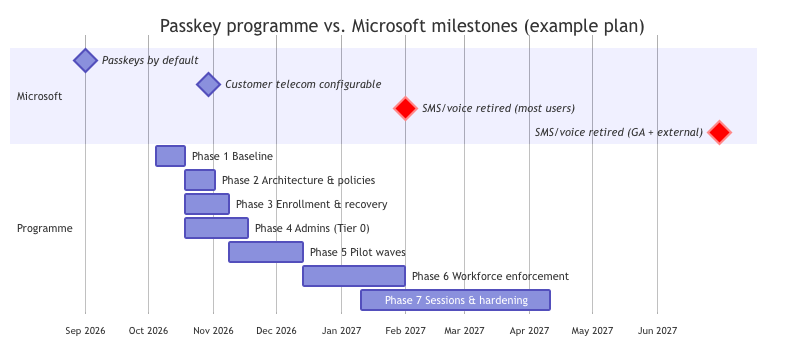
Aim to have every user in scope registered and using a passkey well before 1 February 2027. Then Microsoft's blocking prompt reaches nobody who hasn't already gone through your own supported, communicated process.
The example plan assumes you start in the first week of October, so it's tighter than it would have been over the summer. If your start slips, shorten the pilot waves rather than enrollment and recovery, and use customer-managed telecom as a bridge for a documented population instead of rushing workforce enforcement.
The seven phases
Microsoft's deployment guide frames the same journey as onboarding, then enforcement, per persona:
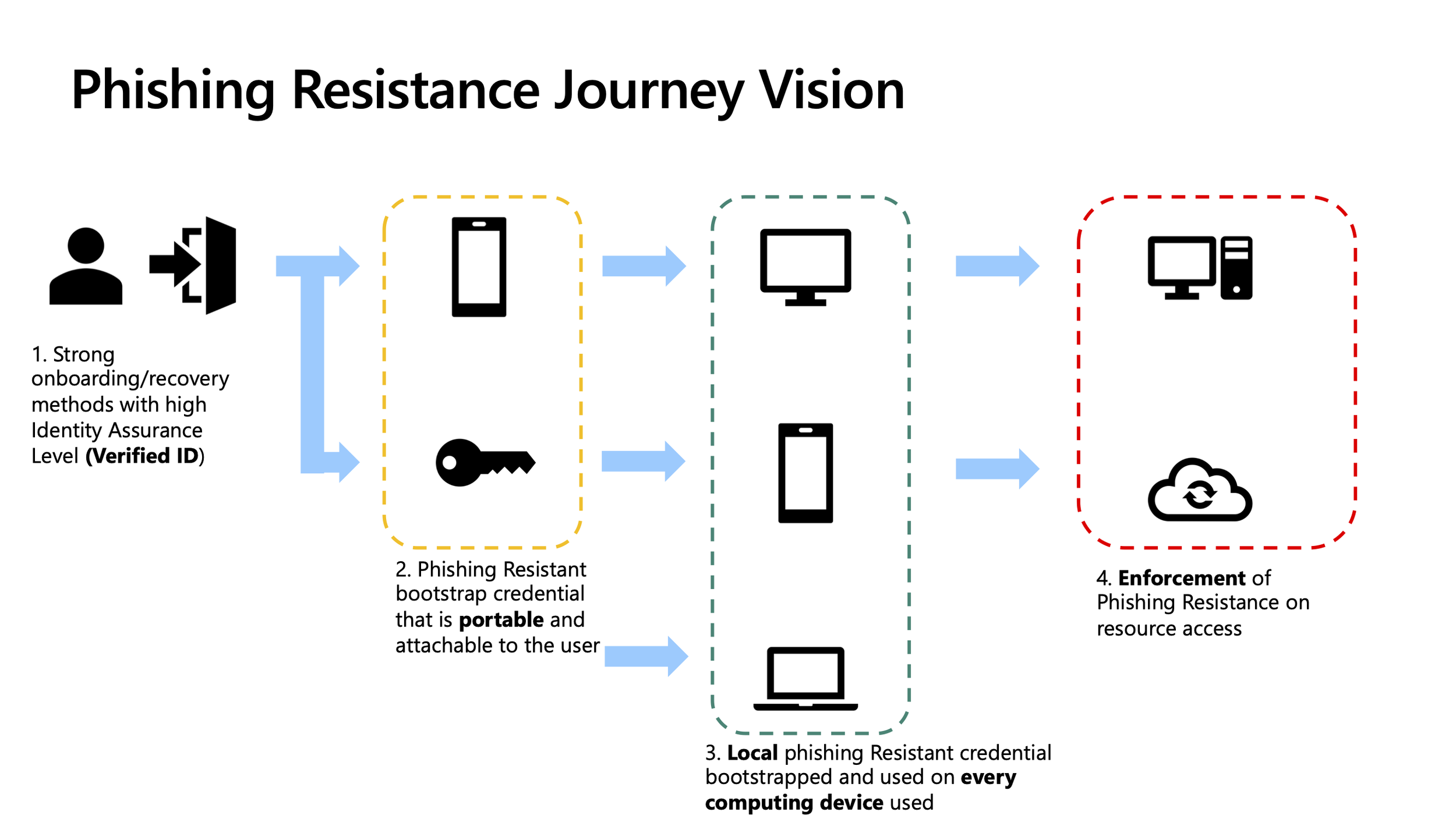
Microsoft's planning phases for phishing-resistant passwordless deployment
Phase 1: Baseline (Part 1)
- Run
Export-EptReadinessReport(below) and keep the output as your "before" picture. - Run Microsoft's SMS/voice usage analyzer (Global Reader, Authentication Policy Administrator or Security Reader). Per the FAQ, any non-zero result means you're in scope.
- Keep three lists separate: users registered for telephony, users policy-enabled for telephony, and users who recently used telephony.
- Inventory the special populations: shared devices, kiosks, frontline workers without company phones, VDI and jump hosts, contractors, guests (no passkey support until later in 2026), and service accounts set up as user accounts.
Phase 2: Target architecture and policy hygiene (Parts 2 and 3)
Finish the Authentication methods policy migration. In Migration in progress, both the legacy MFA/SSPR settings and the new policy are honored. In Migration complete, only the Authentication methods policy counts, so there's one source of truth. The change is reversible.
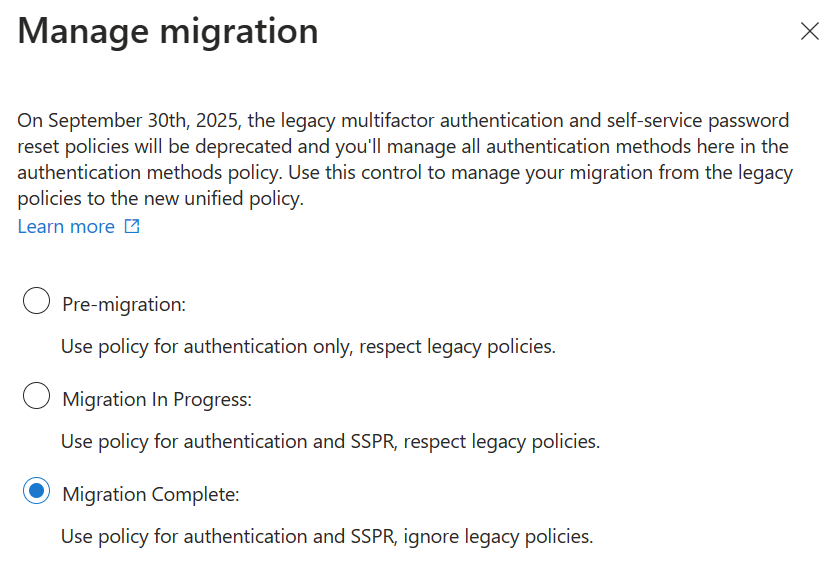
Manage migration: start the migration
Then build the rest of the architecture:
- Personas and passkey profiles for Tier 0, sensitive, workforce, and frontline users (Part 2).
- The built-in Phishing-resistant MFA authentication strength, plus a custom Tier 0 strength limited to approved AAGUIDs (Part 3).
- Conditional Access policies in report-only mode: CA010/011 (device code and authentication transfer), CA100 (admins), and CA110 (pilot).
- An exception register. Every exception needs an owner and an expiry date, and none are permanent.
Phase 3: Enrollment and recovery (Part 4)
- Set up the TAP policy (one-time, short lifetime) and the Register security information Conditional Access policy.
- Document identity verification per tier, and train the service desk before nudges start.
- Decide on the registration campaign: keep Microsoft managed (unlimited snoozes) during the pilot, and switch to Enabled with limited snoozes for the push to completion.
- Test the four hard journeys: new hire, replacement device, lost everything, and no smartphone.
Phase 4: Administrators first (Part 6)
- Issue two attested security keys per admin. Register them in person or through dual-control TAP.
- Enforce CA100/CA101 once
Get-EptPrivilegedUser | Test-EptPhishResistantCoverageshows every admin asCovered. - Remove phishable methods from the admin persona. Set up break-glass passkeys and sign-in alerts.
Phase 5: Representative pilot waves
- Include every OS/browser combination you support, BYOD and corporate devices, remote and office staff, and at least one team of heavy Teams Rooms or shared-device users.
- For each wave, communicate, nudge, and measure registration. Then run the policy in report-only mode, enforce it, and measure usage.
- Microsoft recommends a communications cadence of 60, 45, 30, 15, 7 and 1 days before enforcement.
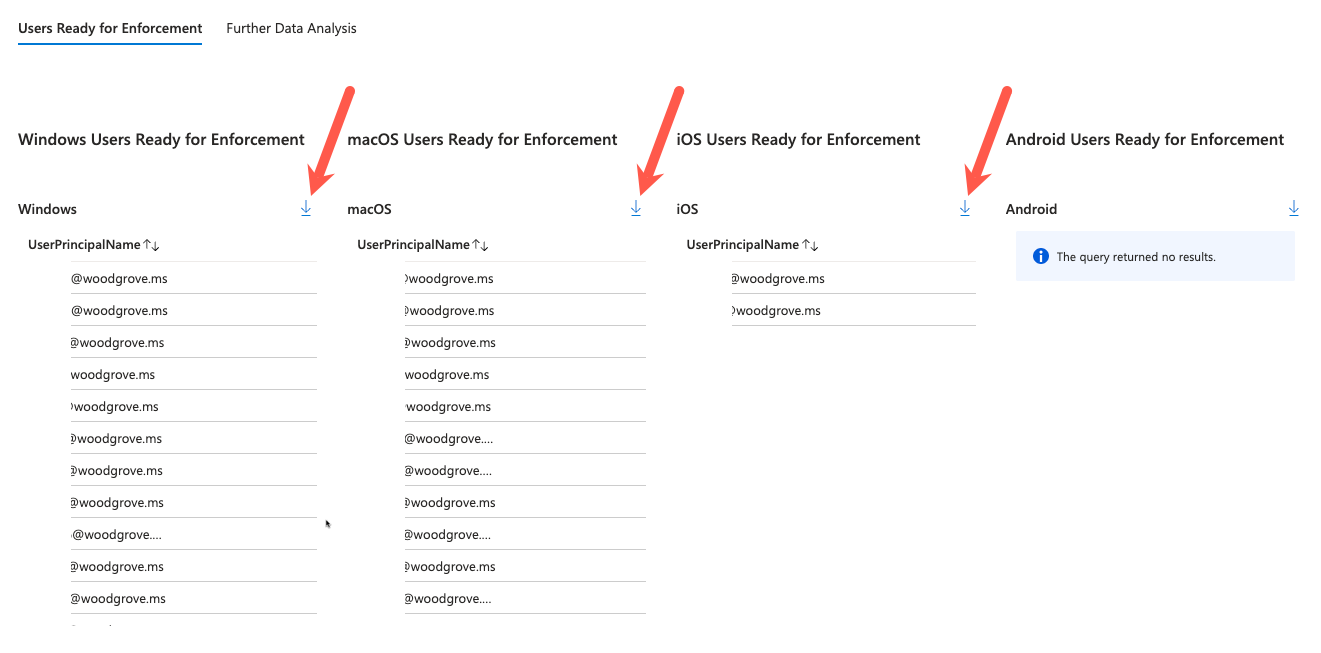
Microsoft's Passwordless workbook can list who is ready for enforcement per platform:
Phase 6: Workforce enforcement
- Enforce by OS group, following Microsoft's recommendation of one Conditional Access policy per platform.
- Move the campaign to Enabled with limited snoozes for the remaining stragglers.
- Retire SMS/voice from the Authentication methods policy group by group as usage drops to zero. Don't leave telephony enabled "just in case". Telephony is the fallback attackers use.
Phase 7: Sessions and continuous hardening (Part 5)
- Require compliant devices for sensitive apps. Pilot token protection for Exchange, SharePoint and Teams.
- Update incident-response runbooks: contain, remove persistence, reset, revoke, verify.
- Schedule monthly
Export-EptReadinessReportruns and review the trend.
If you must keep SMS/voice for a while
Microsoft offers two ways to buy time. Treat each one as a deliberate decision:
- Customer-managed telecom through the Microsoft Security Store (configurable from 30 Oct 2026). Users migrated to a customer provider before the retirement date don't get the blocking prompt. It carries per-provider costs, and it keeps a phishable, SIM-swappable method alive. Use it only as a time-limited bridge for a documented population.
- Temporary opt-out from passkey auto-enablement. The opt-out exists only from 1 Sep 2026 to 1 Feb 2027, so the window is open now and closes on 1 February. The toolkit deliberately doesn't wrap this in a function. The setting is beta-only and missing from the Graph reference docs, so opting out should be a conscious, reviewed decision:
# Requires Policy.ReadWrite.AuthenticationMethod. Beta endpoint: behaviour may change.
# This defers passkey auto-enablement only. There is NO opt-out from the 1 Feb 2027 enforcement.
Connect-MgGraph -TenantId $tenantId -ContextScope Process -NoWelcome -Scopes 'Policy.ReadWrite.AuthenticationMethod'
Invoke-MgGraphRequest -Method PATCH -Uri 'https://graph.microsoft.com/beta/policies/authenticationmethodspolicy' `
    -Body (@{ optOutSettings = @{ passkeyDynamicMigration = $true } } | ConvertTo-Json) -ContentType 'application/json'
Measure what matters
Registration counts are a vanity metric on their own. Track these together:
| Metric | Source | Target |
|---|---|---|
| % users with a phishing-resistant method registered | Measure-EptMfaPosture |
> 95% of in-scope users |
| % MFA sign-ins using a phishing-resistant method | Measure-EptSignInMethod |
Trending to > 90% |
Admins not Covered |
Test-EptPhishResistantCoverage |
0 |
| Telephony-only users | Measure-EptMfaPosture (TelephonyOnlyCount) |
0 before 1 Feb 2027 |
| Enforced phishing-resistant CA policies / device code blocked | Get-EptConditionalAccessPolicy |
Per plan |
| Recovery tickets and TAPs issued per week | Service desk tickets and Get-EptAuthMethodAuditEvent |
Falling after each wave |
| Exceptions past their expiry | Exception register | 0 |
Hands-on: one command for the whole picture
Export-EptReadinessReport runs every read-only assessment from the series and writes a dated evidence folder. Each section runs in its own error boundary. If the tenant lacks P2 for PIM eligibility, or you forgot a scope, the function records that section as an error in summary.json and the rest of the report still completes.
function Export-EptReadinessReport {
    <#
    .SYNOPSIS
        Runs the read-only assessments from the series and writes a dated evidence folder plus a summary.
    .DESCRIPTION
        Orchestrates the other toolkit functions. It is read-only: nothing in the tenant is changed.
          * registration.csv          Get-EptUserRegistration (all users)
          * posture.csv               Measure-EptMfaPosture, overall and by IsAdmin
          * method-policy.csv         Get-EptAuthMethodPolicy
          * passkey-profiles.csv      Get-EptPasskeyProfile
          * conditional-access.csv    Get-EptConditionalAccessPolicy
          * admins.csv                Get-EptPrivilegedUser
          * admin-coverage.csv        Test-EptPhishResistantCoverage for every admin
          * signin-usage.csv          Measure-EptSignInMethod (unless -SkipSignIns)
          * summary.json              The headline numbers, for trending run over run

        Each section runs independently. If one fails (missing licence, scope or role), the error is
        recorded in summary.json and the remaining sections still run.

        Reports contain personal data (UPNs, IPs). Store them in approved locations only.

        Scopes: AuditLog.Read.All, Policy.Read.All, RoleManagement.Read.Directory, GroupMember.Read.All.
    .EXAMPLE
        Export-EptReadinessReport -Path ./reports -SignInDays 7
    .EXAMPLE
        # Trend the headline numbers across monthly runs
        Get-ChildItem ./reports -Filter summary.json -Recurse | Get-Content -Raw | ConvertFrom-Json |
            Sort-Object GeneratedUtc | Format-Table GeneratedUtc, PhishingResistantRegisteredPct, PhishingResistantSignInPct, AdminsNotCovered
    #>
    [Diagnostics.CodeAnalysis.SuppressMessageAttribute('PSReviewUnusedParameter', '',
        Justification = '-SignInDays is used inside the Sign-in usage step scriptblock.')]
    [CmdletBinding()]
    [OutputType([pscustomobject])]
    param(
        [Parameter(Mandatory)]
        [string] $Path,

        [ValidateRange(1, 30)]
        [int] $SignInDays = 7,

        [switch] $SkipSignIns
    )

    Assert-EptGraphConnection -RequiredScope 'AuditLog.Read.All', 'Policy.Read.All', 'RoleManagement.Read.Directory', 'GroupMember.Read.All'
    $tenant = (Get-MgContext).TenantId
    $folder = Join-Path $Path ("{0}-{1}" -f (Get-Date).ToUniversalTime().ToString('yyyyMMdd-HHmmss'), $tenant.Substring(0, 8))
    New-Item -ItemType Directory -Path $folder -Force | Out-Null

    $summary = [ordered]@{ GeneratedUtc = (Get-Date).ToUniversalTime().ToString('o'); TenantId = $tenant; Errors = @() }
    $csv = { param($data, $name) $data | Export-Csv -Path (Join-Path $folder $name) -NoTypeInformation -Encoding utf8 }

    # Run one section; record failures and keep going.
    $step = {
        param([string] $name, [scriptblock] $action)
        Write-Progress -Activity 'EntraPasskeyToolkit readiness report' -Status $name
        try { & $action }
        catch {
            Write-Warning "$name failed: $($_.Exception.Message)"
            $summary.Errors += "${name}: $($_.Exception.Message)"
        }
    }

    & $step 'Registration' {
        $reg = @(Get-EptUserRegistration)
        & $csv ($reg | Select-Object -Property *,
            @{ n = 'Methods'; e = { $_.MethodsRegistered -join ';' } },
            @{ n = 'Phishable'; e = { $_.PhishableMethods -join ';' } } -ExcludeProperty MethodsRegistered, PhishableMethods) 'registration.csv'
        $overall = $reg | Measure-EptMfaPosture
        & $csv (@($overall) + @($reg | Measure-EptMfaPosture -GroupBy IsAdmin)) 'posture.csv'
        $summary.Users = $overall.Users
        $summary.PhishingResistantRegisteredPct = $overall.PhishingResistantPct
        $summary.TelephonyOnlyUsers = $overall.TelephonyOnlyCount
        $summary.UsersWithoutMfa = $overall.NoMfaCount
    }

    & $step 'Method policy' {
        $policy = @(Get-EptAuthMethodPolicy)
        & $csv ($policy | Select-Object Method, State, MigrationState, CampaignState, CampaignMethod,
            @{ n = 'Targets'; e = { $_.Targets -join ';' } }, @{ n = 'Excluded'; e = { $_.Excluded -join ';' } }) 'method-policy.csv'
        $summary.MigrationState = ($policy | Select-Object -First 1).MigrationState
        $summary.SmsOrVoiceEnabled = [bool]($policy | Where-Object { $_.Method -in 'Sms', 'Voice' -and $_.State -eq 'enabled' })
    }

    & $step 'Passkey profiles' {
        & $csv (Get-EptPasskeyProfile | Select-Object ProfileName, PasskeyTypes, Attestation, KeyRestriction,
            @{ n = 'Aaguids'; e = { $_.Aaguids -join ';' } }, @{ n = 'TargetIds'; e = { $_.TargetIds -join ';' } }) 'passkey-profiles.csv'
    }

    & $step 'Conditional Access' {
        $ca = @(Get-EptConditionalAccessPolicy)
        & $csv ($ca | Select-Object Name, State, StrengthName, RequiresMfa, RequiresPhishResistant, BlocksDeviceCode,
            @{ n = 'IncludeUsers'; e = { $_.IncludeUsers -join ';' } }, @{ n = 'IncludeGroups'; e = { $_.IncludeGroups -join ';' } },
            @{ n = 'IncludeRoles'; e = { $_.IncludeRoles -join ';' } }, @{ n = 'ExcludeGroups'; e = { $_.ExcludeGroups -join ';' } }) 'conditional-access.csv'
        $summary.DeviceCodeBlockedEnforced = [bool]($ca | Where-Object { $_.BlocksDeviceCode -and $_.State -eq 'enabled' })
        $summary.PhishResistantPoliciesEnforced = @($ca | Where-Object { $_.RequiresPhishResistant -and $_.State -eq 'enabled' }).Count
    }

    & $step 'Privileged users' {
        $admins = @(Get-EptPrivilegedUser)
        & $csv $admins 'admins.csv'
        $coverage = @($admins | Where-Object PrincipalType -eq 'user' | Test-EptPhishResistantCoverage)
        & $csv $coverage 'admin-coverage.csv'
        $summary.Admins = $admins.Count
        $summary.AdminsNotCovered = @($coverage | Where-Object Verdict -ne 'Covered').Count
    }

    if (-not $SkipSignIns) {
        & $step 'Sign-in usage' {
            $usage = @(Get-EptSignInMethod -Days $SignInDays | Measure-EptSignInMethod)
            & $csv ($usage | Select-Object -Property *,
                @{ n = 'TelephonyUserList'; e = { $_.TelephonyUsers -join ';' } } -ExcludeProperty TelephonyUsers) 'signin-usage.csv'
            $summary.SignInDays = $SignInDays
            $summary.PhishingResistantSignInPct = ($usage | Select-Object -First 1).PhishingResistantPct
            $summary.TelephonySignInPct = ($usage | Select-Object -First 1).TelephonyPct
        }
    }

    Write-Progress -Activity 'EntraPasskeyToolkit readiness report' -Completed
    $summary.Folder = (Resolve-Path $folder).Path
    $summary | ConvertTo-Json -Depth 5 | Set-Content -Path (Join-Path $folder 'summary.json') -Encoding utf8
    [pscustomobject]$summary
}
Source: EntraPasskeyToolkit/Public/Report.ps1
Import-Module ./EntraPasskeyToolkit/EntraPasskeyToolkit.psd1
Connect-MgGraph -TenantId $tenantId -ContextScope Process -NoWelcome -Scopes `
    'AuditLog.Read.All', 'Policy.Read.All', 'RoleManagement.Read.Directory', 'GroupMember.Read.All'

$result = Export-EptReadinessReport -Path ./reports -SignInDays 7
$result | Format-List Users, PhishingResistantRegisteredPct, PhishingResistantSignInPct, TelephonyOnlyUsers, AdminsNotCovered, MigrationState, DeviceCodeBlockedEnforced, Errors

# Month-over-month trend
Get-ChildItem ./reports -Filter summary.json -Recurse |
    ForEach-Object { Get-Content $_ -Raw | ConvertFrom-Json } |
    Sort-Object GeneratedUtc |
    Format-Table GeneratedUtc, PhishingResistantRegisteredPct, PhishingResistantSignInPct, TelephonyOnlyUsers, AdminsNotCovered
Schedule it in Azure Automation or a GitHub Actions / Azure DevOps runner using an app registration with a certificate and application permissions (AuditLog.Read.All, Policy.Read.All, RoleManagement.Read.Directory, GroupMember.Read.All). The toolkit skips the delegated-scope check for app-only sessions and lets Graph enforce permissions. Store the output in an access-controlled location, because it contains UPNs and IP addresses.
The end state
A finished passkey programme needs more than every user registering a passkey. It looks like this:
- Phishing-resistant sign-in is required for every user and resource in scope, with no phishable fallback.
- Admins use attested, device-bound keys from dedicated accounts, and break-glass accounts are tested and monitored.
- Enrollment and recovery run through verified, logged, time-boxed processes that a caller can't talk their way around.
- Sessions are tied to trusted devices for sensitive apps, and incident response knows how to contain token theft.
- You run the readiness report every month. The phishing-resistant sign-in percentage keeps rising, and telephony-only users, uncovered admins, and expired exceptions stay at zero.
Use the Migration Checklist as your working plan, and the EntraPasskeyToolkit to prove each box is ticked.
References
- Passkeys by default and SMS/voice retirement and its FAQ, Microsoft Learn
- SMS/voice usage analyzer, Microsoft (GitHub)
- Plan a phishing-resistant passwordless deployment, Microsoft Learn
- Manage authentication methods and policy migration, Microsoft Learn
- Registration campaign, Microsoft Learn
- Authentication methods policy resource, Microsoft Graph
- Phishing-Resistant Passwordless Deployment workbook