Enabling Passkeys Is Not the Same as Enforcing Them
Authentication strengths, Conditional Access design, and closing the weak-fallback and device-code gaps
MFA to Passkeys in Microsoft Entra ID series · Part 3 of 7
ok lets start with a scenario that plays out in real tenants. An administrator registers a shiny new FIDO2 security key. The security team marks the account as "phishing-resistant". Three months later the account is compromised through an AiTM phishing page. The attacker didn't touch the key. They sent a push notification, because push was still an acceptable way to satisfy every Conditional Access policy that applied to that account.
A stronger credential doesn't remove weaker paths. Entra ID has two separate policy engines, and you need both:
| Engine | Answers the question | Where |
|---|---|---|
| Authentication methods policy | Which methods may this user register and use at all? | Entra ID → Authentication methods → Policies |
| Conditional Access + authentication strengths | Which methods are required to reach this resource, under these conditions? | Entra ID → Conditional Access |
Part 2 configured the first engine. This part configures the second, and then proves it works.
Authentication strengths
An authentication strength is a named list of acceptable method combinations. A Conditional Access policy can demand a strength instead of the generic "Require multifactor authentication" grant. Entra ID has three built-in strengths, identical in every tenant and maintained by Microsoft as new methods ship:
| Built-in strength | ID | Allowed combinations (summary) |
|---|---|---|
| Multifactor authentication | 00000000-0000-0000-0000-000000000002 |
Everything below, plus password + SMS/voice/push/OATH, Temporary Access Pass, federated MFA… |
| Passwordless MFA | 00000000-0000-0000-0000-000000000003 |
WHfB, FIDO2, multifactor CBA, Authenticator phone sign-in (deviceBasedPush) |
| Phishing-resistant MFA | 00000000-0000-0000-0000-000000000004 |
windowsHelloForBusiness, fido2, x509CertificateMultiFactor |
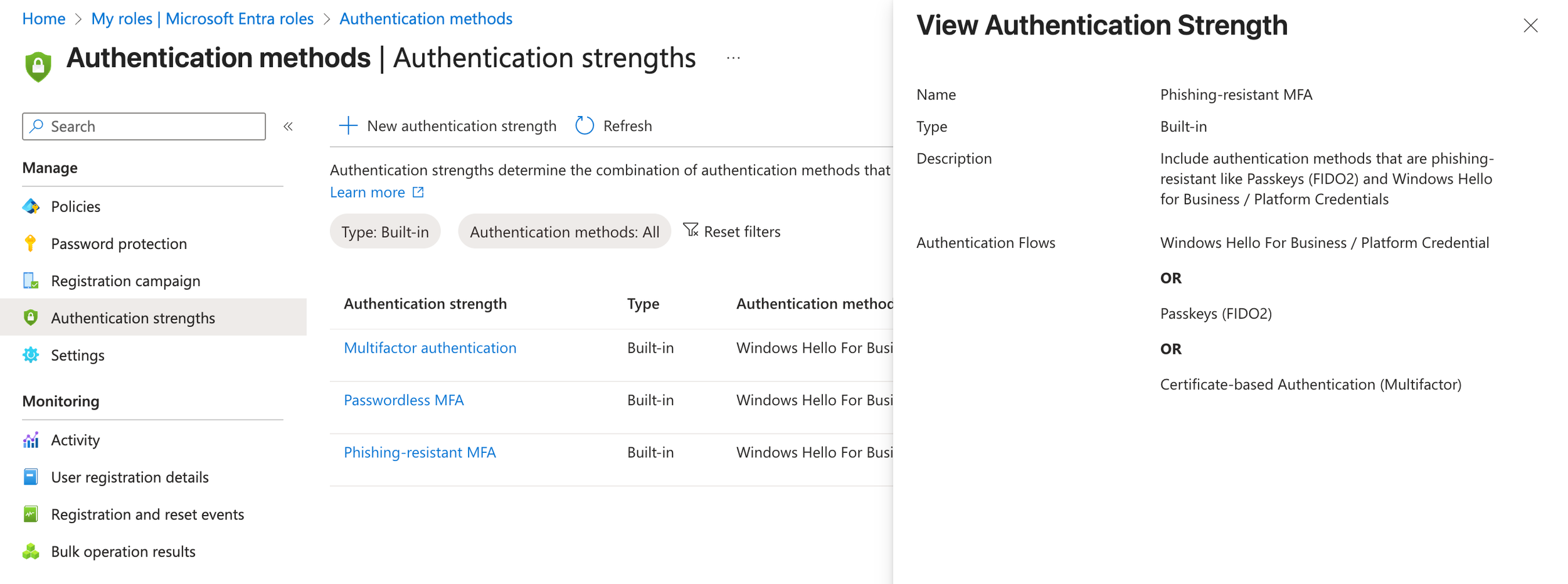
Built-in phishing-resistant MFA strength definition
Custom strengths (up to 15 per tenant) let you go further. The most valuable use is pinning passkeys to approved models. Under Passkeys (FIDO2) → Advanced options you can list the AAGUIDs a strength accepts:
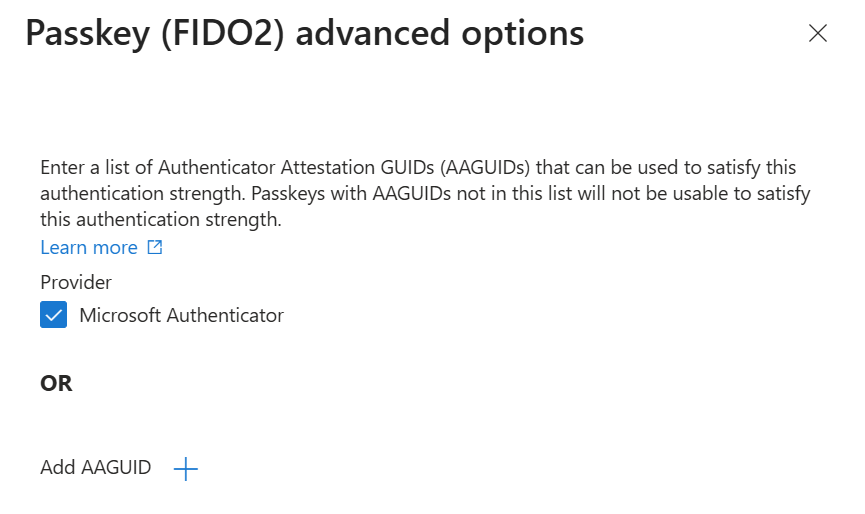
Adding an AAGUID in authentication strength advanced options
A user who signs in with a passkey outside the list sees "You can't get there from here":
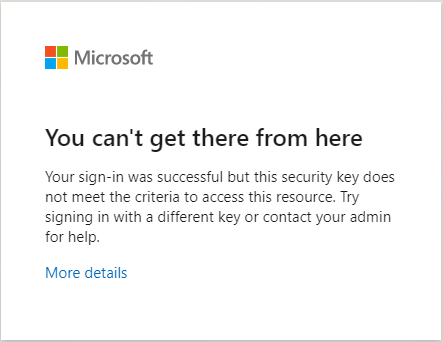
Sign-in error when a passkey is not allowed by the strength
Limitations to plan around
Each item below is from Microsoft Learn: authentication strengths:
- You can't combine Require multifactor authentication and Require authentication strength in the same policy.
- Strengths don't restrict the first factor. Conditional Access evaluates after initial authentication. A user can still type a password first, then be asked to step up with a passkey.
- Temporary Access Pass satisfies only the built-in MFA strength, not Passwordless or Phishing-resistant. That matters for onboarding (Part 4).
- External authentication methods are currently incompatible with authentication strengths.
- Known issue with sign-in frequency: users "can satisfy both requirements at two different times". A passkey sign-in yesterday plus a Windows Hello unlock today can together satisfy a one-hour sign-in frequency.
- Only built-in directory roles are honored in Conditional Access user targeting. Administrative-unit-scoped and custom roles are not. Target admin groups if you use custom roles.
- Microsoft Authenticator passkey registration loop: a policy requiring phishing-resistant MFA on All resources can stop users from registering an Authenticator passkey. So can policies requiring an approved client app or app protection policy, because Authenticator doesn't support app protection policies on iOS or Android. This bites hardest on BYOD phones, and the failure is easy to misdiagnose because registration touches resources beyond the Register security information user action. Part 4 has the diagnosis (
Get-EptRegistrationBlock) and the targeted fix.
A reference Conditional Access design
Name policies so they sort and read well in sign-in logs. A minimal phishing-resistant rollout needs these:
| Policy | Users | Resources | Grant / condition | Start state |
|---|---|---|---|---|
| CA010 Block device code flow | All users, exclude break-glass + documented exceptions | All resources | Authentication flows = device code flow → Block | Report-only |
| CA011 Block authentication transfer | All users, exclude break-glass | All resources | Authentication flows = authentication transfer → Block | Report-only |
| CA100 Admins require phishing-resistant MFA | 14 privileged directory roles, exclude break-glass | All resources | Authentication strength = Phishing-resistant MFA (or custom Tier 0 strength) | Report-only → On |
| CA110 Pilot require phishing-resistant MFA | Pilot group(s), exclude break-glass | All resources | Authentication strength = Phishing-resistant MFA | Report-only → On |
| CA120 Secure security-info registration | All users, exclude guests + break-glass | User action: Register security information | Trusted conditions or TAP/MFA (Part 4) | On (report-only isn't supported for user actions) |
Microsoft's deployment guide goes further for the enforcement phase and recommends one policy per OS group (Windows, macOS, iOS, Android, Other). You can then enforce platform by platform as each passes its pilot (deployment guide).
Build the policy in the portal
Entra ID → Conditional Access → Policies → New policy:
- Users: include the pilot group or the directory roles. Under Exclude, add the emergency-access group.
- Target resources: All resources.
- Grant: Grant access → Require authentication strength → Phishing-resistant MFA.
- Enable policy: Report-only.
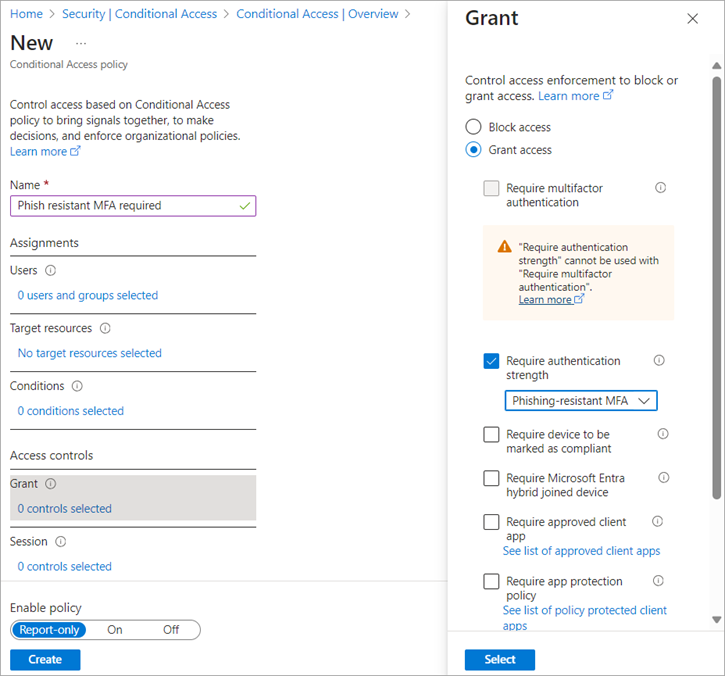
Conditional Access grant control requiring an authentication strength
Microsoft also ships this as a template: Require phishing-resistant multifactor authentication for administrators (policy guide). Heed its warning: "Enabling this policy without completing this step [registering the appropriate methods] risks locking you out of your tenant."
Block device code flow
Passkeys can't stop device code phishing, because the victim signs in on the real Microsoft page. Conditional Access can. In the policy's Conditions → Authentication flows, select Device code flow and grant Block.
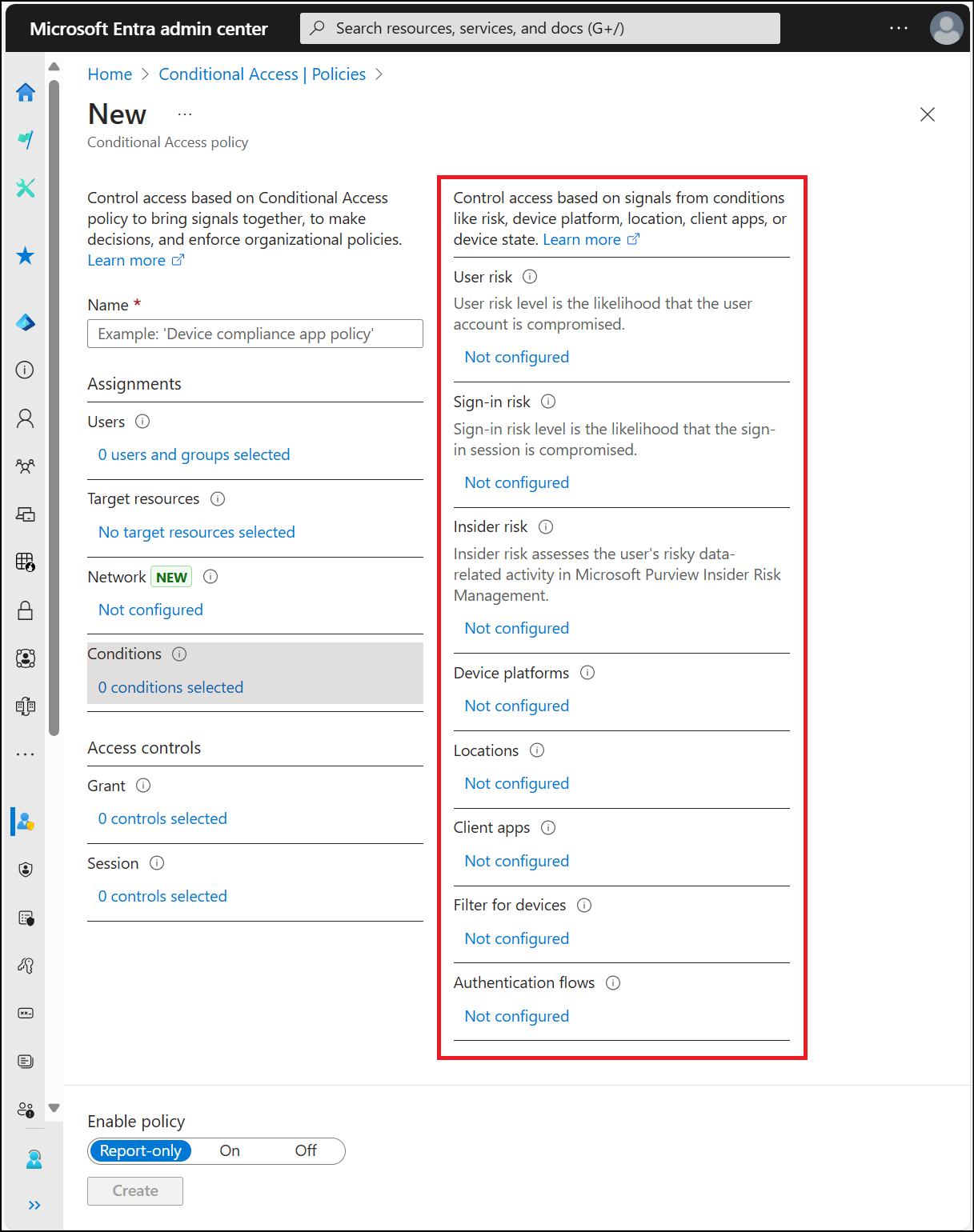
Conditional Access conditions including Authentication flows]
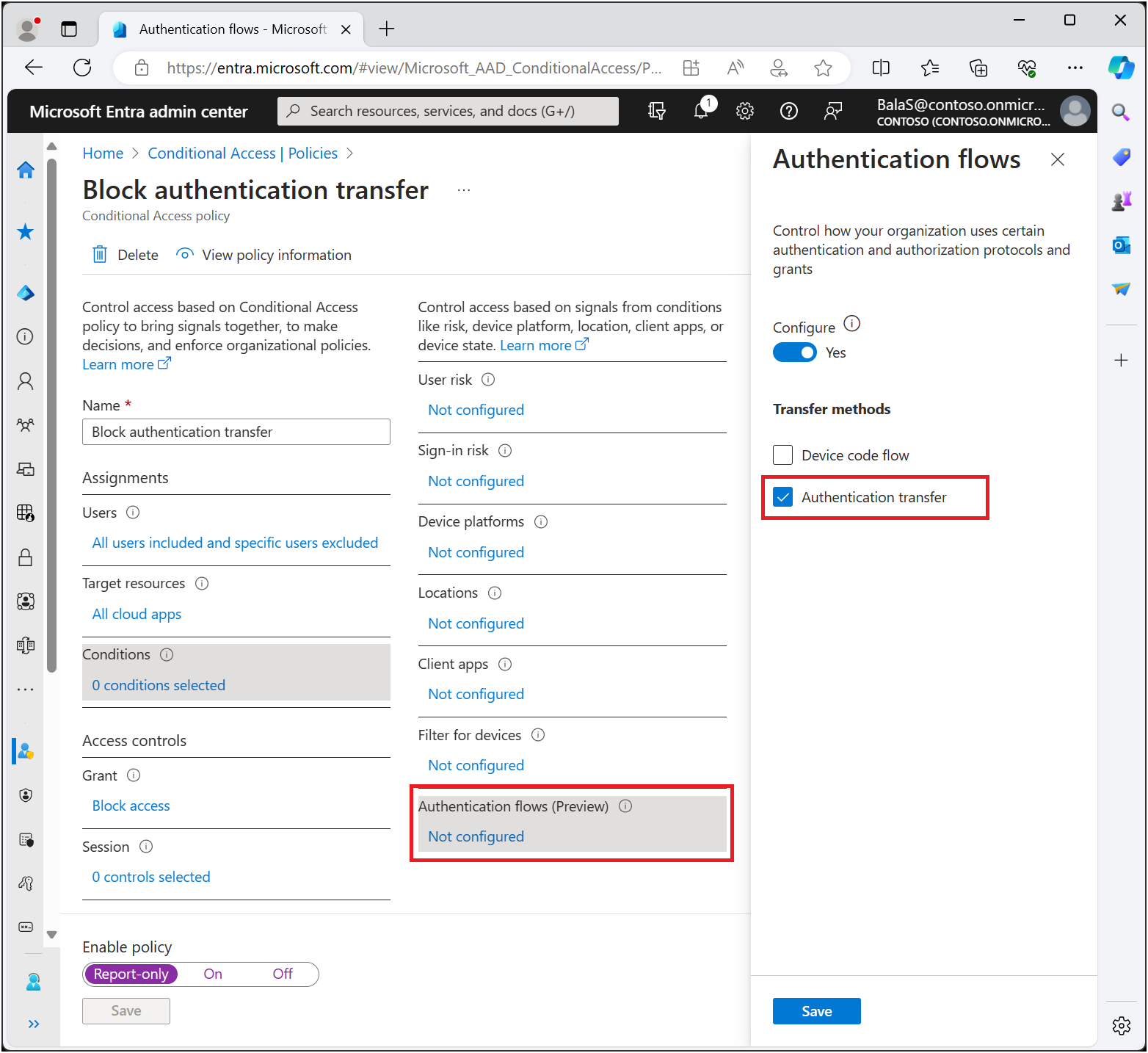
Policy blocking authentication transfer
Things to know before you enforce (concept, how-to):
- Find your legitimate users first. Teams Rooms and other shared devices, some CLI tooling, and provisioning workflows use device code flow. For Teams devices, Microsoft recommends excluding the specific resource accounts, not broad groups (Teams devices guidance).
- Protocol tracking follows the session. Once a session started with device code flow, later refreshes are still treated as device-code-originated and can be blocked with
AADSTS530036. The sign-in log shows it under Original transfer method. - Device Registration Service. Authentication-flows policies targeting All resources also apply to device registration. If you register devices through device code flow, exclude the Device Registration Service app (
01cb2876-7ebd-4aa4-9cc9-d28bd4d359a9).
Report-only first, always
Report-only evaluates the policy on every sign-in and records what would have happened, without blocking anyone. Review it in the sign-in log's Report-only tab or in the Policy impact view (preview, Security Reader or higher):
Report-only: Failure means the user would have been blocked. User action required means they would have been prompted, for example to use a passkey they don't have. Both are your pre-enforcement to-do list. Report-only isn't available for policies scoped to user actions such as Register security information.
Hands-on: build and verify enforcement with PowerShell
Connect-MgGraph -TenantId $tenantId -ContextScope Process -NoWelcome -Scopes `
    'Policy.Read.All', 'Policy.ReadWrite.ConditionalAccess', 'RoleManagement.Read.Directory', 'GroupMember.Read.All', 'AuditLog.Read.All'
Graph known issue: creating or patching Conditional Access policies requires consent to
Policy.Read.Allin addition toPolicy.ReadWrite.ConditionalAccess.
Inspect strengths: Get-EptAuthenticationStrength
function Get-EptAuthenticationStrength {
    <#
    .SYNOPSIS
        Lists built-in and custom authentication strengths with their allowed method combinations.
    .DESCRIPTION
        GET /policies/authenticationStrengthPolicies (v1.0). Output exposes StrengthId, which binds by
        property name to New-EptStrengthPolicy -AuthenticationStrengthId.
        Requires: Policy.Read.All (or Policy.Read.AuthenticationMethod).
    .EXAMPLE
        Get-EptAuthenticationStrength | Format-Table Name, PolicyType, AllowsPhishable
    .EXAMPLE
        Get-EptAuthenticationStrength -Name 'Admin*' | New-EptStrengthPolicy -DisplayName 'CA101 Admins - custom strength' -AdminRoles -ExcludeGroupId $bg
    #>
    [CmdletBinding()]
    [OutputType('Ept.AuthenticationStrength')]
    param(
        [SupportsWildcards()]
        [string] $Name = '*'
    )
    Assert-EptGraphConnection -RequiredScope 'Policy.Read.All'
    $phishable = 'sms|voice|softwareOath|hardwareOath|microsoftAuthenticatorPush|deviceBasedPush|temporaryAccessPass|email|federated|qrCodePin|password'

    Invoke-EptGraphRequest -Uri 'https://graph.microsoft.com/v1.0/policies/authenticationStrengthPolicies' |
        Where-Object displayName -Like $Name |
        ForEach-Object {
            $aaguids = @($_.combinationConfigurations | Where-Object allowedAAGUIDs | ForEach-Object allowedAAGUIDs)
            [pscustomobject]@{
                PSTypeName          = 'Ept.AuthenticationStrength'
                StrengthId          = $_.id
                Name                = $_.displayName
                PolicyType          = $_.policyType
                AllowedCombinations = @($_.allowedCombinations)
                AllowsPhishable     = [bool](@($_.allowedCombinations) -match $phishable)
                RestrictedAaguids   = $aaguids
            }
        }
}
Source: EntraPasskeyToolkit/Public/Enforcement.ps1
AllowsPhishable is the flag that matters. Any strength that accepts sms, voice, OATH, push, TAP, or a password combination is not phishing-resistant, whatever its name says.
Get-EptAuthenticationStrength | Format-Table Name, PolicyType, AllowsPhishable, @{ n = 'Combinations'; e = { $_.AllowedCombinations -join ', ' } } -Wrap
Create a Tier 0 strength: New-EptAuthenticationStrength
function New-EptAuthenticationStrength {
    <#
    .SYNOPSIS
        Creates a custom authentication strength, optionally pinning passkeys to approved AAGUIDs.
    .DESCRIPTION
        WRITE OPERATION. POST /policies/authenticationStrengthPolicies (v1.0).
        The typical use is a "privileged" strength that only accepts FIDO2 keys from an approved
        model list, plus Windows Hello for Business and multifactor certificates.
        Tenants can hold up to 15 custom strengths.
        AAGUID restriction is only a hard control when attestation is enforced on the matching
        passkey profile; otherwise an authenticator can claim any AAGUID.
        Requires: Policy.ReadWrite.ConditionalAccess + Conditional Access Administrator or Security Administrator.
    .EXAMPLE
        New-EptAuthenticationStrength -DisplayName 'Admins - approved security keys' `
            -AllowedCombination fido2, windowsHelloForBusiness -AllowedAaguid $approvedKeys -WhatIf
    #>
    [CmdletBinding(SupportsShouldProcess, ConfirmImpact = 'Medium')]
    [OutputType('Ept.AuthenticationStrength')]
    param(
        [Parameter(Mandatory)]
        [string] $DisplayName,

        [string] $Description = 'Created by EntraPasskeyToolkit',

        [ValidateSet('fido2', 'windowsHelloForBusiness', 'x509CertificateMultiFactor', 'deviceBasedPush',
                     'temporaryAccessPassOneTime', 'temporaryAccessPassMultiUse')]
        [string[]] $AllowedCombination = @('fido2', 'windowsHelloForBusiness', 'x509CertificateMultiFactor'),

        [ValidatePattern('^[0-9a-fA-F-]{36}$')]
        [string[]] $AllowedAaguid
    )
    Assert-EptGraphConnection -RequiredScope 'Policy.ReadWrite.ConditionalAccess'

    $body = [ordered]@{
        displayName           = $DisplayName
        description           = $Description
        requirementsSatisfied = 'mfa'
        allowedCombinations   = @($AllowedCombination)
    }
    if ($AllowedAaguid) {
        if ($AllowedCombination -notcontains 'fido2') { throw '-AllowedAaguid requires fido2 in -AllowedCombination.' }
        $body.combinationConfigurations = @(@{
            '@odata.type'         = '#microsoft.graph.fido2CombinationConfiguration'
            appliesToCombinations = @('fido2')
            allowedAAGUIDs        = @($AllowedAaguid | ForEach-Object ToLower)
        })
    }

    if ($PSCmdlet.ShouldProcess($DisplayName, "Create authentication strength ($($AllowedCombination -join ', '))")) {
        $created = Invoke-EptGraphRequest -Method POST -Uri 'https://graph.microsoft.com/v1.0/policies/authenticationStrengthPolicies' -Body $body
        Get-EptAuthenticationStrength | Where-Object StrengthId -eq $created.id
    }
}
Source: EntraPasskeyToolkit/Public/Enforcement.ps1
$approvedKeyAaguids = @('ee882879-721c-4913-9775-3dfcce97072a', 'fa2b99dc-9e39-4257-8f92-4a30d23c4118')  # replace with yours

New-EptAuthenticationStrength -DisplayName 'Tier0 - approved security keys + WHfB' `
    -AllowedCombination fido2, windowsHelloForBusiness -AllowedAaguid $approvedKeyAaguids -WhatIf
Review existing policies: Get-EptConditionalAccessPolicy
This flattens every policy into a row with the flags you care about: RequiresPhishResistant, RequiresMfa, BlocksDeviceCode, targets and exclusions.
function Get-EptConditionalAccessPolicy {
    <#
    .SYNOPSIS
        Flattens Conditional Access policies into reviewable rows with MFA-relevant flags.
    .DESCRIPTION
        GET /identity/conditionalAccess/policies (v1.0). Resolves the authentication strength name and
        flags policies that require phishing-resistant MFA, generic MFA, or block device code flow.
        It does NOT compute effective access; group nesting, exclusions and multiple policies must still
        be evaluated with the What If tool or report-only results.
        Requires: Policy.Read.All + a role such as Security Reader or Global Reader.
    .EXAMPLE
        Get-EptConditionalAccessPolicy | Where-Object RequiresPhishResistant | Format-Table Name, State, IncludeUsers, IncludeRoles
    .EXAMPLE
        Get-EptConditionalAccessPolicy | Where-Object { $_.State -eq 'enabled' -and $_.RequiresMfa -and -not $_.StrengthName }
    #>
    [CmdletBinding()]
    [OutputType('Ept.ConditionalAccessPolicy')]
    param(
        [ValidateSet('enabled', 'disabled', 'enabledForReportingButNotEnforced')]
        [string[]] $State
    )
    Assert-EptGraphConnection -RequiredScope 'Policy.Read.All'

    $strengths = @{}
    Get-EptAuthenticationStrength | ForEach-Object { $strengths[$_.StrengthId] = $_ }

    Invoke-EptGraphRequest -Uri 'https://graph.microsoft.com/v1.0/identity/conditionalAccess/policies' |
        Where-Object { -not $State -or $_.state -in $State } |
        ForEach-Object {
            $c = $_.conditions
            $g = $_.grantControls
            $strengthId = $g.authenticationStrength.id
            $strength = if ($strengthId) { $strengths[$strengthId] }
            [pscustomobject]@{
                PSTypeName             = 'Ept.ConditionalAccessPolicy'
                PolicyId               = $_.id
                Name                   = $_.displayName
                State                  = $_.state
                IncludeUsers           = @($c.users.includeUsers)
                IncludeGroups          = @($c.users.includeGroups)
                IncludeRoles           = @($c.users.includeRoles)
                ExcludeUsers           = @($c.users.excludeUsers)
                ExcludeGroups          = @($c.users.excludeGroups)
                Applications           = @($c.applications.includeApplications)
                UserActions            = @($c.applications.includeUserActions)
                ClientAppTypes         = @($c.clientAppTypes)
                TransferMethods        = $c.authenticationFlows.transferMethods
                GrantOperator          = $g.operator
                BuiltInControls        = @($g.builtInControls)
                StrengthName           = $strength.Name
                RequiresMfa            = (@($g.builtInControls) -contains 'mfa') -or [bool]$strengthId
                RequiresPhishResistant = [bool]($strength -and -not $strength.AllowsPhishable)
                BlocksDeviceCode       = (@($g.builtInControls) -contains 'block') -and ([string]$c.authenticationFlows.transferMethods -match 'deviceCodeFlow')
                SessionControls        = @($_.sessionControls.PSObject.Properties | Where-Object { $_.Value } | ForEach-Object Name)
            }
        }
}
Source: EntraPasskeyToolkit/Public/Enforcement.ps1
# Policies that ask for "MFA" but accept phishable methods: your weak-fallback suspects
Get-EptConditionalAccessPolicy -State enabled |
    Where-Object { $_.RequiresMfa -and -not $_.RequiresPhishResistant } |
    Format-Table Name, StrengthName, @{ n = 'Users'; e = { $_.IncludeUsers + $_.IncludeGroups + $_.IncludeRoles -join ', ' } }

# Is device code flow blocked anywhere?
Get-EptConditionalAccessPolicy | Where-Object BlocksDeviceCode | Format-Table Name, State

# Snapshot before every change (JSON is review evidence, not a restore script)
Get-EptConditionalAccessPolicy | ConvertTo-Json -Depth 5 | Set-Content "./ca-snapshot-$(Get-Date -Format yyyyMMdd-HHmm).json"
Create the policies: New-EptStrengthPolicy and New-EptDeviceCodeBlockPolicy
Both default to report-only and both make -ExcludeGroupId mandatory, so nobody can forget the break-glass accounts. New-EptStrengthPolicy takes StrengthId from the pipeline, so the output of Get-EptAuthenticationStrength flows straight in. -AdminRoles resolves Microsoft's list of 14 privileged roles by display name, which avoids hard-coded role GUIDs.
function New-EptStrengthPolicy {
    <#
    .SYNOPSIS
        Creates a Conditional Access policy that requires an authentication strength (report-only by default).
    .DESCRIPTION
        WRITE OPERATION. POST /identity/conditionalAccess/policies (v1.0).
        Defaults follow Microsoft's deployment guidance: built-in Phishing-resistant MFA strength,
        All resources, report-only state. -ExcludeGroupId is mandatory so that break-glass
        accounts are never forgotten.

        Accepts StrengthId from Get-EptAuthenticationStrength over the pipeline.
        Only built-in directory roles are honoured by Conditional Access; administrative-unit-scoped
        and custom roles are not.

        Requires: Policy.Read.All + Policy.ReadWrite.ConditionalAccess (+ RoleManagement.Read.Directory
        for -AdminRoles) and Conditional Access Administrator.
    .EXAMPLE
        New-EptStrengthPolicy -DisplayName 'CA100 Admins - Phishing-resistant MFA' -AdminRoles -ExcludeGroupId $breakGlassGroupId -WhatIf
    .EXAMPLE
        New-EptStrengthPolicy -DisplayName 'CA110 Pilot - Phishing-resistant MFA' -IncludeGroupId $pilotGroupId -ExcludeGroupId $breakGlassGroupId
    #>
    [Diagnostics.CodeAnalysis.SuppressMessageAttribute('PSReviewUnusedParameter', '',
        Justification = '-AdminRoles and -AllUsers select parameter sets.')]
    [CmdletBinding(SupportsShouldProcess, ConfirmImpact = 'High', DefaultParameterSetName = 'Groups')]
    [OutputType('Ept.ConditionalAccessPolicy')]
    param(
        [Parameter(Mandatory)]
        [string] $DisplayName,

        [Parameter(Mandatory, ParameterSetName = 'Groups')]
        [guid[]] $IncludeGroupId,

        [Parameter(Mandatory, ParameterSetName = 'Roles')]
        [switch] $AdminRoles,

        [Parameter(ParameterSetName = 'Roles')]
        [string[]] $RoleName = $script:EptAdminRoleName,

        [Parameter(Mandatory, ParameterSetName = 'AllUsers')]
        [switch] $AllUsers,

        [Parameter(Mandatory)]
        [guid[]] $ExcludeGroupId,

        [Parameter(ValueFromPipelineByPropertyName)]
        [Alias('StrengthId')]
        [guid] $AuthenticationStrengthId = $script:EptBuiltInStrength.PhishingResistant,

        [string[]] $IncludeApplication = @('All'),

        [ValidateSet('enabled', 'disabled', 'enabledForReportingButNotEnforced')]
        [string] $State = 'enabledForReportingButNotEnforced'
    )
    begin {
        Assert-EptGraphConnection -RequiredScope 'Policy.Read.All', 'Policy.ReadWrite.ConditionalAccess'
    }
    process {
        $users = @{ excludeGroups = @($ExcludeGroupId.Guid) }
        switch ($PSCmdlet.ParameterSetName) {
            'Groups' { $users.includeGroups = @($IncludeGroupId.Guid) }
            'AllUsers' { $users.includeUsers = @('All') }
            'Roles' {
                Assert-EptGraphConnection -RequiredScope 'RoleManagement.Read.Directory'
                $users.includeRoles = @(foreach ($r in $RoleName) {
                    $def = Invoke-EptGraphRequest -Uri ("https://graph.microsoft.com/v1.0/roleManagement/directory/roleDefinitions?`$filter=displayName eq '{0}'&`$select=templateId" -f $r)
                    if (-not $def) { throw "Role '$r' not found." }
                    $def.templateId
                })
            }
        }

        $body = [ordered]@{
            displayName   = $DisplayName
            state         = $State
            conditions    = @{
                users          = $users
                applications   = @{ includeApplications = $IncludeApplication }
                clientAppTypes = @('all')
            }
            grantControls = @{
                operator               = 'OR'
                authenticationStrength = @{ id = $AuthenticationStrengthId.Guid }
            }
        }

        if ($State -eq 'enabled') {
            Write-Warning 'Creating an ENFORCED policy. Confirm every targeted user has a qualifying method registered, and that break-glass accounts are excluded.'
        }
        if ($PSCmdlet.ShouldProcess($DisplayName, "Create CA policy [$State] requiring strength $AuthenticationStrengthId")) {
            $created = Invoke-EptGraphRequest -Method POST -Uri 'https://graph.microsoft.com/v1.0/identity/conditionalAccess/policies' -Body $body
            Get-EptConditionalAccessPolicy | Where-Object PolicyId -eq $created.id
        }
    }
}
Source: EntraPasskeyToolkit/Public/Enforcement.ps1
function New-EptDeviceCodeBlockPolicy {
    <#
    .SYNOPSIS
        Creates a Conditional Access policy that blocks device code flow (and optionally authentication transfer).
    .DESCRIPTION
        WRITE OPERATION. Microsoft recommends blocking device code flow wherever possible, because an
        attacker can get a victim to approve a code on the genuine Microsoft sign-in page.
        Created in report-only state by default so you can find legitimate users first
        (Teams Rooms, shared-device provisioning, some CLI workflows).
        -ExcludeDeviceRegistrationService excludes the Device Registration Service app
        (01cb2876-7ebd-4aa4-9cc9-d28bd4d359a9) for tenants that register devices with device code flow.
        Requires: Policy.Read.All + Policy.ReadWrite.ConditionalAccess + Conditional Access Administrator.
    .EXAMPLE
        New-EptDeviceCodeBlockPolicy -DisplayName 'CA010 All users - Block device code flow' -ExcludeGroupId $breakGlass, $teamsRoomsAccounts -WhatIf
    #>
    [CmdletBinding(SupportsShouldProcess, ConfirmImpact = 'High')]
    [OutputType('Ept.ConditionalAccessPolicy')]
    param(
        [Parameter(Mandatory)]
        [string] $DisplayName,

        [Parameter(Mandatory)]
        [guid[]] $ExcludeGroupId,

        [switch] $IncludeAuthenticationTransfer,

        [switch] $ExcludeDeviceRegistrationService,

        [ValidateSet('enabled', 'disabled', 'enabledForReportingButNotEnforced')]
        [string] $State = 'enabledForReportingButNotEnforced'
    )
    Assert-EptGraphConnection -RequiredScope 'Policy.Read.All', 'Policy.ReadWrite.ConditionalAccess'

    $transfer = if ($IncludeAuthenticationTransfer) { 'deviceCodeFlow,authenticationTransfer' } else { 'deviceCodeFlow' }
    $apps = @{ includeApplications = @('All') }
    if ($ExcludeDeviceRegistrationService) { $apps.excludeApplications = @('01cb2876-7ebd-4aa4-9cc9-d28bd4d359a9') }

    $body = [ordered]@{
        displayName   = $DisplayName
        state         = $State
        conditions    = @{
            users               = @{ includeUsers = @('All'); excludeGroups = @($ExcludeGroupId.Guid) }
            applications        = $apps
            clientAppTypes      = @('all')
            authenticationFlows = @{ transferMethods = $transfer }   # a flags string, not an array
        }
        grantControls = @{ operator = 'OR'; builtInControls = @('block') }
    }

    if ($PSCmdlet.ShouldProcess($DisplayName, "Create CA policy [$State] blocking $transfer")) {
        $created = Invoke-EptGraphRequest -Method POST -Uri 'https://graph.microsoft.com/v1.0/identity/conditionalAccess/policies' -Body $body
        Get-EptConditionalAccessPolicy | Where-Object PolicyId -eq $created.id
    }
}
Source: EntraPasskeyToolkit/Public/Enforcement.ps1
$breakGlass = '<object id of EmergencyAccess group>'
$pilot      = '<object id of passkey pilot group>'

# Admins: phishing-resistant, report-only
New-EptStrengthPolicy -DisplayName 'CA100 Admins - Require phishing-resistant MFA' -AdminRoles -ExcludeGroupId $breakGlass

# Admins with the custom Tier 0 strength, piped from the strength lookup
Get-EptAuthenticationStrength -Name 'Tier0*' |
    New-EptStrengthPolicy -DisplayName 'CA101 Admins - Require Tier0 keys' -AdminRoles -ExcludeGroupId $breakGlass -WhatIf

# Pilot users
New-EptStrengthPolicy -DisplayName 'CA110 Pilot - Require phishing-resistant MFA' -IncludeGroupId $pilot -ExcludeGroupId $breakGlass

# Device code flow + authentication transfer, report-only
New-EptDeviceCodeBlockPolicy -DisplayName 'CA010 All - Block device code and auth transfer' `
    -ExcludeGroupId $breakGlass -IncludeAuthenticationTransfer
Before switching CA010 to On, find who actually uses device code flow. Get-EptSignInMethod (full source in Part 5) reads the beta sign-in API, which exposes authenticationProtocol:
Get-EptSignInMethod -Days 30 -Protocol deviceCode |
    Group-Object UserPrincipalName, AppDisplayName -NoElement |
    Sort-Object Count -Descending |
    Format-Table Count, Name
Prove it: Test-EptPhishResistantCoverage
This is the function that answers the question from the opening scenario. For every user piped in, it checks:
- whether an enabled policy requiring a phishing-resistant strength on All resources includes them, directly, through a group, through All users, or through an active directory role;
- whether an exclusion removes them;
- whether they have a phishing-resistant method registered, and which phishable methods they still hold.
function Test-EptPhishResistantCoverage {
    <#
    .SYNOPSIS
        For each user, answers: "Is an enforced phishing-resistant policy covering this user, and which
        phishable methods could still satisfy other policies?"
    .DESCRIPTION
        Combines three sources per user:
          1. Registered methods (Get-EptUserRegistration),
          2. Group and active directory-role membership (GET /users/{id}/transitiveMemberOf),
          3. ENABLED Conditional Access policies that require a strength with no phishable combinations
             and target All resources.
        A user is 'Covered' when at least one such policy includes them (All users, directly, by group or
        by role) and no exclusion removes them. Users who are not covered but have phishable methods
        registered are the "weak fallback" population described in Part 3.

        This is a triage aid, not an effective-access engine: it ignores conditions such as platforms,
        locations, client apps and PIM roles that are eligible but not active. Confirm edge cases with
        the Conditional Access What If tool.

        Requires: AuditLog.Read.All, Policy.Read.All, GroupMember.Read.All (or Directory.Read.All).
    .EXAMPLE
        Get-EptPrivilegedUser | Test-EptPhishResistantCoverage | Where-Object Verdict -ne 'Covered'
    .EXAMPLE
        Get-Content pilot-users.txt | Test-EptPhishResistantCoverage | Export-Csv coverage.csv -NoTypeInformation
    #>
    [CmdletBinding()]
    [OutputType('Ept.CoverageResult')]
    param(
        [Parameter(Mandatory, ValueFromPipeline, ValueFromPipelineByPropertyName)]
        [Alias('Id', 'UserId', 'UPN')]
        [string] $UserPrincipalName
    )
    begin {
        Assert-EptGraphConnection -RequiredScope 'AuditLog.Read.All', 'Policy.Read.All', 'GroupMember.Read.All'
        $strongPolicies = @(Get-EptConditionalAccessPolicy -State enabled |
            Where-Object { $_.RequiresPhishResistant -and $_.Applications -contains 'All' })
        if (-not $strongPolicies) {
            Write-Warning 'No ENABLED policy requires a phishing-resistant strength for All resources. Every user will report NotCovered.'
        }
    }
    process {
        $reg = Get-EptUserRegistration -UserPrincipalName $UserPrincipalName | Select-Object -First 1
        $userId = if ($reg) { $reg.UserId } else { $UserPrincipalName }

        # No $select: groups and directoryRoles have different properties; discriminate on @odata.type.
        $memberOf = @(Invoke-EptGraphRequest -Uri "https://graph.microsoft.com/v1.0/users/$(Resolve-EptUserId $userId)/transitiveMemberOf")
        $groupIds = @($memberOf | Where-Object { $_.'@odata.type' -eq '#microsoft.graph.group' } | ForEach-Object id)
        $roleIds = @($memberOf | Where-Object { $_.'@odata.type' -eq '#microsoft.graph.directoryRole' } | ForEach-Object roleTemplateId)

        $covering = foreach ($p in $strongPolicies) {
            $included = $p.IncludeUsers -contains 'All' -or $p.IncludeUsers -contains $userId -or
                        ($p.IncludeGroups | Where-Object { $_ -in $groupIds }) -or
                        ($p.IncludeRoles | Where-Object { $_ -in $roleIds })
            $excluded = $p.ExcludeUsers -contains $userId -or ($p.ExcludeGroups | Where-Object { $_ -in $groupIds })
            if ($included -and -not $excluded) { $p.Name }
        }

        $hasStrong = [bool]$reg.HasPhishingResistant
        $verdict = if ($covering -and $hasStrong) { 'Covered' }
                   elseif ($covering) { 'CoveredButNoMethod' }      # will be blocked or prompted to register
                   elseif ($reg.PhishableMethods) { 'NotCovered-PhishableFallback' }
                   else { 'NotCovered' }

        [pscustomobject]@{
            PSTypeName           = 'Ept.CoverageResult'
            UserPrincipalName    = if ($reg) { $reg.UserPrincipalName } else { $UserPrincipalName }
            Verdict              = $verdict
            CoveringPolicies     = @($covering) -join '; '
            HasPhishingResistant = $hasStrong
            PhishableMethods     = @($reg.PhishableMethods) -join ';'
            ActiveRoleCount      = $roleIds.Count
        }
    }
}
Source: EntraPasskeyToolkit/Public/Enforcement.ps1
# Every admin: are they really covered?
Get-EptPrivilegedUser | Test-EptPhishResistantCoverage | Format-Table UserPrincipalName, Verdict, CoveringPolicies, PhishableMethods

# Pilot readiness before flipping CA110 from report-only to On
Get-Content ./pilot-users.txt | Test-EptPhishResistantCoverage | Group-Object Verdict -NoElement
| Verdict | Meaning | Action |
|---|---|---|
Covered |
Enforced phishing-resistant policy applies, and the user has a qualifying method | None. Keep monitoring usage (Part 5) |
CoveredButNoMethod |
Policy applies, but no phishing-resistant method is registered | The user will be blocked or prompted. Issue a TAP and register a passkey (Part 4) |
NotCovered-PhishableFallback |
No enforced policy, and phishable methods are registered | This is the gap. Add them to the pilot or policy scope |
NotCovered |
No enforced policy and no phishable methods | Usually a new or unregistered user. Onboard with TAP |
It is a triage tool, not an effective-access engine. It ignores platform, location and client-app conditions, and PIM roles that are eligible but not active. Confirm edge cases with the What If tool in Conditional Access.
Best practices
- Require an authentication strength, not "MFA", for anything you care about. Generic MFA accepts SMS.
- Exclude break-glass accounts from every policy that can block, using a dedicated group. Report-only policies don't need the exclusion (Part 6).
- Report-only → small enforced cohort → expand. Review Failure and User action required results at each step.
- Enforce by OS group when you reach the general workforce, so one platform's gap doesn't stall the rest.
- Block device code flow and authentication transfer unless you have a documented, scoped exception.
- Remove phishable methods from privileged users' method policy once they're covered. Even unused, they're an attack path for SSPR and help-desk social engineering.
- Snapshot policies before every change and keep the JSON with the change record.
- Verify outcomes, not configuration: a prepared pilot user reaches their apps with a passkey, and the same user fails with push or SMS.
Next, Part 4: the new weak point. How users get their first passkey, and how an attacker is prevented from getting one on their behalf.
References
- Authentication strengths and advanced options, Microsoft Learn
- Require phishing-resistant MFA for administrators, Microsoft Learn
- Authentication flows and block authentication flows, Microsoft Learn
- Report-only mode, Microsoft Learn
- conditionalAccessPolicy resource and conditionalAccessAuthenticationFlows, Microsoft Graph
- List authenticationStrengthPolicies and create one, Microsoft Graph
- Microsoft Graph known issues