Virtualizing JunOS on VMware

Many times when working with a client network or working on our own we have the need to test, document and validate certain networks configurations in a test environment. Sadly not many have the money to have one so as to test different scenarios so as to gage the impact that this changes might have on the production network. For a majority of configuration when it comes to system settings and routing a virtualized environment can be of great help, sadly anything ASIC or HW Specific configurations. On this blog post I will cover how to virtualize JunOS operating system to aide with testing and validating. I did this for a friend who needed to migrate the configuration of several of his Juniper Routers to a newer version of the OS and Hardware and also asked me for recommendations for hardening the routers. I do have to say I really like JunOS specially since it is a full FreeBSD subsystem underneath to wish a user has access to.

Requirements


Software required to install JunOS on VMware:

  • Download FreeBSD 4.11 mini ISO from FreeBSD ftp site Link
  • M Series Router jinstall Domestic Signed tgz file, Export version does not provide SSH.
  • Jweb tgz file for the version of JunOS being install

NOTE: Do not ask for Juniper images I will ignore those messages. You need a valid contract to obtain them.

Settings for Workstation 7.x


  • On VMware Workstation:
  • Create a New Virtual Machine.
  • Select on the image the FreeBSD ISO image.
  • Ensure that FreeBSD is selected as the operating system type.
  • Make sure HDD is 4GB or higher and of type IDE for version 9.x and 10.x for version 11.x use 6GB or higher.
  • For memory set initially 512MB for 9.x and after installation of jweb it can be changed to 256MB, for 10.x and 11.x set initial value to 1024MB and after install 512MB.
  • After creation of VM and before installation open VMX file and sure that the SCSI devises presence settings be set to FALSE: scsi0.present = "FALSE"

Settings for VMWare ESX 4.x


On VMWare ESX and ESXi :

  • Create a New Virtual Machine with Operating System Other -> FreeBSD 32-bits
  • Make sure HDD is 4GB or higher and of type IDE for version 9.x and 10.x for version 11.x use 6GB or higher.
  • "Select the Edit Virtual Machine Settings Before Completion" Check Box.
  • Change the SCSI Controller to LSI Logic SAS
  • For memory set initially 512MB for 9.x and after installation of jweb it can be changed to 256MB, for 10.x and 11.x set initial value to 1024MB and after install 512MB.
  • Set in the CD Rom the FreeBSD 4.11 ISO and make sure that it is Connected before saving.

FreeBSD Installation


  • Skip the kernel configuration and choose the standard installation.
  • When prompted to use fdisk select OK.
  • When you get to partitioning, allocate first the whole disk to BSD.
  • Press c then OK for the other prompts and finish by selecting q.
  • Select BootMrg as the boot manager.
  • Create the disk slices as shown in the table below:
Slice Name Size
ad0s1a / 2000M
ad0s1b    Swap 1024M
ad0s1e    /config 64M
ad0s1f    /var Remaining Space
  • / has to be a reasonable size or else you'll run out of space on /mnt.
  • Choose 'Minimal' installation type and skip installing ports.
  • After the base is installed it will ask you if you want to configure Ethernet settings, select yes and use DHCP to configure your NIC (em0), Write down the IP given by DHCP and set a Hostname for the server. This allow us to scp the jinstall file after reboot.
  • Except for the DHCP on interface em0, choose "no" for everything else (IPv6. Linux compatibility, NFS, FTP, Inetd, TimeZone etc..)
  • When asked to create a user create one called junos, set a password for it and add it to the group wheel. Ensure to put a password for the root account.
  • After the installer completes it will reboot. Make sure that you have disconnected the CD so as to make sure the VM will not boot in to the CD again.
  • scp to /var/tmp on the VM the jinstall file only, do not copy the jweb file yet since during installation the file system will be formatted and changed.
 $ scp jinstall-<version>-domestic-signed.tgz junos@<ip>:/var/tmp
  • Once the file is there yo will SSH in to the server and use the su command to gain root privileges:
    $ su -

    JunOS 9.6R1


    Unpack the different parts of the installer and remove hash files used to validate the installer:

    # cd /var/tmp/
    
    # mkdir jinst
    
    # cd jinst
    
    # tar xvzf ../jinstall-9.6R1.13-domestic-signed.tgz
    
    # rm *.md5 *.sha1 *.sig
    
    # mkdir domestic
    
    # cd domestic/
    
    # tar xvzf ../jinstall-9.6R1.13-domestic.tgz
    
    # mkdir pkgtools
    
    # cd pkgtools
    
    # ls
    
    # tar xvzf ../pkgtools.tgz


    Make sure that check for hardware always return true by replacing the checkpic command:

    # cp /usr/bin/true bin/checkpic

    Repackage the installer:

    # tar cvzf ../pkgtools.tgz *
    
    # cd ..
    
    # rm -rf pkgtools
    
    # tar cvzf ../jinstall-9.6R1.13-domestic.tgz *
    
    # cd ..
    
    # rm -rf domestic/
    
    # cd jinst
    
    # tar cvzf ../jinstall-9.6R1.13-domestic-signed.tgz *
    
    # cd ..
    
    # rm -rf jinst/

    Install the package using pkg_add:

    # pkg_add jinstall-9.6R1.13-domestic-signed.tgz
    
    Adding jinstall...
    
    sysctl: unknown oid 'hw.product.model'
    
    sysctl: unknown oid 'hw.re.model'
    
    sysctl: unknown oid 'hw.re.model'
    
    sysctl: unknown oid 'hw.re.model'
    
    WARNING:     This package will load JUNOS 9.6R1.13 software.
    
    WARNING:     It will save JUNOS configuration files, and SSH keys
    
    WARNING:     (if configured), but erase all other files and information
    
    WARNING:     stored on this machine.  It will attempt to preserve dumps
    
    WARNING:     and log files, but this can not be guaranteed.  This is the
    
    WARNING:     pre-installation stage and all the software is loaded when
    
    WARNING:     you reboot the system.
    
    Saving the config files ...
    
    Installing the bootstrap installer ...
    
    WARNING:     A REBOOT IS REQUIRED TO LOAD THIS SOFTWARE CORRECTLY. Use the
    
    WARNING:     'request system reboot' command when software installation is
    
    WARNING:     complete. To abort the installation, do not reboot your system,
    
    WARNING:     instead use the 'request system software delete jinstall'
    
    WARNING:     command as soon as this operation completes.

    DO NOT REBOOT, Ensure you can interact with JunOS on the VM Console:

    # chmod +w /boot/loader.conf
    
    # vi /boot/loader.conf
    

    Add this line to the file:

    console="vidconsole"

    Reboot the device by entering the reboot command, the installation process will take several minutes and the router will reboot twice.


    JunOS 10.4R1 and JunOS 11.1R1


    This process is the same for 10.x and 11.x. Unpack the different parts of the installer and remove hash files used to validate the installer:

    # cd /var/tmp/
    
    # mkdir jinst
    
    # cd jinst
    
    # tar xvzf ../jinstall-9.6R1.13-domestic-signed.tgz
    
    # rm *.md5 *.sha1 *.sig
    

    Open in vi the +INSTALL file

    # vi ./+INSTALL


    Modify the variable re_name in the check_arch_compatibility() function as shown bellow, inside vi you can do a :/check_arch<enter> to go directly to it.

    check_arch_compatibility()
    
    {
    
        #re_name=`/sbin/sysctl -n hw.re.name 2>/dev/null`
    
        re_name='olive'
    
        if [ -z "$re_name" ]; then
    
            Error "hw.re.name sysctl not supported."
    
        fi


    Continue unpacking the next level of the package:

    # mkdir domestic
    
    # cd domestic/
    
    # tar xvzf ../jinstall-10.4R1.9-domestic.tgz

    Open with vi +INSTALL and +REQUIRE and modify the variable re_name in the check_arch_compatibility() as done before. Unpack the pkgtools.tgz file and make the checkpic file always return true:

    # mkdir pkgtools
    
    # cd pkgtools
    
    # tar xvzf ../pkgtools.tgz 
    
    # cp /usr/bin/true bin/checkpic 

    Repackage the installer:

    # tar cvzf ../pkgtools.tgz *
    
    # cd ..
    
    # rm -rf pkgtools
    
    # tar cvzf ../jinstall-10.4R1.9-domestic.tgz *
    
    # cd ..
    
    # rm -rf domestic
    
    # tar cvzf ../jinstall-10.4R1.9-domestic-signed.tgz *
    
    # cd ..
    
    # rm -rf jinst

    Install the package:

     # pkg_add jinstall-10.4R1.9-domestic-signed.tgz 
    
     Adding jinstall...
    
     sysctl: unknown oid 'hw.product.model'
    
     sysctl: unknown oid 'hw.re.model'
    
     sysctl: unknown oid 'hw.re.model'
    
     sysctl: unknown oid 'hw.re.model'
    
     WARNING:     This package will load JUNOS 10.4R1.9 software.
    
     WARNING:     It will save JUNOS configuration files, and SSH keys
    
     WARNING:     (if configured), but erase all other files and information
    
     WARNING:     stored on this machine.  It will attempt to preserve dumps
    
     WARNING:     and log files, but this can not be guaranteed.  This is the
    
     WARNING:     pre-installation stage and all the software is loaded when
    
     WARNING:     you reboot the system.
    
     Saving the config files ...
    
     Installing the bootstrap installer ...
    
     WARNING:     A REBOOT IS REQUIRED TO LOAD THIS SOFTWARE CORRECTLY. Use the
    
     WARNING:     'request system reboot' command when software installation is
    
     WARNING:     complete. To abort the installation, do not reboot your system,
    
     WARNING:     instead use the 'request system software delete jinstall'
    
     WARNING:     command as soon as this operation completes.
    

    Ensure you can interact with JunOS on the VM Console, there is no need for this step with version 10.4 but recommended in case there is a change in any other 10.x package:

    # chmod +w /boot/loader.conf
    
    # vi /boot/loader.conf

    Add this line to the file:

    console="vidconsole"

    Reboot the device by entering the reboot command, the installation process will take several minutes and the router will reboot twice.

    Initial Configuration


    On the console at login enter root and enter on the password prompt. Enter cli to enter in to command line interface of JunOS and enter:

    % cli
    
    > configure

    Set the hostname for the router:

    # set system host-name <router name>

    Set the root password:

    # set system root-authentication plain-text-password <enter>
    Create a secondary admin user to use for SSH:
    # set system login user <username> class super-user
    
    # set system login user <username> authentication plain-text-password <enter>
    Set an IP Address on the interface em0 so as to connect to the router:
    # set interfaces em0 unit 0 family inet address <ip/mask>
    Enable and set the SSH Version of the protocol to use to version 2:
    # set system services ssh protocol-version v2
    Enable Telnet:
    # set system services telnet
    Enable FTPD:
    # set system services ftp
    Set the default gateway:
    # set routing-options static route 0.0.0.0/0 next-hop <Default Gateway IP>
    Set the DNS Server to use:
    # set system name-server <name server IP>
    Save the configuration:
    # commit
    To get full list of software installed and version without paging:
    > show version | no-more
    To get full configuration:
    > show configuration | no-more 
    To get full configuration in XML format:
    > show configuration | no-more | display xml

    Install the Web Interface


    Copy to the router the jweb file using scp and the secondary admin account created above:

    > show configuration | no-more | display xml
    SSH in to the router and run:
    > request system software add /var/tmp/jweb-<version>-signed.tgz
    After installer finishes execute a reboot of the router
    > request system reboot 
    
    Reboot the system ? [yes,no] (no) yes
    It will take a while for the router to reboot since it is setting up the files for the web interface. Once the router is back up connect to it, enter configuration mode and enable the the web management system on the interface you configured:
    # set system services web-management http interface em0.0
    
    # commit

    Zero Day Review


    Zero Day is a novel by Mark Russinovich, his name is very well known to security professionals and system administrators that work with Microsoft systems alike, all have used the great set of utilities that he has written under his own company Winternals before being acquired by Microsoft and still available and updated as part of the sys internals suite of tools. He has used his experience in the Security field and community to write this novel in an action style story Tom Clancy style.

    The story starts via a series of events caused by computer systems failing and data and information being altered with catastrophic events, this opens the story to the introduction of the main character Jeff Aiken a security consultant that is called to look at an infection the destroyed the systems of a New York law firm. The character is of a bright security consultant driven by events in his past and the passion for the trill of the chase of hackers and solving the complex puzzle of digital forensics.  As he delves deeper in the origins of the virus and the work of Daryl Hagen a bright determined women that manages a US CERT team and is part CISU/DHS looking at the other cases they discover that this infections are all connected and just the tip of the iceberg of bigger attack that will hit the western governments. The story covers the typical terrorist plot of vengeance against the corrupted west that has been seen in so many novels after 9/11 but this one presents the twist that this time the attack is a cyber attack with very dark consequences.

    As as security researcher and professional I can relate to what Mark exposes in the book, specially the reality that our capacity to defend against a coordinated cyber attack is just not existent.  All of us in the industry that have found holes in systems have been frustrated many times with the speed of the response of private companies to address these holes and the lack of cooperation between them. He mentions how antivirus vendors are flooded with more samples of malware code than what they can handle. He cover the reality how we are loosing the battle against malware writers but in this case the malware writers have a more deadly agenda than feeding their egos or making money like many out there in the real world. I do have to say I do relate to all the problems faced by the heroes in the story making it more real in my imagination as I read the book. I could even relate to the pain of some of the victims having gone to clients to assist in recovering from security breaches and malware infections. I even related to the addictive nature that we in the security field have when we are faced with the hunt of an adversary while doing incident response and how that trill of the chance consumes us in the process.

    He also covered the problems that some of the bright women that are in this industry faced with prejudice and lack of respect by their peers. I found this part of the story very interesting knowing myself women in the industry and in general that have had to face this and fought to be measured and valued by the quality of their work and knowledge.

    I don have to say that I really liked the book and the pace of the story. My tactical side related to the accuracy of the depiction of the action and the weapons and my info sec side related perfectly with main characters and their frustrations with government and industry and the drive that pushed them. I even related with Russian character persona and the choices that many starting in the security field are faced with in term of the direction our research takes and the consequences of those decisions and what may drive many ton make the wrong ones.

    I recommend d this book to any security professional in the industry and to any person who likes actions and intrigue found in Tom Clancy and Alex Berenson books. I do hope that Mark writes another one like this and gives life to the characters behind this book.

    Book on Amazon

    Microsoft EMET

    Many times we are faced with the situation of not being able to patch software in time and many times do to the way companies work and handle security vulnerabilities the time of exposure is a very long one. Microsoft has worked in to making it harder for attacker to exploit code by adding in to the operating system and to several of their products mitigating technologies, but sadly not all Microsoft products or third party products use these mitigating technologies. To help with this Microsoft released the Enhanced Mitigation Experience Toolkit. This toolkit include several pseudo mitigation technologies aimed at disrupting current exploit techniques, it is not a perfect solution in terms that it can make it harder for known techniques used out there, so this makes this toolkit very effective in managing risk. It provides 7 protections:

    Structure Exception Handler Overwrite Protection (SEHOP)

    • Dynamice Data Execution Prevention (DEP) Application Level
    • Dynamice Data Execution Prevention (DEP) System Level
    • Heapspray Allocations
    • Null Page Allocation
    • Mandatory Address Space Layout Randomization (ASLR)
    • Export Address Table Access Filtering (EAF)

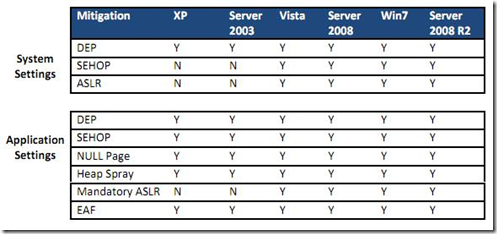
    This options are not present on all Operation Systems


    image


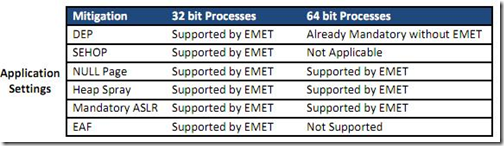
    Also depends on the CPU


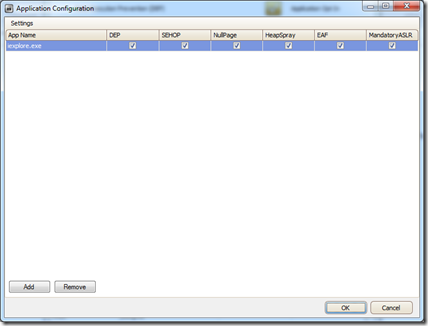
    image


    As it can be be seen from the table, the latest the OS the more protection can be used. The advantage of EMET is that many applications have to be compiled with proper flags and libraries to be able to use these protections, but with EMET they can be forced at the system and application level. With attackers moving more and more to client side attacks and with many companies dependent on applications that many times can not be updated do to the vendor not supporting them on newer versions of Windows, patches taking to much time or just plain quality problems from the company that programed the tool.

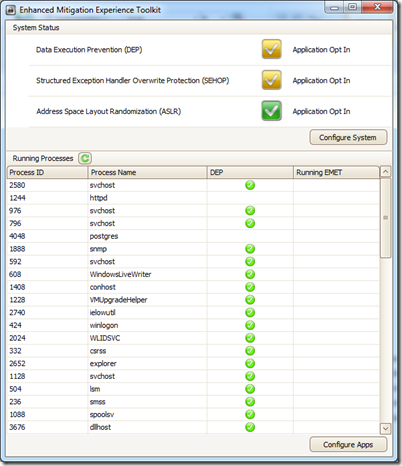
    Once you install the tool the main screen is very Spartan in terms of information given:

    image

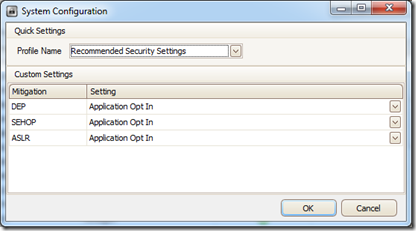
    You can see 2 configuration areas the top part for configuring the system settings and the lower part for configuring the application protection settings. The System configuration

    image

    You can select one of 2 recommended profiles:

    • Maximum Security
    • Recommended Security Settings

    or you can set each of the protection settings.

    You can also configure several protections per application:

    image

    You can push the tool to your servers and client systems thru any package manager that can automate the installation thru MSI. The configuration of the programs to add for protection can be automated very easily via the command line:

    C:\Program Files (x86)\EMET>EMET_Conf.exe
    
    Usage: EMET_Conf.exe [--list | --add path\program.exe | --delete path\program.ex
    
    e | --delete_all]
    

    I highly recommend this tools for anyone that run Microsoft Windows. I highly recomend it for all web browsers, Document editors , media player and for any service that can be touched via the network. I have test a large number of Metasploit exploits and found that this Microsoft solution has bloqued all exploits I could throw at my test machine, machines that I was able to compromise with each before I installed and configured EMET. I do hope MS integrates this in to Service Packs and on the next versions of Windows.

    Download at:

    EMET 20.0


    Parsing CDP Packets with Scapy

    Scapy is a library for python designed for the manipulation of packets, in addition we can forge or decode packets of a wide number of protocols, send them on the wire, capture them, match requests and replies, and much more. It is a Swiss army knife of packet manipulation in python. It can be ran interactively or as part of a script.

    In this blog post I will cover how to use one of the new parsers  to parse CDP packets included in version 2.2 of scapy. Cisco Discovery Protocol (CDP) is a proprietary Layer 2 Data Link Layer network protocol used to share device information with devices connected on the same subnet. Even do most new networks are migrating to Link Layer Discovery Protocol (LLDP) the Cisco Discovery Protocol is in used by many, even both protocols are enabled at the same time on cisco switches and routers to provide interoperability with third party equipment from HP and Juniper.

    In our case we will focus on CDP. The first thing to do is to make sure that we are running the latest version of scapy since during my experimentation with Scapy and CDP I summited several bug reports and they where quickly fixed after the release of version 2.2. So do make sure you are running the latest dev version by downloading and installing from the Mecurial repository used by the project at http://trac.secdev.org/scapy

    Once install we can just run from the command prompt in Linux the command scapy an enter in to the interactive shell so we can see what info we can gain from a capture CDP Packet in a pcap file. Lets start the shell:

    carlos@infidel01:~/Development/scapy$ ./run_scapy
    
    WARNING: No route found for IPv6 destination :: (no default route?)
    
    Welcome to Scapy (2.2.0-dev)
    
    >>>

    The next thing we need to do is list the contributed libraries that came with Scapy 2.2 this is achieved with the call list_contrib():

    >>> list_contrib()
    
    vqp                 : VLAN Query Protocol                      status=loads
    
    cdp                 : Cisco Discovery Protocol                 status=loads
    
    ripng               : RIPng                                    status=loads
    
    skinny              : Skinny Call Control Protocol (SCCP)      status=loads
    
    igmpv3              : IGMPv3                                   status=loads
    
    ubberlogger         : Ubberlogger dissectors                   status=untested
    
    dtp                 : DTP                                      status=loads
    
    bgp                 : BGP                                      status=loads
    
    rsvp                : RSVP                                     status=loads
    
    wpa_eapol           : WPA EAPOL dissector                      status=loads
    
    mpls                : MPLS                                     status=loads
    
    ospf                : OSPF                                     status=loads
    
    chdlc               : Cisco HDLC and SLARP                     status=loads
    
    etherip             : EtherIP                                  status=loads
    
    avs                 : AVS WLAN Monitor Header                  status=loads
    
    ikev2               : IKEv2                                    status=loads
    
    igmp                : IGMP/IGMPv2                              status=loads
    
    vtp                 : VLAN Trunking Protocol (VTP)             status=loads
    
    eigrp               : EIGRP                                    status=loads
    
    >>>
    

    As it can been support for several new protocols was added. we can also see that some of them load and others are untested. This protocols are contributions by external developers to the project. To load the support for CDP we just issue the command load_contrib()

    >>> load_contrib("cdp")
    
    >>>

    I have a pcap file on the same folder with CDP packets in it so we can have a look at how they look, to read the packets we use the rdpcap() call to read them in to a variable.

    >>> cdp_pkts = rdpcap("cdp.cap")
    
    >>> len(cdp_pkts)
    
    16

    As it can be seen there are 16 packets in this capture. Lets take a look at the first packets:


    >>> cdp_p = cdp_pkts[1]
    
    >>> cdp_p
    
    <Dot3  dst=01:00:0c:cc:cc:cc src=00:19:06:ea:b8:85 len=386 |<LLC  dsap=0xaa ssap=0xaa ctrl=3 |<SNAP  OUI=0xc code=0x2000 
    
    |<CDPv2_HDR  vers=2 ttl=180 cksum=0xb0bd msg=[<CDPMsgDeviceID  type=Device ID len=10 val='Switch' |>, <CDPMsgSoftwareVersion 
    
    type=Software Version len=196 val='Cisco IOS Software, C3560 Software (C3560-ADVIPSERVICESK9-M), Version 12.2(25)SEB4, RELEASE
    
     SOFTWARE (fc1)\nCopyright (c) 1986-2005 by Cisco Systems, Inc.\nCompiled Tue 30-Aug-05 17:56 by yenanh' |>, <CDPMsgPlatform  
    
    type=Platform len=24 val='cisco WS-C3560G-24PS' |>, <CDPMsgAddr  type=Addresses len=17 naddr=1 addr=[<CDPAddrRecordIPv4  
    
    ptype=NLPID plen=1 proto='\xcc' addrlen=4 addr=192.168.0.1 |>] |>, <CDPMsgPortID  type=Port ID len=22 iface='GigabitEthernet0/5' 
    
    |>, <CDPMsgCapabilities  type=Capabilities len=8 cap=Switch+IGMPCapable |>, <CDPMsgProtoHello  type=Protocol Hello len=36 
    
    val='\x00\x00\x0c\x01\x12\x00\x00\x00\x00\xff\xff\xff\xff\x01\x02!\xff\x00\x00\x00\x00\x00\x00\x00\x19\x06\xea\xb8\x80\xff\x00\x00' 
    
    |>, <CDPMsgVTPMgmtDomain  type=VTP Mangement Domain len=7 val='Lab' |>, <CDPMsgNativeVLAN  type=Native VLAN len=6 vlan=1 |>,
    
    <CDPMsgDuplex  type=Duplex len=5 duplex=Full |>, <CDPMsgGeneric  type=Trust Bitmap len=5 val='\x00' |>, <CDPMsgGeneric  
    
    type=Untrusted Port CoS len=5 val='\x00' |>, <CDPMsgMgmtAddr  type=Management Address len=17 naddr=1 addr=[<CDPAddrRecordIPv4  
    
    ptype=NLPID plen=1 proto='\xcc' addrlen=4 addr=192.168.0.1 |>] |>, <CDPMsgGeneric  type=Power Available 
    
    len=16 val='\x00\x00\x00\x01\x00\x00\x00\x00\xff\xff\xff\xff' |>] |>>>>
    
    >>>
    

    We can see that each packet has each fields clearly defined. if we do an ls() on the packet we can get them in a more readable format:

    >>> ls(cdp_p)
    
    dst        : DestMACField         = '01:00:0c:cc:cc:cc' (None)
    
    src        : MACField             = '00:19:06:ea:b8:85' ('00:00:00:00:00:00')
    
    len        : LenField             = 386             (None)
    
    --
    
    dsap       : XByteField           = 170             (0)
    
    ssap       : XByteField           = 170             (0)
    
    ctrl       : ByteField            = 3               (0)
    
    --
    
    OUI        : X3BytesField         = 12              (0)
    
    code       : XShortEnumField      = 8192            (0)
    
    --
    
    vers       : ByteField            = 2               (2)
    
    ttl        : ByteField            = 180             (180)
    
    cksum      : XShortField          = 45245           (None)
    
    msg        : PacketListField      = [<CDPMsgDeviceID  type=Device ID len=10 val='Switch' |>, 
    
    <CDPMsgSoftwareVersion  type=Software Version len=196 val='Cisco IOS Software, C3560 Software 
    
    (C3560-ADVIPSERVICESK9-M), Version 12.2(25)SEB4, RELEASE SOFTWARE (fc1)\nCopyright (c) 1986-2005 
    
    by Cisco Systems, Inc.\nCompiled Tue 30-Aug-05 17:56 by yenanh' |>, <CDPMsgPlatform  type=Platform l
    
    en=24 val='cisco WS-C3560G-24PS' |>, <CDPMsgAddr  type=Addresses len=17 naddr=1 addr=[<CDPAddrRecordIPv4  
    
    ptype=NLPID plen=1 proto='\xcc' addrlen=4 addr=192.168.0.1 |>] |>, <CDPMsgPortID  type=Port ID len=22 
    
    iface='GigabitEthernet0/5' |>, <CDPMsgCapabilities  type=Capabilities len=8 cap=Switch+IGMPCapable 
    
    |>, <CDPMsgProtoHello  type=Protocol Hello len=36 val='\x00\x00\x0c\x01\x12\x00\x00\x00\x00\xff\xff\xff\xff\x01\x02!\xff\x00\x00\x00\x00\x00\x00\x00\x19\x06\xea\xb8\x80\xff\x00\x00' |>, <CDPMsgVTPMgmtDomain  type=VTP Mangement Domain len=7 val='Lab' |>, <CDPMsgNativeVLAN  type=Native VLAN len=6 vlan=1 |>, <CDPMsgDuplex  type=Duplex len=5 duplex=Full |>, <CDPMsgGeneric  type=Trust Bitmap len=5 val='\x00' |>, <CDPMsgGeneric  type=Untrusted Port CoS len=5 val='\x00' |>, <CDPMsgMgmtAddr  type=Management Address len=17 naddr=1 addr=[<CDPAddrRecordIPv4  ptype=NLPID plen=1 proto='\xcc' addrlen=4 addr=192.168.0.1 |>] |>, <CDPMsgGeneric  type=Power Available len=16 val='\x00\x00\x00\x01\x00\x00\x00\x00\xff\xff\xff\xff' |>] ([])
    
    >>> 

    We can see that as it is expected the destination of all CDP packets is '01:00:0c:cc:cc:cc'  so this will be the easiest way to identify this packets inside a pcap. The CDP fields are saved in the message, each containing a type and we can call each of the values in the type, they are following a TLV (Type Length Value) format.

    With this information lets build a script to help us parse pcap files.

    Lets start by making sure we have the proper libraries imported:

    #!/usr/bin/python
    import getopt
    import logging
    import re
    import string
    import sys

    Each one will server a different purpose for the script:

    • getopt – Manage the script options that we will use.
    • logging – Control any warning or error messages generated by the scapy library.
    • re – Regular expression library.
    • strings – Manage string objects
    • sys – Provides access system specific parameters.

    Next we will import the scapy 2.2.0-Dev library and set the logging lever to errors only, this will eliminate the “No IPv6 Route” warning message that may show for those running the script on systems without proper IPv6 configurations.

    # suppress the no route warning in scapy when loading
    logging.getLogger("scapy.runtime").setLevel(logging.ERROR)
    # import scapy
    from scapy.all import *

    I like the use of a usage function in my code so I can call it anytime a user enters a wrong parameter, no parameter or simply does –h for help on the script. We will create this function now:

    def usage():
        """
        Function for presenting usage of the tool.
        """
        print "CDP Parse by Carlos Perez carlos_perez@darkoperator.com"
        print "Tool for printing to STDOUT information on CDP packets found capture"
        print "file. Will print all supported options.\n"
        print "cdp_parser.py <OPTIONS>"
        print "-F <dir>  Directory containing pcaps."
        print "-f <pcap> pcap file."

    Now lets create our function to process each packet and print the info to standard out:


      1: def process_packets(pkts):
      2:     """
      3:     Function for processing packets and printing information of CDP Packets
      4:     """
      5: 
      6:     for p in pkts:
      7:         # Check if the packet is a CDP Packet
      8:         if Dot3 in p and p.dst == '01:00:0c:cc:cc:cc':
      9:            
     10:             print "\n*******************************"
     11:             
     12:             print "Source MAC:", p.src
     13:             # Process each field in the packet message
     14:             for f in p[CDPv2_HDR].fields["msg"]:
     15: 
     16:                 # Check if the filed type is a known one
     17:                 if f.type in _cdp_tlv_types:
     18: 
     19:                     # Process each field according to type
     20:                     f_type = _cdp_tlv_types[f.type]
     21: 
     22:                     # Make sure we process each address in the message
     23:                     if re.match(r"(Addresses|Management Address)", f_type):
     24:                         for ip in f.fields["addr"]:
     25:                             print f_type, ip.addr
     26: 
     27:                     elif f_type == "Software Version":
     28:                         print f_type+":"
     29:                         print "\t" + string.replace(f.val, "\n", "\n\t")
     30: 
     31:                     elif f_type == "Port ID":
     32:                         print f_type, ":", f.iface
     33: 
     34:                     elif f_type == "Capabilities":
     35:                         # Ugly but works :)
     36:                         print f_type, ":", "".join(re.findall(r"cap\s*=(\S*)", str(f.show)))
     37: 
     38:                     elif re.match(r"Native VLAN|VoIP VLAN Reply",f_type):
     39:                         print f_type, ":", f.vlan
     40: 
     41:                     elif f_type == "Duplex":
     42:                         print f_type, ":", _cdp_duplex[f.duplex]
     43: 
     44:                     elif f_type == "IP Prefix":
     45:                         print f_type, ":", f.defaultgw
     46: 
     47:                     elif f_type == "Power":
     48:                         print f_type, ":", f.power, " mW"
     49: 
     50:                     # Fields not yet implemented in the current version of the
     51:                     # contributed cdp module.
     52:                     elif f_type == "Power Available":
     53:                         # I know, this should provide the amount of power
     54:                         print f_type, ": POE Enabled"
     55: 
     56:                     elif f_type == "Protocol Hello":
     57:                         pass
     58: 
     59:                     else:
     60:                         try:
     61:                             # Make sure we do not have an empty value and print
     62:                             if f.val is not '\0' and len(f.val) != 0: print f_type, ":", f.val
     63: 
     64:                         except Exception, e:
     65:                             print "ERROR!!!!:", f_type
     66:                             print e
     67:                             print "Send error to: carlos_perez[at]darkoperator.com"
     68:                             pass

    on line 1 we declare our function and we set the pkts variable as the input for the function. On line 6 we are going to iterate thru each of the packets found the in the packet list we give the function, next on line 8 we check the destination of each packet to see if they are '01:00:0c:cc:cc:cc' then they are CDP packets and we can proceed to parse them, on line 12 we will print the source MAC Address.

    On line 17 we check if it is a know type that we can parse, if not we skip the type, In my testing I did not find any it could not do bust just in case Cisco adds one in the future or the packet has an error I added this line, specially since some vendors like HP had CDPv1 support and did some extensions. Next on line 20 we get from hex to text the type name of the field by checking against the _cdp_tlv_types dictionary that is part of the CDP library.

    Now from line 22 to line 54 we parse each type for which we know the name of the field and do not follow the stand name of val like the rest.

    From lines 56 and 57 we skip the Protocol Hello type since it just prints a bunch of garbage for this type, still working on how to dissect this type.

    If the type is not known we try to parse the TLV data and if an exception occurs an error is raised and my email is provided to sent the error to so I can work on improving the script this happens from lines 59 to 68.

    The next step is to create the main function that will handle options, open the pcap files and feed the packets to the function we just created.


      1: def main():
      2: 
      3:     try:
      4:         # Check version
      5:         if not re.match(r"2\.[2-9]\.\S*", config.conf.version):
      6:             print "You are not running the latest scapy release."
      7:             print "Please go to http://trac.secdev.org/scapy and follow the"
      8:             print "the instructions to download the latest versions."
      9:             sys.exit(1)
     10: 
     11:         # load the support for CDP Packets
     12:         load_contrib("cdp")
     13: 
     14:         # Set Variables for Options
     15:         folder = None
     16:         pcap_file = None
     17:         pcap_files = []
     18: 
     19:         # Check that options are given
     20:         if len(sys.argv) == 1:
     21:             usage()
     22: 	      sys.exit(1)
     23: 
     24:         # Set Options
     25:         options, remainder = getopt.getopt(sys.argv[1:], 'F:f:h')
     26: 
     27:         # Parse Options
     28:         for opt, arg in options:
     29:             if opt in ('-F'):
     30:                 folder = arg
     31:             elif opt in ('-f'):
     32:                 pcap_file = arg
     33:             elif opt in ('-h'):
     34:                 usage()
     35: 		sys.exit(0)
     36:             else:
     37:                 usage()
     38: 		sys.exit(1)
     39: 
     40:         # Process folder with pcap files
     41:         if folder:
     42:             if os.path.isdir(folder):
     43:                 for item in os.listdir(arg):
     44:                     fullpath = os.path.join(arg, item)
     45:                     if os.path.isfile(fullpath) and ('.cap' in item or '.pcap' in item or '.dump' in item):
     46:                         pcap_files.append(fullpath)
     47:             else:
     48:                 print "ERROR:", folder, "does not exists!"
     49:                 sys.exit(1)
     50: 
     51:         # Process single pcap file
     52:         if pcap_file:
     53:             if os.path.isfile(pcap_file):
     54:                 pcap_files.appemd(pcap_file)
     55:             else:
     56:                 print "ERROR:",pcap_file,"does not exist!"
     57:                 sys.exit(1)
     58: 
     59:         # Process all files selected and extract CDP Info
     60:         for f in pcap_files:
     61:             pcap = rdpcap(f)
     62:             process_packets(pcap)
     63:     except Exception, e:
     64:         print e
     65:         print "Send error to: carlos_perez[at]darkoperator.com"
     66:         pass
     67: 
     68: if __name__ == '__main__':
     69:     main()

    In the main function at line 5 we do a scapy version check making sure we are running a version equal or above 2.2.x, if not we print a message indication that the wrong version is being used and to upgrade to the latest development version.

    On line 11 we load the contributed CDP Parser. this has to be loaded before we read the packets since they will be ran against it when read.

    In lines 14 to 17 we set the option variables that we will use for the script.

    From lines 19 to 22 check that options are given, if none is given we print the usage message and exit.

    From lines 24 to 38 we parse the options and set the variables, if an option does not match our list of options we exit with an usage message.

    From lines 41 to 49 we check if the folder option is set, if it we check that the folder exists and if it does we list the content of the folder and save the full path of each capture file found in to a list for use.

    From lines 52 to 57 we check if a pcap file is specified, if it is we check that the file actualy exist and we save the full path to it in to the the same list we we saved the files for the folder, so both options can be used at the same time.

    From lines 60 to 62 we parse each file on the list of files collected, read the packets and pass those to the process_packet function to process them.

    This is a very simple simple, I tried my best to explain each part of it so for those starting with python and playing with scapy can follow it and learn. You can download the whole script at cdp_parser.py

    Meterpreter Resource Files

    Tonight while chatting via IRC with Egyp7 he mentioned that Meterpreter should have capability of using Resource files for cleanup in post exploitation and for automating tasks by users without the knowledge in Ruby and the Framework to write a Meterpreter Script or Post Module. He opened and ticket and assigned me the task. Here are the results

    I first opened the file  lib/rex/post/meterpreter/ui/console/command_dispatcher/core.rb this file has all the command for the Meterpreter console so the first this was defining the Resource command:

     def commands
    
                    c = {
    
                            "?"          => "Help menu",
    
                            "background" => "Backgrounds the current session",
    
                            "close"      => "Closes a channel",
    
                            "channel"    => "Displays information about active channels",
    
                            "exit"       => "Terminate the meterpreter session",
    
                            "help"       => "Help menu",
    
                            "interact"   => "Interacts with a channel",
    
                            "irb"        => "Drop into irb scripting mode",
    
                            "migrate"    => "Migrate the server to another process",
    
                            "use"        => "Load a one or more meterpreter extensions",
    
                            "quit"       => "Terminate the meterpreter session",
    
                            "resource"   => "Run the commands stored in a file",
    
                            "read"       => "Reads data from a channel",
    
                            "run"        => "Executes a meterpreter script or Post module",
    
                            "bgrun"      => "Executes a meterpreter script as a background thread",
    
                            "bgkill"     => "Kills a background meterpreter script",
    
                            "bglist"     => "Lists running background scripts",
    
                            "write"      => "Writes data to a channel",
    
                    }
    

    Once this was done I added 2 methods, the first one for tab completion of the command:

      1:  def cmd_resource_tabs(str, words)
    
      2:                 return [] if words.length > 1
    
      3: 
    
      4:                 tab_complete_filenames(str, words)
    
      5:         end
    
      6: 

    Then the method that defined the command it self:

      1: def cmd_resource(*args)
    
      2:                 if args.empty?
    
      3:                         print(
    
      4:                                 "Usage: resource path1 path2" +
    
      5:                                   "Run the commands stored in the supplied files.\n")
    
      6:                         return false
    
      7:                 end
    
      8:                 args.each do |glob|
    
      9:                         files = ::Dir.glob(::File.expand_path(glob))
    
     10:                         if files.empty?
    
     11:                                 print_error("No such file #{glob}")
    
     12:                                 next
    
     13:                         end
    
     14:                         files.each do |filename|
    
     15:                                 print_status("Reading #{filename}")
    
     16:                                 if (not ::File.readable?(filename))
    
     17:                                         print_error("Could not read file #{filename}")
    
     18:                                         next
    
     19:                                 else
    
     20:                                         ::File.open(filename, "r").each_line do |line|
    
     21:                                                 next if line.strip.length < 1
    
     22:                                                 next if line[0,1] == "#"
    
     23:                                                 begin
    
     24:                                                         print_status("Running #{line}")
    
     25:                                                         client.console.run_single(line)
    
     26:                                                 rescue ::Exception => e
    
     27:                                                         print_error("Error Running Command #{line}: #{e.class} #{e}")
    
     28:                                                 end
    
     29: 
    
     30:                                         end
    
     31:                                 end
    
     32:                         end
    
     33:                 end
    
     34:         end
    
     35: 

    One of the first things I did was from lines 1 to 7 is check if an argument is given if not display a help message and return false.  Next thing I do from lines 8 to 13 is check that each argument is actually a file. You can give it several files to process. Then from lines 14 to the end of the method you will see I check if the file is readable, open it and use the client.console.run_single() to run each command as if they where typed in the console. You will notice that on lines 21 and 22 I check for empty lines and commented lines, this will allow you to comment your resource files.

    To use the command simply use the command resource and the file containing the commands here you can see an example run:

    meterpreter > resource /tmp/cmd.rc
    
    [*] Reading /tmp/cmd.rc
    
    [*] Running sysinfo
    
    System Language : en_US
    
    OS              : Windows 7 (Build 7600).
    
    Computer        : INFIDEL01
    
    Architecture    : x64 (Current Process is WOW64)
    
    Meterpreter     : x86/win32
    
    [*] Running getuid
    
    Server username: Infidel01\Carlos
    

    The contents of the file is as follows:

    loki:trunk cperez$ cat /tmp/cmd.rc
    
    sysinfo
    
    getuid