MFA Passed. The Attacker Still Got In.
*MFA to Passkeys in Microsoft Entra ID series · Part 1 of 7
As long as I can remember, "turn on MFA" has been the single most repeated piece of identity security advice, heck I repeat this phrase on regular basis to customers at work, and for good reason. The security community has seen and experience has long shown that MFA blocks the overwhelming majority of password-based account compromise. But when we look at incident reports from the last two years and a pattern starts showing up: the user completed MFA, and the attacker still got in.
That is not a contradiction. MFA is not a single security property, even when we give the advise we lump it as one. It is a category of authentication methods, and those methods behave very differently under attack. An SMS code, an authenticator OTP, a push approval, and a FIDO2 passkey all satisfy a checkbox labeled "MFA". Only one of them is designed so that a convincing fake sign-in page cannot use it.
This first part of a series of blog post, this first one sets the foundation for the rest of the series:
- Why traditional MFA fails against modern phishing kits,
- What "phishing-resistant" actually means,
- Why Microsoft's 2026–2027 changes make this urgent,
- How to measure your tenant's real starting point with PowerShell.
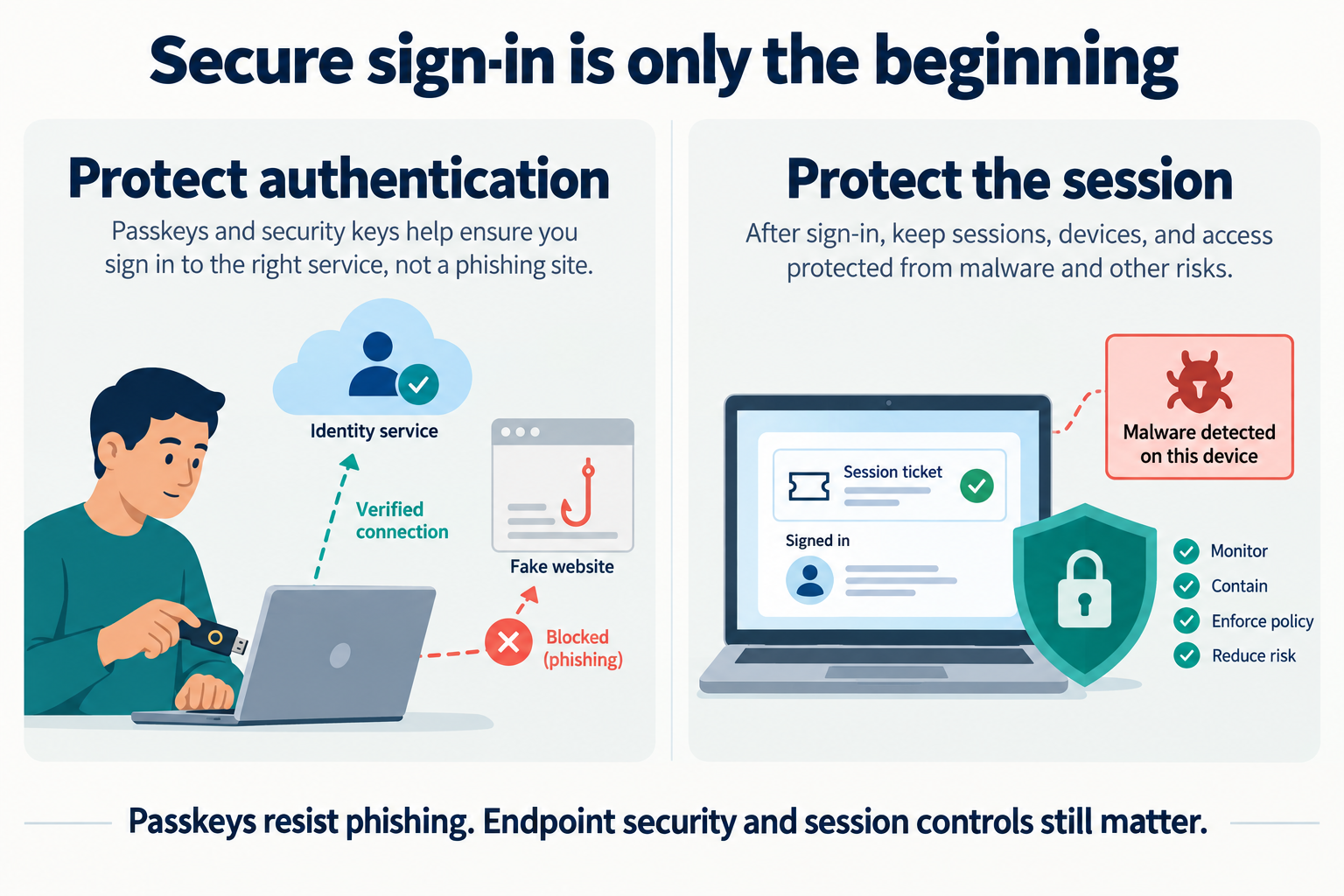
Passkeys protect the sign-in ceremony. Parts 5 and 6 cover what happens after it.
The series at a glance
| Part | Title | What you walk away with |
|---|---|---|
| 1 | MFA Passed. The Attacker Still Got In. | Threat model, method strength ladder, baseline measurement |
| 2 | Passkeys Explained, and Choosing the Right Model | How WebAuthn stops phishing, device-bound vs. synced, passkey profiles |
| 3 | Enabling Passkeys Is Not Enforcing Them | Authentication strengths, Conditional Access, blocking device code flow |
| 4 | Enrollment and Recovery: The New Weak Point | TAP, securing registration, help desk procedures, audit monitoring |
| 5 | Passkeys Stop Phishing, Not Every Token Theft | Session protection, token protection, sign-in analytics, incident response |
| 6 | Protecting Privileged Access | Admin personas, break-glass accounts, app owners and other hidden admins |
| 7 | The Migration Roadmap | Phased plan, SMS/voice retirement, metrics, checklist |
Every part ships PowerShell advanced functions from a companion module, EntraPasskeyToolkit (You know me I have to add some PowerShell in to the mix :) ). The functions are built to pipe into each other. For example, Get-EptPrivilegedUser | Test-EptPhishResistantCoverage takes every admin in your tenant and tells you whether a phishing-resistant policy actually covers them.
MFA is a category, not a control
Start by lining the methods up by what they actually resist:
| Method | Resists password spray / reuse | Resists real-time phishing (AiTM) | Resists SIM swap | Satisfies the built-in Phishing-resistant MFA strength |
|---|---|---|---|---|
| Password only | No | No | n/a | No |
| SMS / voice call | Yes | No | No | No |
| Authenticator OTP / hardware OATH | Yes | No | Yes | No |
| Authenticator push with number matching | Yes | No (relay still works) | Yes | No |
| Authenticator passwordless phone sign-in | Yes | No | Yes | No (satisfies Passwordless MFA) |
| Passkey (FIDO2): security key, Authenticator, synced, Entra passkey on Windows | Yes | Yes | Yes | Yes |
| Windows Hello for Business / platform credential | Yes | Yes | Yes | Yes |
| Certificate-based authentication (multifactor) | Yes | Yes | Yes | Yes |
In the table the last column matters most. Entra ID's built-in Phishing-resistant MFA authentication strength accepts exactly three families of methods:
- Windows Hello for Business or platform credential
- Passkeys (FIDO2)
- Multifactor certificate-based authentication (Microsoft Learn: authentication strengths).
Everything above them in the table can be phished.
Number matching is good, but it is not phishing resistance. It kills MFA-fatigue "spam until they approve" attacks, this is why Microsoft enforces it for Authenticator push. It does nothing against an adversary-in-the-middle proxy, because the victim is looking at the attacker's page and dutifully types the number that page shows.
Four ways attackers get past MFA
1. Adversary-in-the-middle (AiTM) phishing
This is the technique behind most if not all of the modern Microsoft 365 business email compromise that we see. Kits like Evilginx, and the phishing-as-a-service platforms built on the same idea, run a reverse proxy between the victim and the real login.microsoftonline.com.
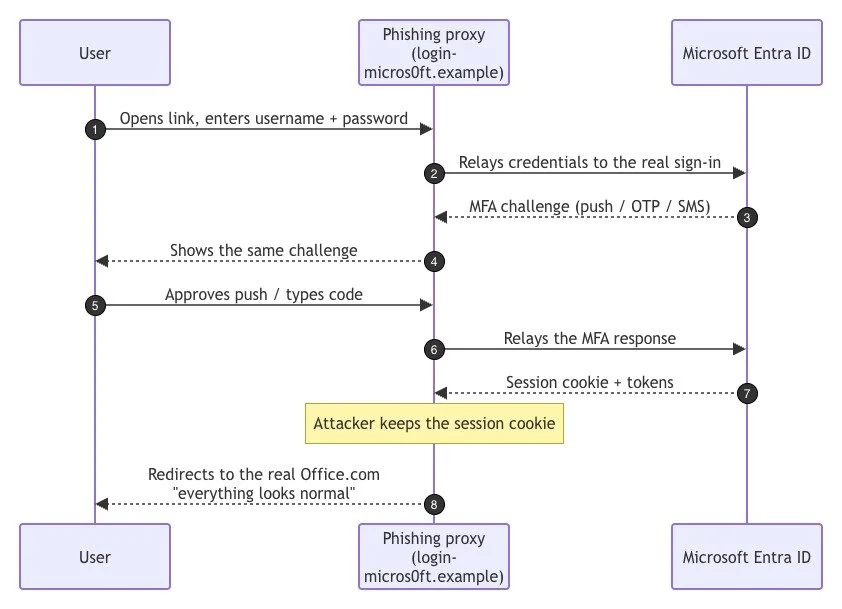
MFA did not fail. The real user really did complete the challenge. Where weakness lies is that nothing in an OTP, SMS or push response is tied to the website the user was looking at, so the proxy can relay it. The prize is the session cookie. The attacker replays it from their own browser and never has to authenticate again until it expires or is revoked.
2. MFA fatigue and social engineering
These are push bombing and "Hi, it's the IT help desk, please approve the prompt I'm about to send". Number matching and additional context (app name, location) mostly neutralized raw push bombing. Help-desk impersonation moved elsewhere: attackers now call the service desk and talk their way into a new registration or a password reset. Part 4 covers that.
3. SIM swap and telephony interception
SMS and voice depend on the security of the mobile carrier's customer-service process and the SS7 network. A successful SIM swap redirects every code to the attacker. This is a major reason Microsoft is retiring Microsoft-provided SMS and voice for Entra MFA (see the timeline below).
4. Device code phishing
The attacker starts a legitimate OAuth device code flow, then sends the victim the real https://microsoft.com/devicelogin URL with a code: "Enter this code to view the shared document". The victim authenticates on a genuine Microsoft page, with whatever MFA they have, and the tokens go to the attacker's device. Passkeys do not help here: the victim really is on the real site, approving a sign-in for someone else's device. The fix is a Conditional Access policy that blocks device code flow, which Microsoft explicitly recommends "wherever possible" (Microsoft Learn: authentication flows). Part 3 builds that policy.
And after sign-in: token theft
Infostealer malware on an endpoint doesn't need to phish anyone. It copies the browser's cookie store and primary refresh tokens after a perfectly legitimate passkey sign-in. Part 5 is dedicated to this.
What "phishing-resistant" actually means
A phishing-resistant method has one essential property: the credential is cryptographically bound to the legitimate service's origin. With FIDO2/WebAuthn, the browser, not the user, tells the authenticator which site is asking. A passkey registered for login.microsoft.com simply does not respond to login-micros0ft.example. There is no code to type and nothing to relay, so the user has no way to make the mistake.
Certificate-based authentication and Windows Hello for Business get the same property through TLS client-certificate binding and device-bound keys respectively. Part 2 digs into the WebAuthn ceremony in detail.
Why this is urgent: Microsoft's 2026–2027 timeline
Microsoft is actively moving the platform away from telephony methods. The dates below come from Passkeys by default and retirement of Microsoft-provided SMS and voice authentication, I last checked this information 28 September 2026 as I wrote the blogpost. Re-check the page before you plan against it. As of October 2026, the first two milestones are behind us and the clock is running on the rest.
| Date | Status | What changes |
|---|---|---|
| 1 Sep 2026 | Done | Passkeys became the default. Users enabled for SMS or voice (in the Authentication methods policy or legacy MFA settings) were auto-enabled for passkeys, placed in a passkey profile that allows all passkey types, and the registration campaign was set to Microsoft managed targeting passkeys, with unlimited snoozes by default. |
| 18 Sep 2026 | Done | Customer-managed telecom providers became available to review in the Microsoft Security Store (Soprano and Telesign are the initial private-preview providers). |
| 30 Oct 2026 | This month | Customers who must keep SMS/voice can select and configure a telecom provider from the Security Store. |
| 1 Feb 2027 | About 4 months away | Microsoft-provided SMS and voice delivery retires for all users except Global Administrators and external users. Users whose only MFA method is SMS/voice get a blocking prompt to register a passkey at sign-in. "There is no opt out from this February 1 behavior." |
| 1 Jul 2027 | Upcoming | The same retirement applies to Global Administrators and external users. (Internal guests follow the February date.) |
The retirement also applies to self-service password reset (SSPR). Separately, mandatory MFA for Azure and admin portals (phase 1, from October 2024) and for Azure CLI, PowerShell, IaC and REST create/update/delete operations (phase 2, from October 2025) already applies with no opt-out, including to break-glass accounts (Microsoft Learn: mandatory MFA).
If you haven't acted yet, Microsoft is already nudging your users toward passkeys on its own schedule (since 1 September), and it will force the issue on 1 February 2027. If you plan it, you choose the passkey types, the recovery process, and the enforcement order.
Best practices for the foundation phase
- Measure three things separately: what users have registered, what the policy allows, and what they actually use to sign in. They are almost never the same list.
- Stop treating "MFA registered" as a success metric. Track phishing-resistant registration and phishing-resistant sign-in percentages instead.
- Finish the Authentication methods policy migration. If your tenant is still reading legacy per-user MFA and SSPR settings, you have two sources of truth for which methods are enabled. Microsoft's wizard makes this reversible (Manage authentication methods).
- Start with administrators. They are the highest-value targets, the smallest population, and the people best placed to become internal champions.
- Block device code flow early. It is cheap to deploy in report-only mode and addresses a phishing path passkeys cannot.
- Plan recovery before enforcement. Every passkey rollout that stalls, stalls on "what happens when someone loses their device?"
- Keep humans out of the loop where possible. Push approvals and codes rely on the user spotting a fake. Phishing-resistant methods don't ask them to.
EntraPasskeyToolkit PowerShell module to help you measure your baseline
When it comes to dealing with EntraID PowerShell remains the scripting platoform of choice. Because of this here is a module to help you build out a baseline of yout environment. I have it in my GitHub account EntraPasskeyToolkit
Prerequisites
- PowerShell 7.2 or later
Microsoft.Graph.Authentication2.x (the toolkit calls Graph throughInvoke-MgGraphRequest, so you don't need the full Microsoft.Graph SDK)- Entra ID P1 or P2 for the reporting APIs
- A read-only role for the assessment work: Global Reader, Security Reader or Reports Reader. Don't use Global Administrator to run reports.
Install-Module Microsoft.Graph.Authentication -Scope CurrentUser
# Download or clone the EntraPasskeyToolkit folder from this series, then:
Import-Module ./EntraPasskeyToolkit/EntraPasskeyToolkit.psd1
Get-Command -Module EntraPasskeyToolkit
Least-privilege scopes by task
I recommend you use the least level of privilage as possible. Specially since I know some of you will ask an agent to execute this for you against your tenant ;)
| Task | Delegated scopes | Typical role |
|---|---|---|
| Registration and posture reporting (Parts 1, 7) | AuditLog.Read.All, Policy.Read.All |
Reports Reader / Global Reader |
| Passkey inventory (Part 2) | UserAuthenticationMethod.Read.All, Policy.Read.All |
Global Reader / Authentication Administrator |
| Conditional Access review (Part 3) | Policy.Read.All, GroupMember.Read.All |
Security Reader / Global Reader |
| Conditional Access changes (Part 3) | Policy.Read.All, Policy.ReadWrite.ConditionalAccess, RoleManagement.Read.Directory |
Conditional Access Administrator |
| TAP and method removal (Part 4) | UserAuthenticationMethod.ReadWrite.All |
Authentication Administrator / Privileged Authentication Administrator |
| Sign-in analytics and session revocation (Part 5) | AuditLog.Read.All, User.RevokeSessions.All |
Security Reader / Security Operator |
| Privileged inventory (Part 6) | RoleManagement.Read.Directory, GroupMember.Read.All, Application.Read.All |
Global Reader |
Connect explicitly to the tenant you intend to assess. -ContextScope Process keeps the token out of the persistent cache:
$tenantId = '<your-tenant-guid>'
Connect-MgGraph -TenantId $tenantId -ContextScope Process -NoWelcome `
    -Scopes 'AuditLog.Read.All', 'Policy.Read.All'
The plumbing: paging, throttling and scope checks
Every function in the module leverages two private helpers.
Assert-EptGraphConnectionit fails fast with a readable message if you forgot a scope. That's better than a cryptic 403 halfway through a 40,000-user report.Invoke-EptGraphRequestfollows@odata.nextLink, retries on 429/503 withRetry-After, and streams each item to the pipeline as it arrives. Downstream commands start working before the last page is downloaded, and memory stays flat.
Classifying methods by strength
Get-EptMethodStrength turns the method names Entra reports (mobilePhone, passKeyDeviceBound, microsoftAuthenticatorPush and so on) into four buckets: PhishingResistant, Phishable, Telephony and RecoveryOnly. It accepts pipeline input, so you can classify a list in one line.
The mapping lives in $script:EptMethodClass at the top of Registration.ps1. Microsoft adds method names as new passkey types ship (the passKey* values are recent), so review this periodically. Anything the toolkit doesn't recognize is shown as Unclassified instead of silently dropped.
Registration details, enriched
Get-EptUserRegistration wraps the userRegistrationDetails report and adds the fields you actually want: StrongestMethod, HasPhishingResistant, HasTelephony, and the list of PhishableMethods still registered.
It has two parameter sets:
- No input: streams the whole tenant.
- Pipeline input: accepts UPNs, object IDs, or any object with a
UserPrincipalNameorIdproperty, including the output ofGet-EptPrivilegedUser
few details worth pointing out:
- The report is keyed by object ID, so UPN input is converted into an OData
$filterautomatically. - Each user is fetched inside
try/catchand failures go to the error stream withWrite-Error, notthrow. One deleted account in a list of 500 doesn't abort the other 499. - Objects carry a
PSTypeNameofEpt.UserRegistration, which letsMeasure-EptMfaPostureinsist on the right input type.
Turning rows into a posture summary
Measure-EptMfaPosture is a pipeline aggregator. It collects in process {} and emits one summary in end {}, optionally split with -GroupBy
Putting it together
# 1. Whole-tenant posture, members only
$registration = Get-EptUserRegistration -UserType member
$registration | Measure-EptMfaPosture | Format-List

# 2. Admins vs. everyone else
$registration | Measure-EptMfaPosture -GroupBy IsAdmin | Format-Table

# 3. Who depends on telephony only? These users get the blocking prompt on 1 Feb 2027.
$registration |
    Where-Object StrongestMethod -eq 'Telephony' |
    Select-Object UserPrincipalName, DisplayName, @{ n = 'Methods'; e = { $_.MethodsRegistered -join ';' } } |
    Export-Csv ./telephony-only-users.csv -NoTypeInformation

# 4. Registered methods across the tenant, most common first
$registration.MethodsRegistered | Group-Object -NoElement | Sort-Object Count -Descending
Sample output (illustrative):
Group                       : All
Users                       : 4812
MfaRegisteredPct            : 96.4
PhishingResistantPct        : 11.2
TelephonyRegisteredPct      : 71.8
TelephonyOnlyCount          : 903
NoMfaCount                  : 171
AdminsWithoutPhishResistant : 37
That shape is typical: 96% MFA looks like a win in a board report, while 11% phishing-resistant is the number that actually describes your exposure to AiTM kits.
What the policy allows
Registration is only half the story. Get-EptAuthMethodPolicy (full source in Part 2) reads the Authentication methods policy and shows which methods are enabled and for whom. It also shows the migration state and the current registration-campaign configuration:
Connect-MgGraph -TenantId $tenantId -ContextScope Process -NoWelcome -Scopes 'Policy.Read.All'

Get-EptAuthMethodPolicy |
    Format-Table Method, State, @{ n = 'Targets'; e = { $_.Targets -join ', ' } }, MigrationState, CampaignState -AutoSize
Check three things in the output:
MigrationStateshould bemigrationComplete. Anything else means the legacy MFA/SSPR pages still influence which methods users can use.SmsandVoice: if they areenabledfor All users, everyone in scope was auto-enabled for passkeys on 1 September 2026, and will face the retirement changes.CampaignState:defaultmeans Microsoft managed. Decide deliberately whether that's what you want (Part 4).
The same data in the portal
If you prefer clicking (The insanity), or want to sanity-check the script, go to Entra ID → Authentication methods → Activity. It shows the same registration and usage picture. It needs Entra ID P1/P2 and one of the reader roles, and data can lag by up to 36 hours (Authentication methods activity).
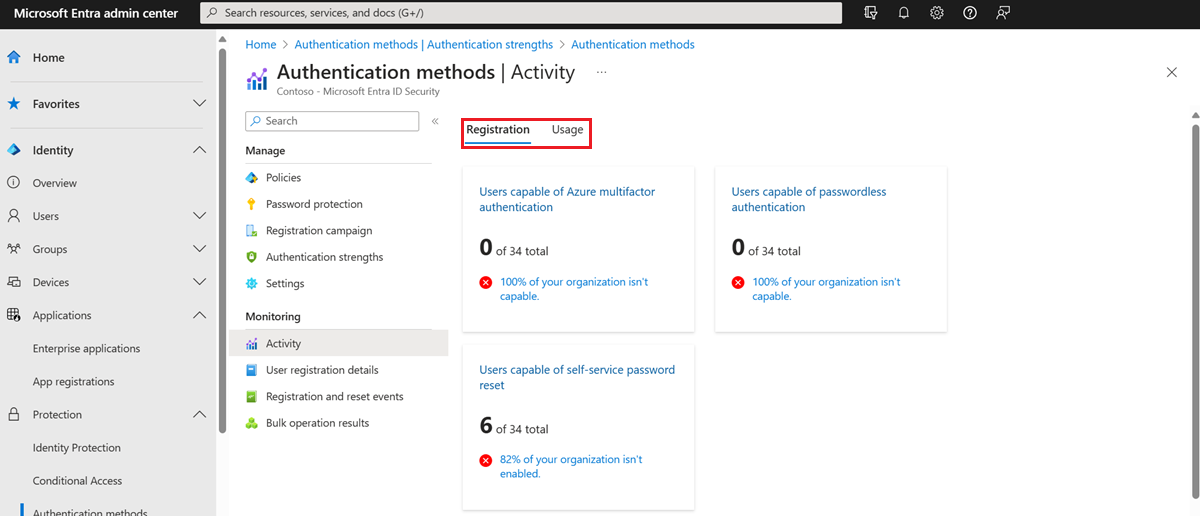
Screenshot: Microsoft Learn, "Authentication methods activity".
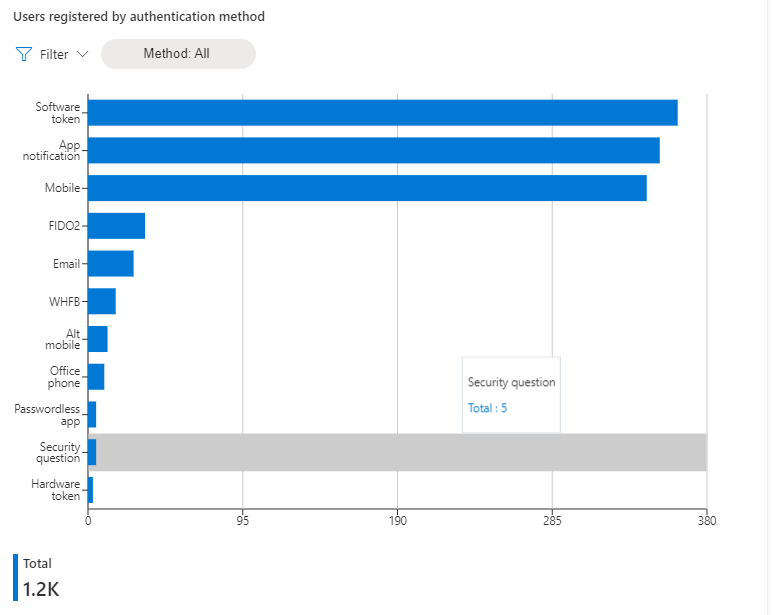
Users registered by authentication method
Microsoft also publishes a Log Analytics workbook for this journey, Phishing-Resistant Passwordless Deployment (aka.ms/PasswordlessWorkbook). It's worth deploying alongside the scripts if you already stream sign-in logs to Log Analytics.
Interpreting the baseline
| If you see… | It means… | Go to |
|---|---|---|
| High MFA %, low phishing-resistant % | Typical. Your users are protected against spray, not AiTM. | Parts 2–3 |
| Admins without phishing-resistant methods | Your most valuable accounts are the most phishable. Fix first. | Part 6 |
| Many telephony-only users | Blocking prompts on 1 Feb 2027 (1 Jul 2027 for Global Admins). | Parts 4, 7 |
MigrationState not complete |
Two sources of truth for enabled methods. | Part 7 |
| Users with no MFA at all | Bootstrap needed before enforcement. Plan TAP issuance. | Part 4 |
Key takeaways
- MFA is a category. Only passkeys (FIDO2), Windows Hello for Business / platform credentials and multifactor CBA are phishing-resistant.
- AiTM proxies relay OTP, SMS and push. Device code phishing uses the real Microsoft site. Token theft happens after sign-in. Each needs its own control.
- Microsoft's timeline is already running: passkeys became the default on 1 September 2026, and Microsoft-provided SMS/voice retires on 1 February 2027, about four months from the start of October.
- Measure registration, policy and usage separately. The gap between them is your work plan.
Next, Part 2: how passkeys actually defeat phishing, and how to choose between device-bound and synced passkeys for each part of your workforce.
References
- Authentication strengths, Microsoft Learn
- Passkeys by default and SMS/voice retirement and its FAQ, Microsoft Learn
- Mandatory multifactor authentication for Azure and admin portals, Microsoft Learn
- Authentication flows in Conditional Access, Microsoft Learn
- Authentication methods activity, Microsoft Learn
- List userRegistrationDetails, Microsoft Graph
- Manage authentication methods (policy migration), Microsoft Learn
- Plan a phishing-resistant passwordless deployment, Microsoft Learn